 Install with Gale

👗 Vanity Wardrobe
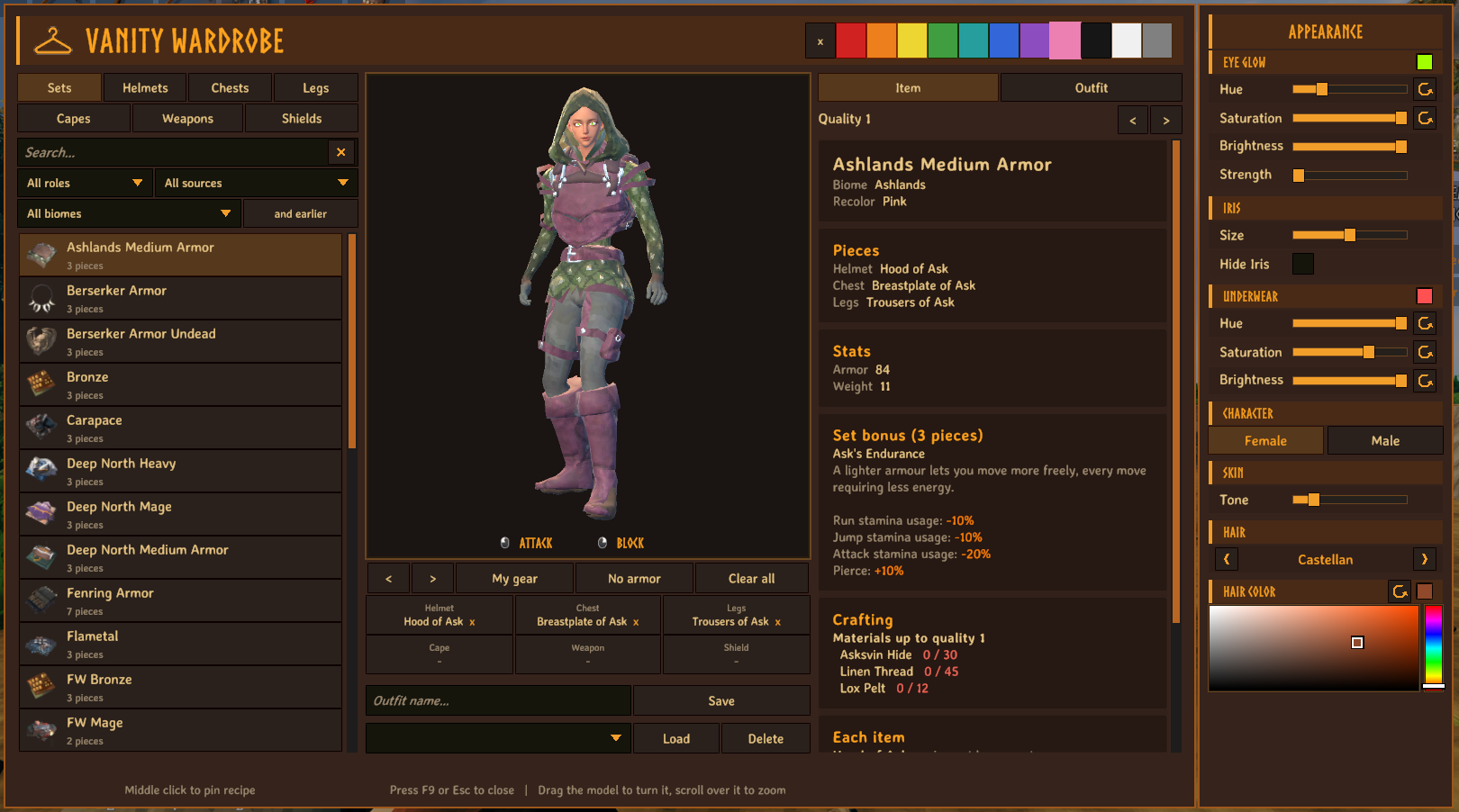
An in-game wardrobe and fitting room. Press F9 to browse every armor set, cape, weapon and shield in your game, including everything your other mods add. Try them on a model of your own character and see exactly what it takes to craft them.
💶 Donations:
If you enjoy using this Valheim mod, please consider making a small donation to help support its development and future updates.
Even £1 or $1 would be greatly appreciated and would help more than you might think!
Thank you for your support, and happy gaming! ⚔️ ...... (A Paypal account is NOT required!)

✅ Features:
- Everything in your game, automatically. The list is built from the game's item database after every mod has loaded, so items from other mods show up on their own.
- Fitting room. A model with your character's body, skin, hair and beard wears what you pick. Drag it to turn it, scroll over it to zoom. Your real character and inventory are never touched.
- Sets. Armor is grouped into sets, by the set name the game gives it or by matching item names, with total armor, weight, movement speed, eitr regeneration and the set bonus.
- Mix and match. Wear a helmet from one set, a chest from another, any cape, and a weapon with a shield. Click a slot to take that item off.
- Outfit totals. The Outfit tab shows the combined stats, which set bonuses you have, and the materials for the whole look.
- Saved outfits. Give an outfit a name, save it, and put it back on later.
- Appearance preview. A panel beside the window lets you try a different look on the model: male or female, skin tone, hair, beard and hair colour. With Einherjar Bodies installed it also has the eye glow, iris and underwear colour settings. It is only a preview: nothing is saved to your character, and the next time you open the window it starts from your real look again. It works without Einherjar Bodies.
- Recolor. Pick one of 11 colours (red, orange, yellow, green, teal, blue, purple, pink, black, white, grey) for an item, a set or a whole outfit. The mod finds the item's main colour and changes only that, so metal, leather and trim keep theirs. The colour shows on the preview and on your own character, and other players who have the mod see it too (it is stored with your character, no server install needed). Players without the mod see the original colours. Items on the ground or on armor stands keep their own colours, and items with unusual shaders may change only partly. Your choices are kept in
BepInEx/config/VanityWardrobe/colors.txt. - Biome filter. Every item and set is placed in the biome its materials come from, worked out from the world itself (trees, rocks, creatures, dungeons and recipes), so items from other mods are placed too. Pick a biome, or switch on "and earlier" to see everything up to it. The details show the biome. The first time you load a world it reads the locations in the background for about two minutes and keeps the result in
BepInEx/config/VanityWardrobe/biomes.cache. - Role and source filters. Show only Mage, Tank, Damage or Archer gear, worked out from each item's stats, and only items from Valheim or from one particular mod.
- Weapons and shields. Filter by weapon type, and see damage, block and what each attack costs.
- Crafting costs. The materials to craft an item or a whole set, up to any quality, with a have / need count (your inventory and nearby chests), the station and level for each upgrade, and whether you know the recipe yet.
- My gear and No armor. Put on what you are wearing now, or take the armor off.
- Uses the same panel style as the Mod Settings window.
- Client side: you do not need the server to have it, and it does not change gameplay.
- Pinned recipes. Middle-click an item or a set in the list to pin its crafting recipe (at the quality chosen in the window). A panel under the minimap shows the materials with how many you have out of how many you need, counting nearby chests, green when you have enough and red while short. Middle-click again to unpin; with the mouse pointer free (inventory open), left-click a pin to fold its materials, right-click to remove it, and drag the panel to move it (the position is remembered). Pins are saved with the character.
- Keyboard and mouse only. There is no game controller support: the window is opened with a key and used with the mouse.
🖱️ Using it:
| Action | How |
|---|---|
| Open or close | F9 (can be changed), or Esc |
| Turn the model and move the camera up or down | Drag on it with the left or right mouse button (sideways turns, up and down moves the camera), or use the < and > buttons to turn |
| Zoom | Mouse wheel over the model |
| Attack or block | Left click or right click the model |
| Pin or unpin a recipe | Middle-click an item or set in the list |
| Wear something | Click it in the list. A set puts on all its pieces. |
| Take something off | Click its slot under the model |
| Crafting quality | The < and > buttons above the details |
⚙️ Settings:
Press F7 in game to open the settings panel, or edit BepInEx/config/MagicMike.VanityWardrobe.cfg.
| Setting | Default | What it does |
|---|---|---|
| Enable Plugin | On | Turns the mod on or off. Needs a restart. |
| Open Key | F9 | The key that opens and closes the wardrobe. |
| Chest Radius | 30 | Chests within this many metres count towards the have / need totals. 0 counts only your inventory. |
| Start With My Gear | On | The model wears what you are wearing each time the wardrobe opens. If Off, it keeps the last outfit you tried. |
| Show Pinned Recipes | On | Show the pinned recipes panel under the minimap. |
| Panel Scale | 1 | Size of the pinned recipes panel. |
| Max Pins Shown | 6 | How many pins the panel shows; the rest are counted in a "+N more" line. |
| Vertical Offset | 0 | Moves the panel down or up from just under the minimap, in pixels. Dragging the panel sets this. |
| Horizontal Offset | 0 | Moves the panel right or left from the minimap's right edge, in pixels. Dragging the panel sets this. |
| Debug Log | Off | If On, the game's log gets lines starting [VanityWardrobe] about colours: the ones your game sends, the ones it receives from other players, and each item recoloured. Turn it on when asking about a problem seeing other players' colours. |
🌍 Translations:
The translation files are in BepInEx/config/VanityWardrobe/Translations/<Language>/VanityWardrobe.json. Edit them, or add a language, and restart the game. English, Chinese, French, German, Polish, Portuguese (Brazil), Russian, Spanish and Turkish come with the mod. Saved outfits are kept in BepInEx/config/VanityWardrobe/outfits.txt.
💻 Installation:
Automatic Install
Plugin is created to be installed with r2modman or Gale. For Nexus downloads you will need to install manually.
Manual Install
- Un-zip and drag the
VanityWardrobefolder in yourBepInEx/plugins/folder.
💥 Plugins Created by Magic Mike:
- Aurora Borealis
- Better Build Menu
- Better Equip Slots
- Corewood Additions
- Corewood Extras
- Corewood Fortified
- Chest Preview
- Destroy It
- Einherjar Bodies
- Extra Inventory Slots
- My Dirty Hoe
- Valheim Skies
- Vanity Wardrobe
- Village Plebs
- YabbaDabbaDoo