 Install with Gale

🎯 HD Corewood Fortified
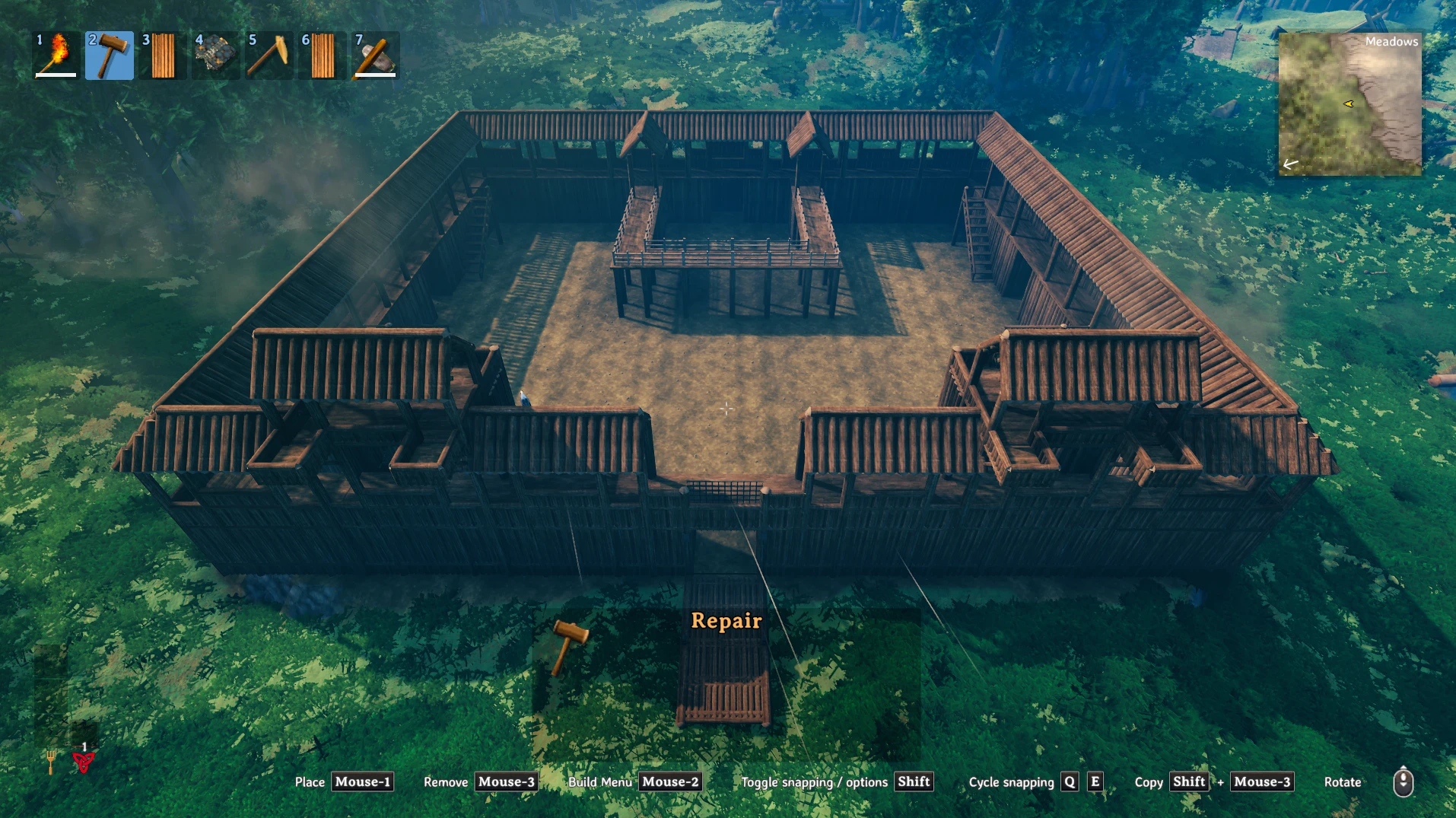
HD Core Wood fortifications: palisade walls, roofed walls, gates, lift gates, drawbridges, fences, spikes, braziers, climbable ladders, ziplines, traps, electric fences, a smarter ballista and more!
💶 Donations:
If you enjoy using this Valheim mod, please consider making a small donation to help support its development and future updates.
Even £1 or $1 would be greatly appreciated and would help more than you might think!
Thank you for your support, and happy gaming! ⚔️ ...... (A Paypal account is NOT required!)

✅ Recommended Plugins:
- MyBuildCamera by EndoCo.
Workbench
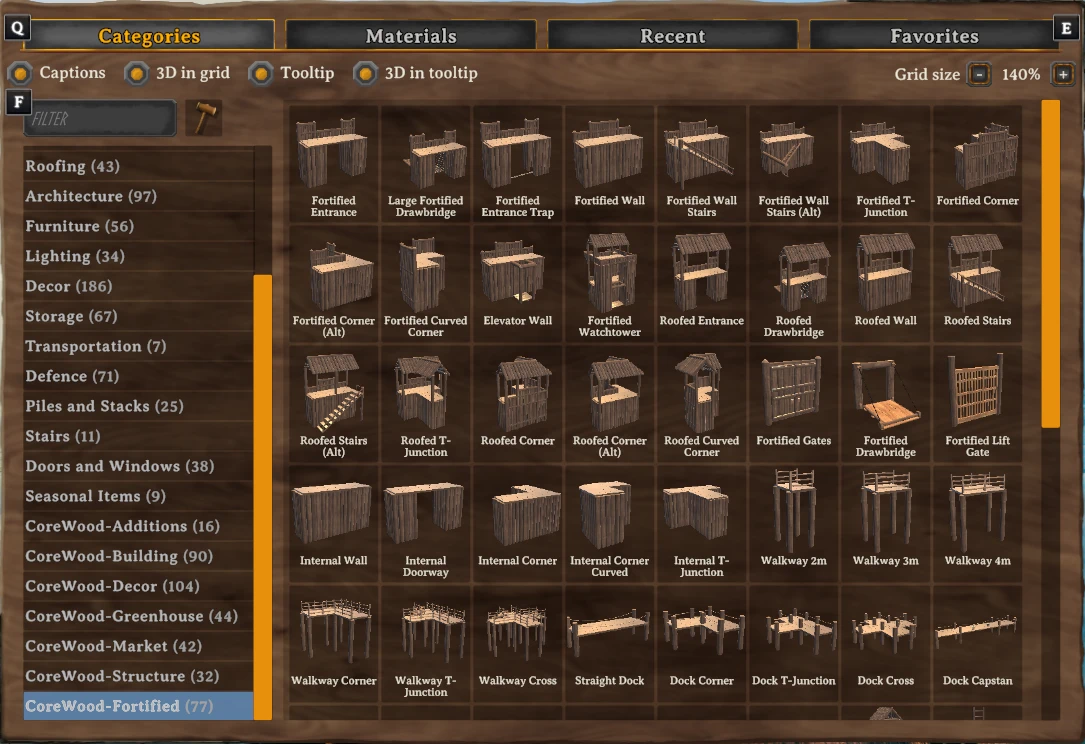
Walls
- Fortified Entrance: 30 Core Wood, 8 Wood
- Fortified Wall: 40 Core Wood, 8 Wood
- Fortified Wall Stairs: 30 Core Wood, 8 Wood
- Fortified Wall Stairs (Alt): 30 Core Wood, 8 Wood
- Fortified T-Junction: 40 Core Wood, 12 Wood
- Fortified Corner: 30 Core Wood, 8 Wood
- Fortified Inner Corner: 30 Core Wood, 8 Wood
- Fortified Curved Corner: 30 Core Wood, 8 Wood
- Elevator Wall: 35 Core Wood, 12 Wood
Roofed Walls
- Roofed Entrance: 40 Core Wood, 10 Wood
- Roofed Wall: 40 Core Wood, 8 Wood
- Roofed Stairs: 45 Core Wood, 12 Wood
- Roofed Stairs (Alt): 45 Core Wood, 12 Wood
- Roofed T-Junction: 50 Core Wood, 16 Wood
- Roofed Corner: 40 Core Wood, 10 Wood
- Roofed Inner Corner: 30 Core Wood, 8 Wood
- Roofed Curved Corner: 40 Core Wood, 12 Wood
Internal Walls
- Internal Wall: 20 Core Wood, 8 Wood
- Internal Doorway: 15 Core Wood, 8 Wood
- Internal Corner: 20 Core Wood, 8 Wood
- Internal Corner Curved: 20 Core Wood, 8 Wood
- Internal T-Junction: 30 Core Wood, 12 Wood
Fences
- Fortified Fence: 4 Core Wood
- Large Fortified Fence: 8 Core Wood
- Windowed Fortified Fence: 6 Core Wood
- Fortified Fence Gate: 4 Core Wood, 1 Bronze
Spikes
- Fortified Spikes: 2 Core Wood, 2 Wood
Walkways
- Walkway 2m: 2 Core Wood, 4 Wood
- Walkway 3m: 2 Core Wood, 5 Wood
- Walkway 4m: 4 Core Wood, 8 Wood
- Walkway Corner: 8 Core Wood, 14 Wood
- Walkway T-Junction: 8 Core Wood, 16 Wood
- Walkway Cross: 10 Core Wood, 18 Wood
- Walkway End: 2 Core Wood, 6 Wood
Docks
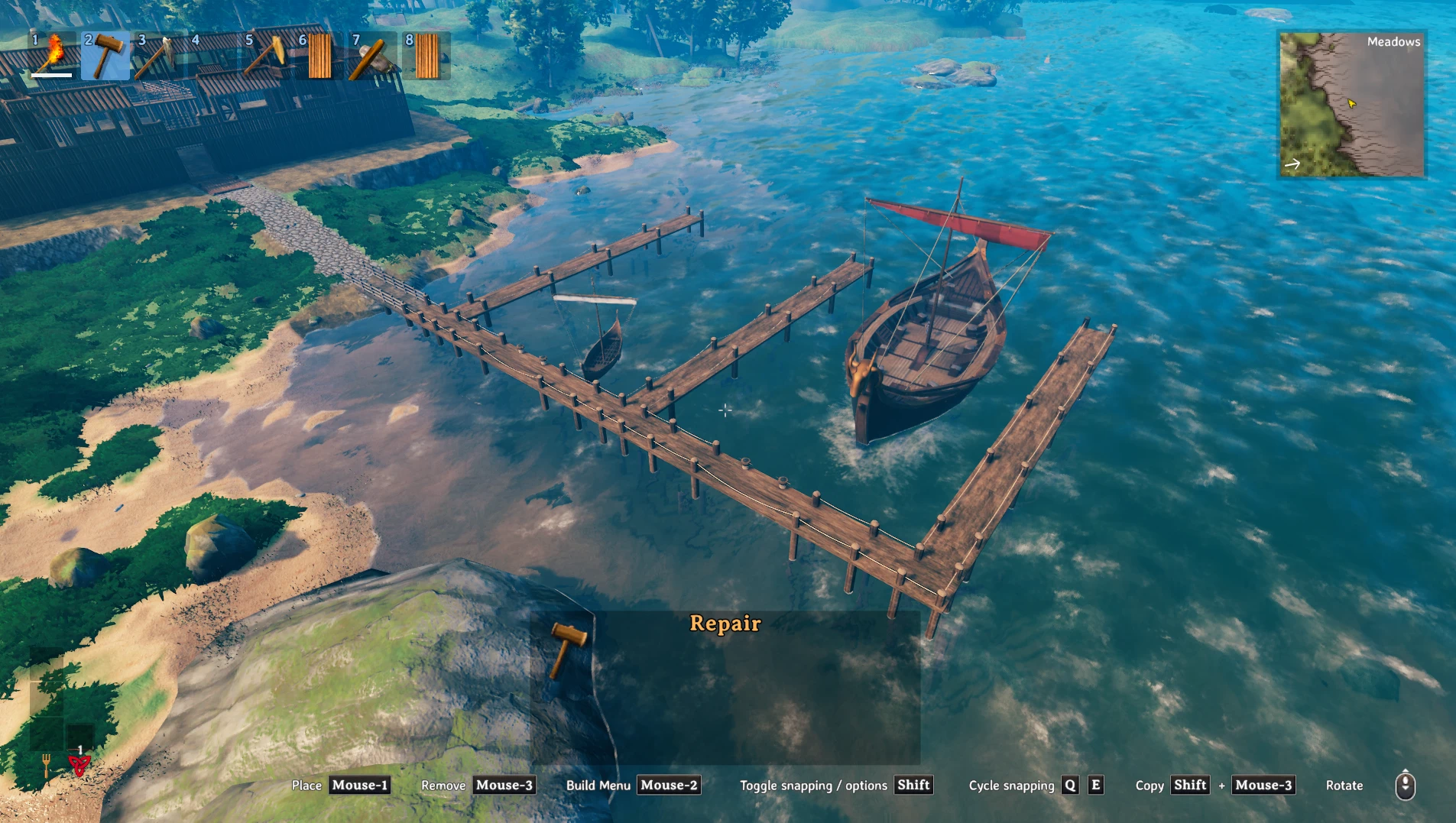
Once placed, each post reaches down to the ground below it, so a dock can be built out over water and stands on the sea floor.
- Dock Straight: 8 Core Wood, 12 Wood
- Dock Corner: 9 Core Wood, 14 Wood
- Dock T-Junction: 10 Core Wood, 16 Wood
- Dock Cross: 12 Core Wood, 20 Wood
- Dock Capstan: 10 Core Wood, 16 Wood
- Dock End: 6 Core Wood, 10 Wood
A ship bigger than the raft that sails towards a Dock Capstan from in front of it, within 30 m, is brought in by itself, without turning, and held with its hull 6 m out from the capstan, tied to the capstan by two ropes, and takes no damage from waves while docked. If a dock lies alongside the ship once it is there, within 15 m, the ship is moved sideways up to it, stopping just short. Raise the speed from the helm to sail off again. If anything is in the way you are told docking is blocked. Auto Docking can be turned off in the Docks config section.
- Drawbridge Opens For Ships (default On): a large drawbridge opens by itself when a ship comes within 50 m and closes once none is within 50 m. It waits while a player is on or near the bridge, and only closes a bridge it opened itself. Synced from the server.
Drawbridges
- Large Drawbridge: 12 Core Wood, 24 Wood, 6 Linen Thread, 20 Stone (for each half)
Once placed, its legs reach down to the ground below, so it can span a moat or a river. Placing one also places a second half facing it, so the two meet in the middle as one full drawbridge, and both halves open and close together. You need materials for both halves, and nothing is built if the other half would be inside a ward you cannot build in. Destroying one half, by damage, the hammer or losing support, destroys the other too, and each half drops its own materials.
Wooden Bridges
Once placed, each post reaches down to the ground below it, so a bridge can be built over a moat, a river or a gap.
- Wooden Bridge 4m: 6 Core Wood, 10 Wood
- Wooden Bridge 8m: 10 Core Wood, 18 Wood
- Wooden Bridge Corner: 8 Core Wood, 14 Wood
- Wooden Bridge T-Junction: 10 Core Wood, 16 Wood
- Wooden Bridge Cross: 12 Core Wood, 20 Wood
- Wooden Bridge End: 6 Core Wood, 10 Wood
Ladders
- Ladder 2m: 2 Core Wood
- Ladder 3m: 3 Core Wood
Tower Beacon
- Tower Beacon: 2 Core Wood, 4 Wood
A log tower with a stand on top. Snap a Fortified Brazier Small onto the stand and light it: while it burns, the map is revealed for 300 m around the beacon (set by Beacon Reveal Radius). Each player's map is revealed when they come near the beacon, and is saved with their character like any explored land.
Storage
- Large Storage: 8 Core Wood, 6 Wood, 6 Iron
Forge
- Fortified Gates: 10 Core Wood, 6 Wood, 1 Bronze
- Fortified Drawbridge: 8 Core Wood, 20 Wood, 6 Chain, 4 Bronze
- Fortified Lift Gate: 10 Core Wood, 20 Wood, 8 Bronze
- Fortified Brazier Small: 2 Wood, 2 Iron, 5 Coal
- Fortified Brazier Large: 4 Wood, 2 Iron, 5 Coal
- Bronze Spikes: 2 Core Wood, 2 Wood, 2 Bronze
- Iron Spikes: 2 Core Wood, 2 Wood, 2 Iron
Towers
- Fortified Watchtower: 60 Core Wood, 20 Wood, 3 Iron
Drawbridges
- Large Fortified Drawbridge: 30 Core Wood, 8 Wood, 8 Chain
- Roofed Drawbridge: 40 Core Wood, 12 Wood, 8 Chain, 2 Iron
Chain Towers
- Small Chain Tower 8m: 12 Core Wood, 10 Wood, 1 Chain, 2 Iron
- Medium Chain Tower 15m: 20 Core Wood, 16 Wood, 2 Chain, 4 Iron
- Large Chain Tower 21m: 30 Core Wood, 24 Wood, 3 Chain, 6 Iron
Note: A build camera is recommended to place the towers!
Ziplines
- Zipline Post: 8 Core Wood, 2 Iron, 10 LinenThread
Defence
- Fortified Ballista: 10 Black Metal, 10 Yggdrasil Wood, 3 Mechanical Springs
- Organ Cannon: 10 Black Metal, 10 Yggdrasil Wood, 4 Mechanical Springs, 4 Iron
Ammo (crafted at the forge)
- Cannon Ball: 1 Iron
Artisan Table
Spikes
- Black Metal Spikes: 2 Core Wood, 2 Wood, 2 Black Metal
Traps
- Trap Controller: 20 Stone, 6 Coal
- Flame Trap: 4 Black Metal, 6 Wood
- Saw Wall: 4 Black Metal, 6 Wood
- Spike Floor: 4 Black Metal, 8 Stone
- Fortified Entrance Trap: 30 Core Wood, 8 Black Metal
- Floor Blades: 4 Iron
- Ground Trap: 2 Iron, 10 Wood
Galdr Table
- Electric Fence 2m: 2 Core Wood, 2 Eitr
- Electric Fence 4m: 2 Core Wood, 4 Eitr
- Fence Controller: 2 Core Wood, 2 Crystal, 2 Eitr, 4 Iron, 4 Iron
Black Forge
- Flametal Spikes: 2 Core Wood, 2 Wood, 2 Flametal
Frost Foundry
- Fortified Spikes Bloodgold: 2 Core Wood, 2 Wood, 2 Bloodgold
⛓️ Chain Towers:
Build two chain towers facing each other across the water and they link up on their own. Use the winch on either tower to raise a net of chains from the seabed, and use it again to lower it.
- While placing a tower, a preview line shows which tower it will link to, or why it can't (too far, too close, or not facing each other).
- Each size has its own reach: 15 m, 30 m or 60 m. Two towers of different sizes can link, up to the shorter of their two reaches. The towers must be at least 6 m apart.
- Hitting the net passes half the damage on to the two towers. If either tower is destroyed, the net goes with it.
- Each size's reach can be changed in the config, and chain towers can be turned off entirely.
Note: A build camera is recommended to place the towers!
🛗 Elevators:
Elevator Wall: a fortified wall with a built-in lift platform that carries players up to the top of the wall and back down.
Fortified Watchtower: a corner tower with a lift inside that stops at the ground, the first floor and the top.
- Use the platform itself to send it to the next stop, or simply step onto the platform and it moves on its own.
- Use a switch to call the platform to that switch's floor, or to send it on if it is already there.
- The Fortified Watchtower has a lever on each floor: pull it to call the platform to that floor. Every player sees the lever move.
- Anything standing on the platform rides with it, and the platform stays in step for every player on a server.
- Speed, automatic movement and sound volume can all be changed in the config, and elevators can be turned off entirely.
🪢 Ziplines:
Tie a rope between two zipline posts and ride it, hanging from a trolley.
- Hold the Alt Place key and press Use on a post to take a rope from it. Walk to another post and do the same to tie the rope there.
- Press Use at either post to ride. Downhill ropes speed you up; hold Forward to pull yourself along (this uses stamina), and Backward or Block to brake. Jump or Use lets go.
- A post holds up to four ropes by default. Look along the rope you want before pressing Use.
- Jump or fall into a rope away from the posts to catch it in mid-air.
- A rope is refused if it is too long, too steep, or a rider would hit the ground, water, trees or buildings on the way.
- Destroying a post takes its ropes down. If you log out while riding, you come back on the ground by a post.
- Rope length, speed, braking, stamina and more can be changed in the config, and ziplines can be turned off entirely.
🪜 Ladders:
Ladder 2m and Ladder 3m: ladders you can climb, with hands and feet taking hold of the rungs as you go.
- Press Use on a ladder to get on, from the ground, part way up, or from the floor at the top. You can climb either side.
- Forward climbs up and Backward climbs down, whichever way you are looking. Hold Run to climb faster, which uses stamina. Carrying too much halves your speed.
- At the top you step off onto the floor across the ladder, if there is room to stand. At the bottom you step off onto the ground.
- Jump pushes off the ladder, the way you are holding or straight back. Your Jump skill makes the push stronger, by up to 40%, and jumping off raises it. Crouch drops you, and Use lets go.
- Climbing has its own skill, raised by every metre you climb. It makes climbing fast cheaper on stamina, by up to 25% at level 100. From level 20, holding Run while climbing down slides you down the ladder.
- Stack ladders on each other's snap points, 2m and 3m in any mix, and they climb as one ladder.
- The ladder's own height never counts as a fall: fall damage starts from where you leave it.
- Other players see your hands and feet on the rungs too.
- Climb speeds and stamina can be changed in the config.
Climbing and its animation are ported from The Concerned Cat's Concerned Ladders.
🏹 Fortified Ballista:
A ballista on a raised Core Wood base. Load it with any vanilla bolt, and give it trophies to pick which creatures it shoots at, just like the vanilla ballista. On top of that:
- Predictive Aiming: it aims where a moving target will be when the bolt arrives, and allows for the bolt dropping on the way.
- Fast Turning: it gets up to speed and settles on its aim quickly, so it keeps up with moving targets and fires sooner.
- Homing Bolts: within 25 m of the target, bolts turn in flight towards it. They turn only so fast, so a dodging target can still be missed.
- Spare Buildings: bolts that miss do no damage to building pieces, so it cannot shoot down your own walls, towers or other ballistas.
- Auto Reload: when it is not full, it takes bolts from chests within 10 m, every few seconds. It only uses chests its builder may open, never while someone has the chest open, and only the kind of bolt already loaded. Graves, carts and ships are left alone.
- A scanning sound plays while it sweeps looking for a target.
- Moving it: look at it and press U (the Turret Move Key) to pick it up. A copy follows where you aim: scroll to turn it, attack to put it down, block or U again to leave it where it was. It keeps its bolts and trophies. You need access to the area at both ends.
- By default it shoots only at enemies, not at players or tames.
- Each feature can be turned off, and the range, scan arc, turning, targets and ammo can all be changed in the config. The ballista can also be turned off entirely.
Note: Auto Reload is safe in multiplayer, but every player and the server need this mod installed for chests to hand over bolts.
💣 Organ Cannon:
Thirteen barrels on a wheeled carriage. Load it with Cannon Balls and it fires at enemies in front of it, with a volley of one ball from every barrel.
- Cannon Balls: forged at the forge, 1 Iron for each ball.
- The whole cannon turns on the spot towards the target, its wheels rolling opposite ways, but only within its fire arc, so place it facing the way you want it to fire. Its range circle shows the arc it covers.
- It aims where a moving target will be when the balls arrive, and allows for them dropping on the way.
- Each volley kicks the cannon back on its wheels, and it rolls forward into place again.
- Give it trophies to pick which creatures it fires at, just like the ballista. By default it fires only at enemies, not at players or tames.
- Spare Buildings: balls that miss do no damage to building pieces.
- Auto Reload: when it is not full, it takes cannon balls from chests within 10 m, every few seconds. It only uses chests its builder may open, never while someone has the chest open. Graves, carts and ships are left alone.
- Moving it: look at it and press U (the Turret Move Key) to pick it up. A copy follows where you aim: scroll to turn it, attack to put it down, block or U again to leave it where it was. It keeps its cannon balls and trophies. You need access to the area at both ends.
- The range, fire arc, reload time, volley size, ball damage, targets, ammo and auto reload can all be changed in the config, and the cannon can be turned off entirely.
🪤 Traps:
- Flame Trap: a floor trap that bursts into flame, with the roar of fire, when something steps near it. It burns anyone, players included.
- Saw Wall: a wall of saw blades that spin up when anyone comes close, and cut enemies.
- Spike Floor: a floor trap whose spikes shoot up when anyone steps near it, and stab enemies.
- Floor Blades: blades set into the floor that whirl round fast, with a high saw whine, when anyone steps near, and cut enemies.
- Ground Trap: a spiked pit under a false floor. Placing it digs the ground out beneath it, and the ground comes back when it is removed. When anyone steps onto the false floor, it drops away so they fall onto the spikes; it closes over again a couple of seconds after the pit is clear. Standing beside it does not set it off. Grass from the biome it is in grows on its cover and frame, to help hide it.
- Fortified Entrance Trap: a gateway with a spiked roller on each side. When anyone comes near, the rollers spin up with a whirr like the Saw Wall's and roll in until they meet in the middle, cutting enemies caught between them. When they stop, the rollers spin down and roll back to the sides.
- A trap only runs while someone (a player, creature or tame) is near it, and stops a couple of seconds after they leave.
- Traps do not hurt players, except the Flame Trap, and are harmless while you are placing them.
Trap Controller: switches the traps within 30 m of it (the radius can be changed in the config).
- Its traps stay on, whether or not anyone is nearby, until you turn them off.
- Press Use on it to turn its traps off, and again to turn them back on. You need access to the area, as with a ward.
- Its range shows while you place it, while you look at it, and while you place a trap inside it.
- Traps only work within range of a Trap Controller. A trap with no controller in range stays off and says so when you look at it.
⚡ Electric Fence:
- Electric Fence 2m and Electric Fence 4m: beams that crackle with green lightning and hum, and shock enemies who touch them. They clank as they switch on and off. It is not a trap: it is powered by a Fence Controller, not switched by a Trap Controller.
- Fence Controller: powers the electric fences within 50 m of it (the radius can be changed in the config).
- Press Use to open its store, which holds only Eitr. Press Shift + Use to turn it off, and again to turn it back on. You need access to the area, as with a ward.
- It burns one Eitr every 10 minutes (changeable in the config), but only while it is on and has a fence in range.
- Looking at it shows how much Eitr it holds and how long its power will last.
- Its range shows while you place it, while you look at it, and while you place a fence inside it.
- A fence is live only while a powered Fence Controller is in range. Looking at it tells you if it has no controller, or its controller is off or out of Eitr.
📦 Large Storage:
Large Storage: a chest whose slots hold far bigger stacks than normal, up to 65,535 of an item in each slot (set by Max Stack Size). Items that do not stack, like weapons and armour, still take a slot each.
- Only this chest does this. Everywhere else, items keep their normal stack size.
- Opening the chest merges matching stacks.
- Dragging an item out takes one normal stack at a time. Take All and quick-moving take as many stacks as fit in your inventory, and the rest stays in the chest.
- If the chest is destroyed, each slot falls as one pile. Picking a pile up takes what fits and leaves the rest on the ground.
While a Large Storage is open:
- Deposit All: the button under the chest's name, or
F, moves your whole inventory into it. Your hotbar and equipped items stay with you. - Search: type in the box to dim everything that does not match, and click the X to clear it. Type part of an item's name, or use
@to search by mod (@modfor any modded item, or part of a mod's name), by kind of item (such as@material,@weaponor@food), or by what it is crafted from (such as@iron). - Sort: the three icons sort by name (A-Z, click again for Z-A), by weight (heaviest first, click again for lightest first), and by type.
- Trash: pick up an item in the chest and click the Trash tab on the side of the panel, or press
Delete. If it has a crafting recipe, it is recycled and what it was crafted from goes back into the chest (anything that does not fit falls beside it). Otherwise it is deleted. Only whole crafts are recycled, so dragging 25 arrows of a recipe that makes 20 leaves 5 in the chest. Only items from the chest can be trashed, and trashing more than one normal stack of an item asks you to confirm first. - Keep an item: hold
Left Altand right-click an item in your inventory to give it a gold frame. Framed items stay with you when you use Deposit All or Place Stacks. Do the same again to remove the frame. - Split a stack: the split dialog gets + and - buttons, and the mouse wheel changes the amount. Hold Shift to change it by 10, or Ctrl by 100.
⚙️ Configuration:
Settings are in BepInEx/config/MagicMike.CorewoodFortified.cfg (or press F7, in game or on the main menu, to open a panel with the settings of all your installed Magic Mike mods).
- Enable Plugin (default
true): turns the mod on or off. Restart required. - Disable HD (default
false, experimental): swaps the piece materials for low quality versions that look more vanilla like. Changing it applies straight away, including to pieces already built. - Enable Biome Overlays (default
false): gives the wood, log and stone materials of the Corewood Fortified pieces a faint overlay that depends on the biome each piece stands in: ice and snow in the Mountain and the Deep North, moss everywhere else. Only materials used by this mod's pieces change. It also works with the Disable HD materials, and changing it applies straight away, including to pieces already built. It replaces the old Mossy Textures setting and keeps its value. - Turret Move Key (default
U): look at a Fortified Ballista or Organ Cannon and press it to move it. - Beacon Reveal Radius (default
300, synced from the server): how far around a Tower Beacon the map is revealed while a lit Fortified Brazier Small stands on its top, in metres, from 100 to 3000. The map is made of 64 m squares, so the edge of the circle is rough. - Beacon Unlimited Fuel (default
Off, synced from the server): if On, a Fortified Brazier Small standing on a Tower Beacon never runs out of fuel. It is kept full, lights even when empty, and wind and rain do not put it out; switching it off or covering it over still puts it out.
Large Storage (synced from the server)
- Max Stack Size (default
1000): how many of an item one slot of a Large Storage can hold, from 100 to 65535. Lowering it never removes items already stored. - Recycle Return (default
1): how much of what an item was crafted from comes back when it is trashed, from 0 (nothing, trashed items are deleted) to 1 (all of it).
Large Storage (each player's own)
- Deposit All Key (default
F): the key for Deposit All while a Large Storage is open. - Keep Item Key (default
LeftAlt): hold it and right-click an item in your inventory to mark it to keep. - Trash Key (default
Delete): trashes the item you are holding from a Large Storage.
Elevators (synced from the server)
- Enable Elevators (default
true): if off, the Elevator Wall and Fortified Watchtower are hidden from the build menu and placed elevators do not move. - Automatic Elevators (default
true): if on, an elevator moves on its own when a player steps onto the platform. - Elevator Speed (default
2): how fast the platform moves, in metres per second, from 0.5 to 10.
Chain Towers (synced from the server)
- Enable Chain Towers (default
true): if off, chain towers are hidden from the build menu, and placed towers stay but their winches cannot be used. A net keeps the height it had. - Max Span Small (default
15): the longest net a small chain tower can hold, in metres, from 15 to 64. - Max Span Medium (default
30): the longest net a medium chain tower can hold, in metres, from 15 to 64. - Max Span Large (default
60): the longest net a large chain tower can hold, in metres, from 15 to 60.
Ziplines (synced from the server)
- Enable Ziplines (default
true): if off, the Zipline Post is hidden from the build menu, placed posts and their ropes stay but cannot be used, and ropes cannot be caught in mid-air. - Max Rope Length (default
150): the longest rope between two posts, in metres, from 10 to 400. - Max Slope (default
60): the steepest rope allowed, in degrees, from 10 to 80. - Max Ropes Per Post (default
4): how many ropes one post can hold, from 1 to 8. - Require Clearance (default
true): refuse ropes where a rider would hit the ground, water, trees, rocks or buildings. - Rope Sag (default
0.02): how much a new rope sags in the middle, as a share of its length. - Max Speed (default
20): top speed on a rope, in metres per second. - Gravity (default
1): how strongly a downhill rope speeds you up. - Crawl Speed (default
0): minimum speed towards the far post, so riders arrive without pulling. 0 is off. - Pull Speed (default
4): speed when holding Forward to pull yourself along, in metres per second. - Pull Stamina (default
6): stamina used per second while pulling. - Brake Strength (default
10): how fast braking slows you down. - Auto Brake (default
true): slow riders down automatically before the far post. - Arrival Speed (default
3): the speed Auto Brake slows riders to, in metres per second.
Ziplines (each player's own)
- Ride Animation (default
hang): body pose while riding:hang,repell,grappling,attach_chairornone. - Hang Height (default
2.3): distance from the rope down to your feet while riding, in metres. - Rope Thickness (default
0.05): how thick the ropes look, in metres across. - Grab Rope In Mid-Air (default
true): catch a rope by jumping or falling into it. - Log Back In On The Ground (default
true): logging out mid-ride brings you back on the ground by a post. - Messages (default
Short):Shortshows a few words in the corner,Allthe full help,Offnothing.
Ladders (synced from the server)
- Enable Ladders (default
true): if off, ladders are hidden from the build menu, and placed ladders stay but cannot be climbed. Anyone on a ladder lets go. - Climb Speed (default
0.9): how fast you climb up and down, in metres per second, from 0.3 to 4. The climbing animation is made for 0.9. - Fast Climb Speed (default
1.2): how fast you climb while holding Run, in metres per second, from 0.3 to 6. The climbing animation is made for 1.2. - Fast Climb Stamina (default
8): stamina used per second while climbing fast, from 0 to 30, up to 25% less with the Climbing skill. 0 is free. Out of stamina, you climb at the normal speed. - Slide Skill Level (default
20): the Climbing skill level from which holding Run while climbing down slides you down, from 0 to 100. 0 lets anyone slide. - Slide Speed (default
4.5): how fast you slide down, in metres per second, from 1 to 10. - Slide Stamina (default
2): stamina used per second while sliding, from 0 to 30, up to 25% less with the Climbing skill. 0 is free. Out of stamina, you climb down at the normal speed.
Fortified Ballista (synced from the server)
- Enable Fortified Ballista (default
true): if off, the Fortified Ballista is hidden from the build menu, and placed ones stay but do not turn, fire or take bolts, by hand or from chests. - Scan Arc (default
100): how wide it sweeps while looking for a target, in degrees from one side to the other, from 10 to 178. - Sweep Time (default
7): seconds to sweep from one side of the scan arc to the other, from 1 to 15. - Turn Rate (default
45): how fast it turns, in degrees per second, from 15 to 90. - Fast Turning (default
true): get up to speed and settle on its aim quickly. If off, it turns as gently as the vanilla ballista. - Range (default
30): how far away it finds and shoots at targets, in metres, from 3 to 50. - Predictive Aiming (default
true): aim where a moving target will be when the bolt arrives. If off, it aims like the vanilla ballista. - Homing Bolts (default
true): bolts turn in flight towards their target once within 25 m of it. - Spare Buildings (default
true): bolts that miss do no damage to building pieces, including other ballistas. If off, they damage whatever they hit, like the vanilla ballista. - Target Players (default
false): it can shoot at players. - Target Tames (default
false): it can shoot at tamed creatures. - Target Enemies (default
true): it shoots at enemies. - Max Target Trophies (default
10): how many trophies can be loaded to pick its targets, from 1 to 10. - Max Ammo (default
40): how many bolts it holds, from 5 to 100. - Auto Reload (default
true): take bolts from nearby chests when not full. - Auto Reload Range (default
10): how far away a chest can be, in metres, from 2 to 20. - Allow Moving (default
true): it can be picked up with the Turret Move Key and put down somewhere else.
Organ Cannon (synced from the server)
- Enable Organ Cannon (default
true): if off, the Organ Cannon is hidden from the build menu, and placed ones stay but do not aim, fire or take cannon balls. - Range (default
40): how far away it finds and fires at enemies, in metres, from 10 to 60. - Fire Arc (default
60): how far it turns from one side to the other, in degrees, from 10 to 120. - Reload Time (default
6): seconds between volleys, from 1 to 30. - Volley Size (default
13): how many of its 13 barrels fire in each volley, one cannon ball each. - Cannon Ball Damage (default
40): blunt damage of each ball, from 5 to 300. - Max Ammo (default
65): how many cannon balls it holds, from 13 to 260. - Spare Buildings (default
true): balls that miss do no damage to building pieces. If off, they damage whatever they hit. - Target Players (default
false): it can fire at players. - Target Tames (default
false): it can fire at tamed creatures. - Target Enemies (default
true): it fires at enemies. - Auto Reload (default
true): take cannon balls from nearby chests when not full. - Auto Reload Range (default
10): how far away a chest can be, in metres, from 2 to 20. - Allow Moving (default
true): it can be picked up with the Turret Move Key and put down somewhere else.
Traps (synced from the server)
- Enable Traps (default
true): if off, the traps and the Trap Controller are hidden from the build menu, and placed traps stay but are switched off and do no damage. - Trap Controller Radius (default
30): how far from a Trap Controller its traps can be, in metres, from 15 to 200. Placed controllers change too. - Flame Trap Trigger Radius, Saw Wall Trigger Radius and Spike Floor Trigger Radius (default
8): how close a creature or player has to come to a switched-on trap for it to go off, in metres, from 1 to 20. Placed traps change too. - Entrance Trap Trigger Radius (default
6) and Floor Blades Trigger Radius (default2): the same for the Fortified Entrance Trap and the Floor Blades. - Flame Trap Damage (default
100fire), Saw Wall Damage (default50slash, per blade), Spike Floor Damage (default100pierce), Floor Blades Damage (default50slash), Ground Trap Damage (default50pierce) and Entrance Trap Damage (default100slash, per roller): how much each trap does each time it hits, from 1 to 1000. Placed traps change too. - Ground Trap Ignores Players (default
false): if on, players never open a Ground Trap, so they can walk over their own; only creatures do.
Traps (each player's own)
- Ground Trap Grass (default
true): if on, grass like the grass round it grows on a Ground Trap's cover and frame, so it is harder to spot.
Electric Fence (synced from the server)
- Fence Controller Radius (default
50): how far from a Fence Controller its electric fences can be, in metres, from 5 to 100. - Minutes Per Eitr (default
10): how many minutes one Eitr keeps a controller's fences live, from 1 to 120. - Electric Fence Damage (default
100lightning): how much a live fence does each time it shocks, from 1 to 1000. Placed fences change too.
Sounds (each player's own)
Every volume goes from 0 (silent) to 1 (full).
- Gate Sound Volume (default
1): the lift gate and drawbridge sounds. - Large Drawbridge Sound Volume (default
1): the large and roofed drawbridge sounds, used instead of Gate Sound Volume for these pieces. - Elevator Sound Volume (default
0.5): the elevator sound. - Chain Tower Sound Volume (default
0.5): the chain tower winch sounds. - Zipline Sound Volume (default
1): the rope sound while riding. - Ballista Scan Sound Volume (default
0.5): the Fortified Ballista's sound while it sweeps for a target. - Flame Trap Sound Volume, Saw Wall Sound Volume and Spike Floor Sound Volume (default
1): each trap's sound, such as the Flame Trap's fire or the Saw Wall's blade. - Entrance Trap Sound Volume and Floor Blades Sound Volume (default
1): the Fortified Entrance Trap's whirring spikes and the Floor Blades' whine. - Electric Fence Sound Volume (default
1): the fence's hum while it is live. - Large Storage Trash Sound Volume (default
1): the sound when an item is trashed at a Large Storage. - Fence Controller Sound Volume (default
0.5): the controller's sound while it powers its fences.
💻 Installation:
Automatic Install
- Plugin is created to be installed with Gale Mod Manager. For Nexus downloads you will need to install manually.
Manual Install
- Un-zip and drag the
pluginsandconfigfolders into yourBepInExfolder.
🌐 Multiplayer:
- Every player and the server need this mod installed.
- Versions only need to match on the first number: anyone on 1.x.x can play with anyone else on 1.x.x, so a server and its players do not all have to update at the same time.
- Settings marked "synced from the server" use the server's values for everyone.
🙏 Credits:
- Ladder climbing and its climbing animation are ported from The Concerned Cat's Concerned Ladders.
💥 Plugins Created by Magic Mike:
- Corewood Extras
- Corewood Fortified
- Corewood Additions
- My Dirty Hoe
- Chest Preview
- YabbaDabbaDoo
- Better Build Menu
- Better Crafting
- Better Equip Slots
- Extra Inventory Slots
- Village Plebs
- Body Replacer
💬 Comments/Suggestions/Help: Nexus, Discord.
💶 Donations:
Please support this project if you can!