 Install with Gale
🎯 Einherjar Bodies
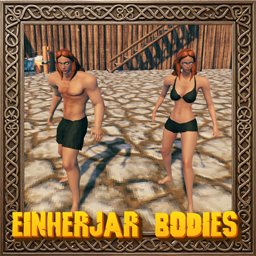
Gives Valheim's characters detailed Einherjar male and female bodies on the game's own skeleton: the game's animations, armor, hair and beards all still work. Armor is refitted to the new bodies, and there are eye colours, Norse tattoos, coloured underwear and a restyled character editor.
💶 Donations:
If you enjoy using this Valheim mod, please consider making a small donation to help support its development and future updates.
Even £1 or $1 would be greatly appreciated and would help more than you might think!
Thank you for your support, and happy gaming! ⚔️ ...... (A Paypal account is NOT required!)

⚠️ Note:
- The game's own armor comes already fitted. Custom armor and helmets from other mods are fitted the first time they are worn, which may take a few seconds (longer for a big piece); the piece snaps into place when it is done, and every later time it loads at once.
⭐ Features:
- Draws female characters with the Einherjar female body and male characters with the Einherjar male body, each with its own head and eyes; each can be turned on or off.
- The bodies use the game's own skeleton, so every animation, emote and attack works as it does on the game's characters.
- Restyles character creation to match the Mod Settings panel:
- a Hair Style window with the hair style, the beard on the male body, and a hair colour picker;
- an Appearance panel with eye colour, glow and iris size, underwear colour, male or female, and skin tone;
- an Armor panel with a dropdown each for Helmet, Body Armor and Leg Armor;
- a Tattoos panel with a design and an ink for the Face, Chest, Back, Arms and Legs.
- The game's own hairstyles and beards are fitted to the new heads one by one, for each body.
- Norse tattoos drawn on the skin across the five areas, in seven inks. Painted armor covers them, and other players see them.
- Underwear where no armor is worn: a bra and shorts on the female body and swimming trunks on the male. Chest armor hides the top and leg armor hides the bottom, and under a tunic that hangs over the hips the bottom is a plain dark cover. Its colour is chosen with Hue, Saturation and Brightness in the Appearance panel.
- Armor fitting. The game's own armor comes already fitted to the Einherjar bodies. Armor from other mods is refitted the first time it is worn:
- it is carried onto the new body by the difference between the game's body and the new one, and cut finely enough to follow the shape;
- it is kept out of the skin, including skin that would poke through a large flat piece such as a skirt;
- it takes the skin's own movement near the body and is kept clear of it in several poses (stepping, sitting, striding, bending, reaching), so it doesn't slide through when the character moves;
- armor the game keeps unreadable is read back from the graphics card and fitted too;
- fitting runs in the background and the result is cached on disk.
- Helmets are fitted to the new heads too, so the eye openings line up with the eyes; helmets from other mods are fitted automatically.
- Painted armor (a leather tunic, padded armor and the like) is drawn as a thin shell over the body with the game's own textures, cut out where there is no paint, so it keeps its colours and detail.
- Characters blink, open their mouths when attacking and smile when emoting, and their hands close around what they hold.
- A character select screen as a list, with your most recent characters around the menu's fire. CharacterSelect turns it off.
- An Edit button on the character select screen lets you change an existing character's name and look. Done saves the changes to that character, Cancel leaves it as it was.
- VillagePlebs companions can be drawn as Einherjar too (turn on CreaturesAsEinherjar).
- Hair is hidden where a worn helmet covers it and stays visible through the helmet's openings; hoods keep only a fringe of hair at the face.
- Helmets, hats and hoods can be hidden so the hair stays visible (the helmet still counts for armor and effects).
- A hotkey (F8 by default) opens the appearance window anywhere. Done keeps the changes; Cancel or Escape restores the old look.
- Languages: English, Russian, German, Chinese, Portuguese (Brazil), Spanish, French, Polish and Turkish, following the game's language setting. The files are in
config/EinherjarBodies/Translations/<Language>/EinherjarBodies.json.
🎚️ Configuration:
Settings are in BepInEx/config/MagicMike.EinherjarBodies.cfg (or edit them in Gale Mod Manager, Configuration Manager, or press F7, in game or on the main menu, to open a panel with the settings of all your installed Magic Mike mods). The ones marked (server) are synced from the server (or the hosting game) and are the same for every player; the rest are each player's own.
- General
- FemaleEinherjar (server) draws female characters with the Einherjar body. Off: the game's own female body.
- MaleEinherjar (server) draws male characters with the Einherjar body. Off: the game's own male body.
- StyleKey opens the appearance window anywhere (F8 by default).
- CharacterSelect shows the character select screen as a list, with your most recent characters around the fire (on by default). Off: the game's own screen.
- Look
- HideHelmets hides helmets, hats and hoods on Einherjar characters and keeps their hair (off by default).
- HideHairWithHelmet hides the hair completely while a helmet is shown (when HideHelmets is off).
- FirstPerson (off by default) is for first-person camera mods: while the camera is inside your character's head, the head, hair, beard and helmet are hidden.
- CreaturesAsEinherjar (server) also draws the creatures that are built on the player model (such as VillagePlebs companions) as Einherjar.
- ToonShading (on by default) lights Einherjar skin and underwear with the game's own stepped (toon) lighting, like the vanilla character. Off: smooth lighting from the mod's own shaders, mostly the game's ambient light with a gentle sun.
🌐 Multiplayer:
- Every player who should see the Einherjar bodies needs the mod; a player without it sees the game's own bodies.
- FemaleEinherjar, MaleEinherjar and CreaturesAsEinherjar come from the server when it has the mod, so everyone sees the same bodies.
- Your appearance choices are saved with your character and seen by other players who have the mod.
📦 Requirements:
💻 Installation:
Automatic Install
Plugin is created to be installed with Gale. For Nexus downloads you will need to install manually.
Manual Install
- Un-zip and drag the
configandpluginsfolders into yourBepInExfolder.
🙏 Credits:
The models and underwear are tweaked MakeHuman community assets, used under Creative Commons licences.
💥 Plugins Created by Magic Mike:
- Corewood Extras
- Corewood Fortified
- Corewood Additions
- My Dirty Hoe
- Chest Preview
- YabbaDabbaDoo
- Better Build Menu
- Better Crafting
- Better Equip Slots
- Extra Inventory Slots
- Village Plebs
- Einherjar Bodies