 Install with Gale

🍖 FATTY: The Valheim Culinary Overhaul 🍻




Stop surviving. Start feasting.
Fatty is a massive overhaul to Valheim's food system: it stops food stats from decaying, grows your food bar from 3 slots to 5 (a new 4th food slot and a dedicated 5th drink slot), lets you stack the same food for bonus stats, rewards a varied diet with powerful synergy buffs, gives meads and drinks their own buffs, and permanently makes you tougher the more you eat. Every buff comes with its own custom icon.
⚠️ Upgrading
From 1.1.x? Getting Fat's rewards changed shape: the five diet categories no longer grant health directly, they each grant their own stat instead, and health now comes from the new Fatness tally (total food eaten). Your existing per-category counts carry over untouched and immediately start feeding the new stats — you don't lose progress, but your current health bonus will move to whichever stats your diet has actually been feeding.
From 1.0.x? Your food data file gains the new Eitr category and drink flag, so Fatty runs a one-time migration on first launch and re-derives every category. Your old file is backed up to
Fatty_FoodData.json.bak— restore any hand-edits from there afterwards.
🍗 Guide to Being a Fatty
Fatty changes a lot at once. If you've opened your food bar, seen five slots doing five different things, and gone "...huh?" — this is for you. Everything below happens automatically; there's nothing to activate. You just eat.
The 60-second version
- Eat food. It doesn't decay. Whatever a food gives you, it keeps giving until its timer hits zero, then it's gone — no gradual fade like vanilla.
- You have 5 slots: 4 for solid food, 1 just for drinks. A drink can never get pushed out by food, and food can never steal the drink slot.
- Eat the same food again to stack it into the same slot, for more stats out of that one slot (up to 4 copies by default). Different foods take different slots.
- Eating a good spread of food triggers free buffs (below) and slowly, permanently makes you tougher (also below) — no crafting, no activation, just eating what's in front of you.
Stacking, and why a slot's timer might surprise you
Stack the same food and each extra copy is worth less than the last — so stacking is strong, but spamming one food isn't a full replacement for a varied diet:
| Copy | Value |
|---|---|
| 1st | 100% |
| 2nd | 30% |
| 3rd | 20% |
| 4th+ | 10% |
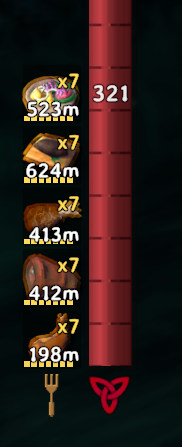
The "×N" badge on a slot tells you how many copies are stacked there.
Only the most-recently-eaten item in a stack actually counts down. Every older copy in that same slot is held in reserve, frozen, until the active one runs out — then the next-most-recent copy picks up automatically and starts its own countdown. So a slot showing "×4, 75m" means the item you just ate empties in 75 minutes, and the three behind it are banked and waiting their turn, not also draining in the background. The thin bar under the icon shows you each individual item and dims them one at a time as each takes its turn, so you can watch the stack empty in eaten order.
If you want the full picture — every item's own time left, its stack position, and exactly what it's contributing — click the gold ▲ FEAST tab (or press F8) to open The Feast Ledger.
Reading your food bar at a glance
| What you see | What it means |
|---|---|
| Icon | The food (or drink) occupying that slot |
| ×N badge (top-right) | How many times you've stacked that food |
| Number under the icon | When the active item (the one you most recently ate) runs out — the next copy in the stack then takes over automatically |
| Segmented bar under the icon | One segment per stacked item, dimming as each runs down |
The gold ▲ FEAST tab (drag it anywhere; press F8 to toggle it too) opens The Feast Ledger — see below.
The buffs that just... happen
Eat the right mix and a Status Effect appears with no input from you — keep eating that mix and it stays up; let it lapse and it fades. Its icon shows a live countdown to the moment your diet stops qualifying, so you know exactly how long you have to top it back up.
| You're eating | You get |
|---|---|
| 1 Meat + 1 Produce | 🟢 Balanced Diet — big Health & Stamina regen |
| 3 Sweets + 1 Drink | 🩷 Sugar Rush — big movement speed |
| 2 Fish + 1 Produce | 🔵 Fisherman's Friend — faster, cheaper swimming |
| 3 Meat + 1 Drink | 🟤 Lumberjack's Feast — more carry weight & woodcutting damage |
Whatever's in your drink slot grants its own buff too, chosen by what that drink actually does (an eitr mead → Arcane Draught, a stamina mead → Reveler's, and so on) — see the Mead & Drink Buffs table below for the full list. You don't pick a draught; the drink you're holding picks it for you.
Fill your drink slot with Tasty Mead and you get Drunk — harder hitting, harder to stagger, but a much weaker guard. It's the one drink you can chug back-to-back, specifically so this is reachable.
The buffs that never go away
Separately from all of the above, Fatty is quietly counting every food you've ever eaten, by category, for the life of your character. Cross a threshold in a category and you get a small slice of a permanent stat matched to that category's flavour — Meat → carry weight, Sweet → stamina, Eitr → max eitr, Fish → swim speed, Produce (vegetables and fruit) → all-round regen — and none of it has anything to do with your current stomach; it's never lost, even if you starve. Meat/Sweet/Eitr/Fish don't repeat the same reward three times either: the 2nd tier swaps in a different permanent perk (Sword & Axe skill, stamina regen, eitr regen, or reduced swim stamina cost) before the 3rd tier goes back to the flat bonus. On top of all that, your total food eaten across every category (a separate "Fatness" tally, which alternates the same way — max health, then health regen, then max health again) permanently raises your max health. It's deliberately per-category, so it rewards actually eating a varied diet over a long playthrough rather than spamming one cheap food. Check your progress any time in the Getting Fat section of the ▲ FEAST panel.
A worked example
You eat 3 Cooked Meat, 1 Carrot Soup, and a Stamina Mead:
- Meat slot: shows "×3" — 1st Meat at 100%, 2nd at 30%, 3rd at 20% of its stats, stacked together.
- Produce slot: Carrot Soup on its own, full value.
- Drink slot: the Stamina Mead — health/stamina from it feed your bars like any food, and because it's a Sweet-category drink it also grants the Reveler's Draught for as long as it holds the slot.
- You now have 1 Meat + 1 Produce on the board → Balanced Diet kicks in automatically, with its own countdown ticking on the icon.
- Every one of those four foods also just counted toward its category's lifetime "Getting Fat" tally (and the overall Fatness tally) — permanently, whether or not you ever eat that exact meal again.
That's the whole loop: eat → stack → qualify for buffs → get a little more permanent, forever, in the background.
✨ Core Features
🛑 No Food Decay
Hate watching your health and stamina slowly tick down to nothing? Fatty disables vanilla food decay. When you eat, you keep 100% of a food's stats until its timer fully expires — no gradual fade. (Configurable — you can turn decay back on and keep the rest of the mod.)
🥞 Stat Stacking
If you really love Lox Meat, why stop at one? Fatty lets you eat the same food multiple times to pile on stats.
- By default you can stack a food up to 4 times.
- To keep it balanced, extra stacks give diminishing returns (configurable).
- Default: 1st serving = 100%, 2nd = 30%, 3rd = 20%, 4th and beyond = 10%.
- The HUD shows an "×N" badge so you always know how many times a food is stacked.
🔍 The Feast Ledger
A stacked slot's timer shows exactly when the active item empties (the most recently eaten copy - older copies are held in reserve and take over one at a time), and a thin segmented bar under each icon shows every individual item in the stack, dimming one at a time as each takes its turn.
Click the small gold ▲ FEAST tab, or press F8 (rebindable in the config), to open The Feast Ledger: every stacked item's own remaining time, its position in the diminishing-returns ladder, its actual icon, and exactly how much HP/Stamina/Eitr it's contributing right now. A stack of the same food (e.g. "Tasty Mead ×4") collapses behind one line — click it to expand the individual items instead of repeating the food's name over and over. Inside the same panel, two more sections expand on click:
- Getting Fat — your progress toward all six permanent milestone perks.
- Lifetime Feast Log — every distinct food you've ever eaten on this character, and how many times, independent of what's currently in your stomach.
The panel closes with your inventory or the ESC menu, like any other window — the little ▲ FEAST tab stays put, and that's how you reopen it. It is draggable (grab the title bar), resizable (drag the corner grip), and framed in a full gilt picture frame — a polished double-rail gold border with mitred acanthus-flourish corners and a crest top and bottom, over a near-black leather panel. Text runs a couple of points larger than a typical Fatty panel by default; adjust or disable that in "10 - HUD Panels" → Feast Ledger Font Size Delta. It remembers where you left it, even across a full game restart.
🍺 A 4th Food Slot + a 5th Drink Slot
Vanilla only gives you 3 food slots. Fatty expands the food bar to 5: a brand-new 4th solid-food slot plus a dedicated 5th slot just for drinks — so you can run 4 foods and a drink at once. Icons get a gold trim for a cleaner look.
Note: the drink slot covers every drink — including vanilla/modded meads that just grant a timed status effect with no food stats (Frost Resistance, Tasty Mead, etc.), not only drinks that carry food stats. A mead holds the slot for its own effect's duration or 20 minutes, whichever is longer, so a health mead's draught doesn't vanish a few seconds after you drink it. (That floor is 10 minutes scaled by the Food Duration Multiplier, which now ships at 2.0 — see below.)
Drinking is never blocked. If your drink slot is already busy, the mead still works exactly as it does in vanilla — it just doesn't get a Fatty drink buff. You can never be locked out of a health mead mid-fight.
Fatty also never lets you drink more often than vanilla does. The game's cooldown between meads is untouched — that's what stops potion spam, and Fatty has no business removing it. Tasty Mead is the single exception, because its effect does nothing at all; see Drunk below.
⚡ Regen That Keeps Up With Your Bars
Valheim regenerates stamina and eitr at a flat rate that completely ignores how big your bars are — so any mod that enlarges your pools secretly makes them refill slower. Fatty scales regeneration to match the pools it gives you, keeping refill times at vanilla parity no matter how much you stack. (Configurable, and it will never make regen worse than vanilla.)
🍔 Getting Fat Is a Reward
Fatty counts every food you eat, per category, for the lifetime of your character. Pass a threshold and you permanently gain a stat matched to that category's flavour — small awards, well spaced out, and capped so it stays sane. Meat, Sweet, Eitr, Fish and Fatness don't just grant more of the same thing three times over, either: tier 2 swaps in a different permanent perk before tier 3 goes back to the flat reward.
| Category | Tier 1 & 3 | Tier 2 (the alternate) |
|---|---|---|
| 🥩 Meat | Carry weight | Sword & Axe skill |
| 🍬 Sweet | Base stamina | Stamina regen |
| 🔮 Eitr | Max eitr | Eitr regen |
| 🐟 Fish | Swim speed | Reduced swim stamina cost |
| 🥕 Produce (vegetables & fruit) | Health, stamina & eitr regen, all 3 tiers | (no alternate - it's the regen category already) |
| 🍔 Fatness (total eaten, every category) | Base max health | Health regen |
- Because the five diet counts are per category, a varied diet is what pays off — you can't just spam the cheapest berry to max out everything.
- Each of those five runs its own independent ladder, and its own cap for the flat tiers. Fatness is separate again: it's your total food eaten across every category (including food Fatty couldn't identify), so it climbs faster and needs bigger thresholds — that's what grants max health now, not any single category.
- Progress lives on your character, so it survives relogs and follows you between worlds.
- Default: 50 / 200 / 500 of a single category earns its 3 tiers; 150 / 600 / 1500 total food eaten earns Fatness' 3 tiers. Every threshold, award and cap — including each tier-2 alternate's own amount — is configurable in "8 - Milestones".
🥗 Dietary Synergies
Eating the right combination of food categories triggers a unique, powerful Status Effect — complete with its own custom icon — applied and removed automatically as your diet changes:
| Synergy | Recipe | Effect |
|---|---|---|
| 🟢 Balanced Diet | 1 Meat + 1 Produce | Greatly increased Health & Stamina regen |
| 🩷 Sugar Rush | 3 Sweets + 1 Drink | Big movement-speed boost |
| 🔵 Fisherman's Friend | 2 Fish + 1 Produce | Improved swim speed & reduced swim stamina use |
| 🟤 Lumberjack's Feast | 3 Meat + 1 Drink | Bonus carry weight & woodcutting damage |
Its status icon shows a live countdown to when your diet will actually stop qualifying — eat more of what's about to run out and the timer pushes back out. Banked stacks of the same food are counted in sequence, matching how they actually burn down, so the countdown reflects your real reserve rather than a single slot's timer.
⏳ Max Effect Duration. Between the 2× food duration and four banked stacks, one activation could otherwise sit on you for well over an hour, so every food-driven Fatty effect — the four synergies, the four draughts and Drunk — is capped at 30 minutes by default (4 - Synergies). When an effect hits the ceiling it ends even if your diet still qualifies, and it won't return until its recipe stops being met and is met again. Set it to 0 for no ceiling. Milestone perks are permanent progression and are never affected.
🍻 Mead & Drink Buffs
Vikings love their mead. Whatever sits in your drink slot now grants a buff for exactly as long as that drink lasts, chosen by what the drink actually does — an eitr mead gives the Arcane Draught, a stamina mead the Reveler's, a swimming mead the Seafarer's — rather than by guessing from its name:
| Draught | Drink type | Effect |
|---|---|---|
| 🟣 Arcane Draught | Eitr drinks | Improved eitr regen + Elemental & Blood Magic skill |
| 🔴 Warrior's Draught | Meat drinks | Improved Swords & Axes skill |
| 🟠 Reveler's Draught | Sweet drinks | Improved stamina regen + Run & Jump skill |
| 🩵 Seafarer's Draught | Fish drinks | Improved Swim & Fishing skill, faster swimming |
Every drink buff also grants bonus max health that scales with how many stacks of that drink you commit — on the same diminishing-returns ladder as food.
Every mead in the game grants something, including the resistance and repellent meads, so committing your one drink slot is never a wasted choice. Its status icon counts down to the moment your drink slot actually runs dry.
🍯 Drunk
Fill your drink slot with Tasty Mead (configurable) and you get Drunk. It's a real trade, not a freebie: you hit harder and are much harder to stagger, but your blocking skill craters and blocking burns far more stamina. Skal!
Tasty Mead is the one drink you're allowed to knock back one after another, because unlike every other mead its effect does nothing — so letting you re-drink it costs the game nothing. Health, stamina and every other mead still respect the vanilla cooldown exactly as before.
The requirement is capped by your Max Food Stacks, and ships set deliberately above it — so Drunk always means "a drink slot full of mead" rather than a fixed number that quietly gets easier the moment you raise your stack limit. At the defaults that's 4 Tasty Meads.
Every synergy, draught and Drunk value is configurable and server-synced.
🛠️ Configuration & Data-Driven Modding
⚙️ ServerSync
Fatty is fully ServerSync integrated. Server admins have authority over all gameplay values — no-decay, max stacks, diminishing returns, regen scaling, food duration, milestones, and every synergy and drink buff. (Only the personal debug-logging toggle stays local to each client.)
Config sections: 2 - Core, 3 - Stacking, 4 - Synergies, 6 - Regen, 7 - Duration, 8 - Milestones, 9 - Drink Buffs, 11 - Feast Export.
Every numeric setting is range-checked, so a mistyped value — or one pushed by a server — is clamped instead of corrupting your health bar. Each description states its unit (multiplier vs. flat vs. fraction), what vanilla is, and what the default works out to.
🔧 Something in the wrong category?
Set Rebuild Food Data = true in 2 - Core and launch once. Fatty backs up your Fatty_FoodData.json to .bak, re-sorts every food from scratch, and turns the switch back off. Use this whenever a food is filed wrong — no need to delete files by hand.
⏱️ Food Duration
Fatty has its own Food Duration Multiplier (section 7 - Duration) — it ships at 2.0, so food lasts twice as long as vanilla out of the box. Set it to 1.0 for vanilla timings, or higher for longer still. No extra mod required.
If you do have blacks7ar's FoodDurationMultiplier installed, Fatty detects it and defers to that mod's value entirely rather than multiplying the two together — so running both can never silently double up on you. Fatty also reads that mod's Health / Stamina / Eitr Benefits sliders and applies them itself, so your settings there keep working.
🤝 Food-Mod Compatibility
Fatty is built to play nicely with any food mod:
- Automatic, open support: Fatty scans every food in the game — from the base game or any mod — and sorts each one into a category. New foods just work.
- Eitr food is identified by its stats, not its name. "Mushroom Omelette" is mage food, not produce, and Fatty files it accordingly.
- Valheim Cuisine: specifically recognized. Fatty pre-sorts its meats, fish, sweets and drinks out of the box using Valheim Cuisine's own recipe ingredients as ground truth — not guessing from the name.
- Full manual control: anything the auto-sorter gets wrong, you fix in one JSON file (below).
🏷️ Food Categories
Every food has a category (its diet) and, separately, a flag for whether it takes the drink slot. Keeping those apart means an eitr mead can count as mage food for synergies while still being a drink.
| Category | What it is |
|---|---|
| Meat / Fish / Produce / Sweet | The classic four. Produce covers vegetables and fruit — raw berries are produce, while a berry pie is Sweet |
| Eitr | Mage food — anything whose eitr outweighs its health or its stamina |
| Unknown | Fatty couldn't identify it. Always treated as food, never a drink, so it can never steal your drink slot |
The drink flag is set from the item's name (mead, ale, tea, brew, smoothie, wine…), so potions, scrolls and boss-power items are never mistaken for drinks. Anything the name test misses is one IsDrink edit away in the JSON below.
📁 The JSON Data File
The first time you run Fatty, it writes every food's real stats, category and drink flag to BepInEx/config/Fatty_FoodData.json. After that it only rewrites the file when it discovers new foods (for example, after you add another food mod) — so a normal launch never touches it and your manual edits are preserved.
Want to change a food's category? Edit that JSON file — set any food to Meat, Produce, Sweet, Fish, Eitr or Unknown, and set IsDrink to control whether it uses the drink slot. Fatty will respect it.
📊 Server Feast Records (for Discord bots & dashboards)
Off by default. Turn on Enable Feast Export in section 11 - Feast Export on the server
and Fatty starts keeping a server-wide record of what everyone eats — enough to answer "what's their
favourite food", "who has eaten the most Serpent Stew", and "who is the biggest glutton here".
Leave it off and Fatty collects nothing, sends nothing, and creates no file. Only the server's copy of the setting matters, and changing it takes effect right away — no restart.
For players
Nothing to install, nothing to turn on, and your existing history counts. The first time you play on a server with this enabled, your whole lifetime feast log is included as-is — if you've been eating since 1.1.0, all of it is already there. Log off and your totals stay on the leaderboard.
Worth knowing: this is the only part of Fatty that sends anything anywhere. What crosses the wire is exactly what the Lifetime Feast Log in your own Feast Ledger already shows you — food names and counts, nothing else. It goes to the server you are playing on and nowhere else, once every five minutes, and only when that server asked for it.
For server admins
| Setting | Default | What it does |
|---|---|---|
Enable Feast Export |
false |
Off = no collection, no traffic, no file. |
Feast Export Interval Seconds |
60 |
How often the file is rewritten. |
Feast Sync Interval Seconds |
300 |
How often each player is asked for fresh counts. New arrivals are asked immediately. |
Two files are written under BepInEx/config/Fatty/:
BarrkBOT_feasts.json— the aggregate. This is the one to read.feasts/<player>.json— the persistence store, one file per player, so a bad write costs one player rather than the server's whole history. Bots should ignore these; the aggregate has the same fields and one read beats thirty-five.
The schema
This is an interface, not internal state — a program on another machine reads it and has no way to find out if a field is renamed. Prefer adding over renaming.
{
  "generated_at": "2026-08-22T06:12:44.0000000Z",
  "source": "Fatty 1.1.11",
  "players": {
    "Fatty": {
      "name": "Fatty",
      "player_id": 1234567890123,
      "last_updated": "2026-08-22T06:12:40.0000000Z",
      "total_meals": 261,
      "distinct_foods": 3,
      "favourite_food": "CookedMeat",
      "food_counts":     { "CookedMeat": 143, "Sausages": 30, "Cloudberry": 88 },
      "category_counts": { "Meat": 173, "Produce": 88 }
    }
  }
}
Guarantees a reader can rely on:
favourite_foodisnullon a tie, andnullwhentotal_mealsis 0. Never an arbitrary pick and never a placeholder string — silently choosing one of a tie invents a fact.food_countskeys are raw prefab names (CookedMeat, not "Cooked Meat"). Resolve display names at your end; two different prettifiers would drift apart.total_mealsanddistinct_foodsare emitted, not derived. Don't recompute them — a field both sides calculate is a field that will eventually disagree.- A player absent from
playershas never been seen. That is not the same as having eaten nothing, and a leaderboard that conflates the two will tell someone they've never eaten. Offline players are never dropped. - Counts are absolute lifetime totals, never deltas. They self-correct after a dropped message, and they jump on a player's first sync after updating — that's their back history arriving. Don't diff two files for "meals since yesterday"; ask and it can be emitted properly.
- Written atomically (temp file, then renamed over), so a reader can never catch a half-written file — and without a byte-order mark, so any standard JSON parser handles it.
category_countsuses Fatty's six categories. NoteProduce(vegetables + fruit) — renamed fromVegetablein 1.1.9, so don't hardcode the old name.
How it works, and why it has to
Fatty is client-authoritative by design: your food history lives in your own character file, on your
own machine. A dedicated server has no Player objects at all, so it genuinely cannot read it — no
arrangement of file paths avoids this. Instead the server asks each client for a snapshot and the
client answers. That direction matters: the server owns the switch, so "off" means it never asks,
and there is no client-side setting that can get out of step with it.
A client running an older Fatty simply doesn't answer, and shows up as a player with no record rather than breaking anything.
🧩 Dependencies
Fatty needs just two things at runtime — Gale installs them automatically:
| Dependency | Why |
|---|---|
| BepInExPack Valheim | The mod loader (also provides HarmonyX). |
| JsonDotNET | Newtonsoft.Json, used to read/write Fatty_FoodData.json. |
(ServerSync is compiled into Fatty and needs no separate download.)
📥 Installation
With Gale (recommended): just install Fatty — the dependencies above are pulled in for you.
Manual install:
- Install BepInExPack Valheim and JsonDotNET.
- Drop
Fatty.dllintoBepInEx/plugins. - Eat up!
join the Mists of Avalor Open BETA find it only on Hexium
License: MIT — use, modify, and redistribute freely, including commercially; just keep the copyright notice. See LICENSE.md for the full text.