
 Install with Gale

Professions
Adds a profession system to your server. Requires additional mods to work.
The following professions are available. Please install the linked mods, to add the professions you want:
All of these are optional, but you should install at least two of them, for players to have any meaningful choice and for professions to make any sense.
In the game, players can then press a hotkey (default: P) to open the profession panel and choose their profession.
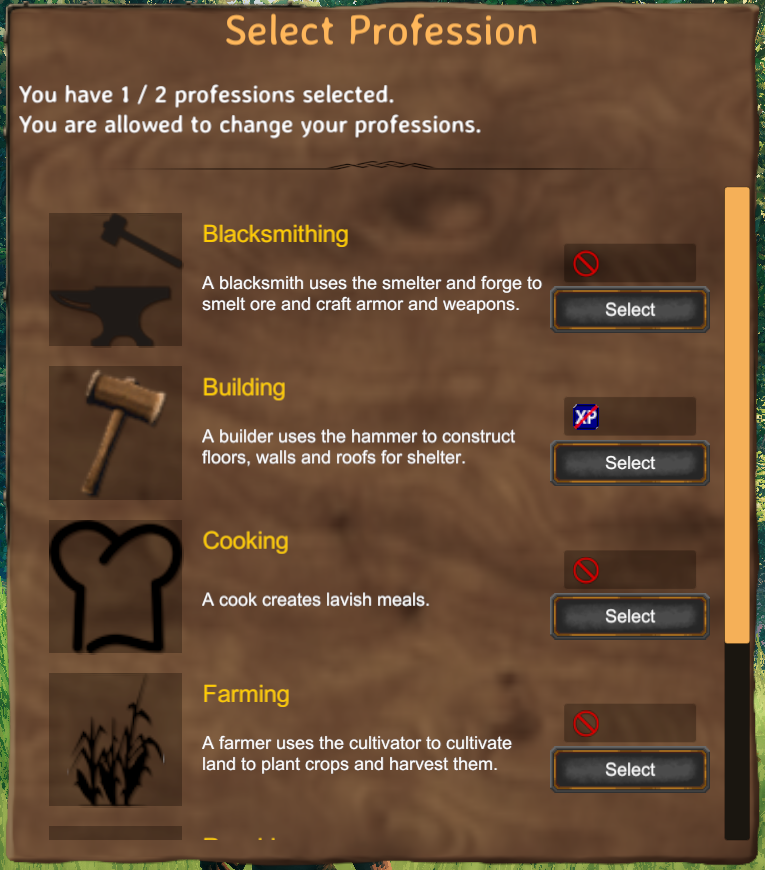
The number of professions a player can have at the same time can be configured in the mods settings. There is also an option to allow players to unlearn their professions and pick new ones, when they feel like it.
For each profession, you can decide between three different modes:
- Ignored: The skill associated with the profession is not considered a profession and behaves as always. You can use this, if you want to use the skill, but do not want to lock it to a profession.
- Block Experience: If players do not pick this profession, they will still be able to perform the actions associated with the skill, but will not gain any experience for this skill.
- Block Usage: If players do not pick this profession, they will not be able to perform most actions associated with the skill.
The different modes are indicated by a small icon next to the profession in the profession selection. Hovering over them will display an explanation like the one above.
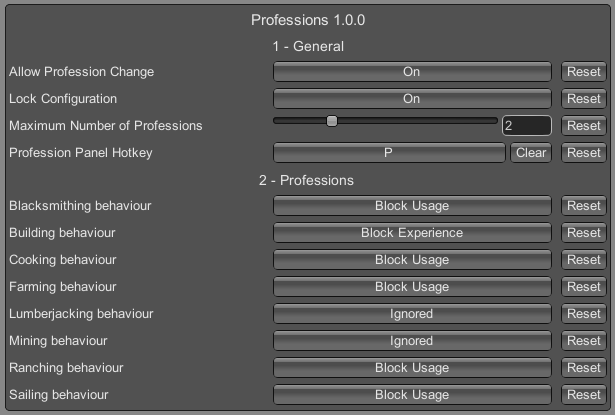
Don't forget to install this on your server as well, to enforce the configuration.