
Confirm with your password

Ravenwood Regions

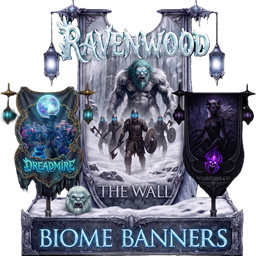
Adds 35 regional themed banners each with a Standing Banner, Wall Banner and Gate Banner for over 100 total banners! Also adds a few unique entrance gates and a light that you can toggle the colors.

Client & Server Pieces
Version history

· Website · 💗 Donate

Stars
1
Downloads
8
Version
1.0.3
Updated
Author
JamesJonesTV
Virus scan
✓ Scan successful
Runs on
Client & Server

Compatibility

Required 1

Install these too — Gale pulls them in for you.
  • Jotunn ValheimModding ·2.28.0

Description

JamesJonesTV

JamesJonesTV

JamesJonesTV

JamesJonesTV

JamesJonesTV

JamesJonesTV

JamesJonesTV

JamesJonesTV

JamesJonesTV

JamesJonesTV

This mods includes:

  • 35 regional themed standing banners
  • 35 regional themed wall banners
  • 35 regional themed entrance gate banners
  • 3 massive entrance gates
  • 1 light that you can toggle the colors.

The Standing and Gate banners have their own unique lights that you can customize their colors.

You can also attach banners and lights to the 3 massive world gates and customize them to your liking.


Credits:

Caenos:


The Ravenwood TV Community

Feel free to join our discord at https://discord.gg/h6cDGkgE8h

You can see my other mods at: https://thunderstore.io/c/valheim/p/JamesJonesTV/

JamesJonesTV


Donate:

If anyone wants to help me be able to afford spending so much of my time making mods, you can donate below and it will go towards more cool stuff.

JamesJonesTV


Changes:

  • 1.0.3: Deleted server sync and useless extra code.
  • 1.0.2: New icon.
  • 1.0.1: Adds a unique light that you can toggle the colors. Also adds a few massive entrance gates.
  • 1.0.0: Adds 35 regional themed banners each with a Standing Banner, Wall Banner and Gate Banner for over 100 total banners!

Manual download
Just this mod One .zip — Ravenwood Regions 1.0.3
Files you'll get 2
  • Ravenwood Regions 1.0.3 JamesJonesTV this mod Get
  • Jotunn 2.29.2 ValheimModding asked for 2.28.0 Get

Your browser may ask permission to download several files at once. How to install these manually

Manual installation instructions
1

Install BepInExPack Valheim

BepInExPack Valheim is required to run mods in Valheim.

Download BepInExPack Valheim 5.4.2333 · View mod page

Check out the mod page for detailed installation instructions.

2

Install Ravenwood Regions

This mod must be installed on both the client and the server.

Download Ravenwood Regions 1.0.3

Extract the ZIP and place the file(s) into the BepInEx/plugins/ folder inside your Valheim game folder.