 Install with Gale
DrakesReskinIt
Change how your items look in Valheim: a new inventory icon, a new equipped model, and custom colors for both, picked from a crafting-style menu. Save your favorite looks as presets.
Part of the DrakeMods suite. Works on its own with DrakeModsLibs, and shares its menu (and optionally its admin settings) with DrakesRenameIt.
⚠️ Beta (0.1.0-beta.1)
This is the first public test build. Expect rough edges, and back up your characters and worlds before trying it on a server you care about.
Found a bug? Please open an issue with:
- what you did and what happened instead,
- your
BepInEx/LogOutput.log(attach the whole file, errors near the end are the useful part),- single player or server, and any other mods you run.
Every report helps get this to a stable 0.1.0.
What it can do
- New icon: give any item the icon of another game item. A stone axe can wear the bronze axe icon, a fish can look like a trophy, and so on.
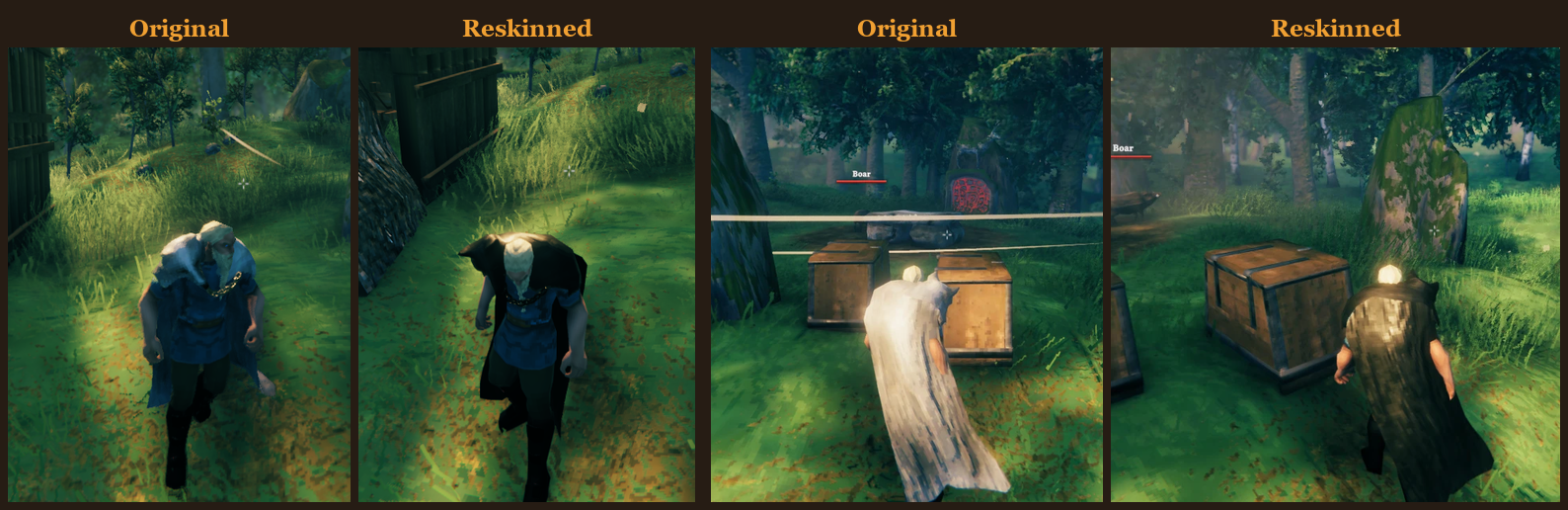
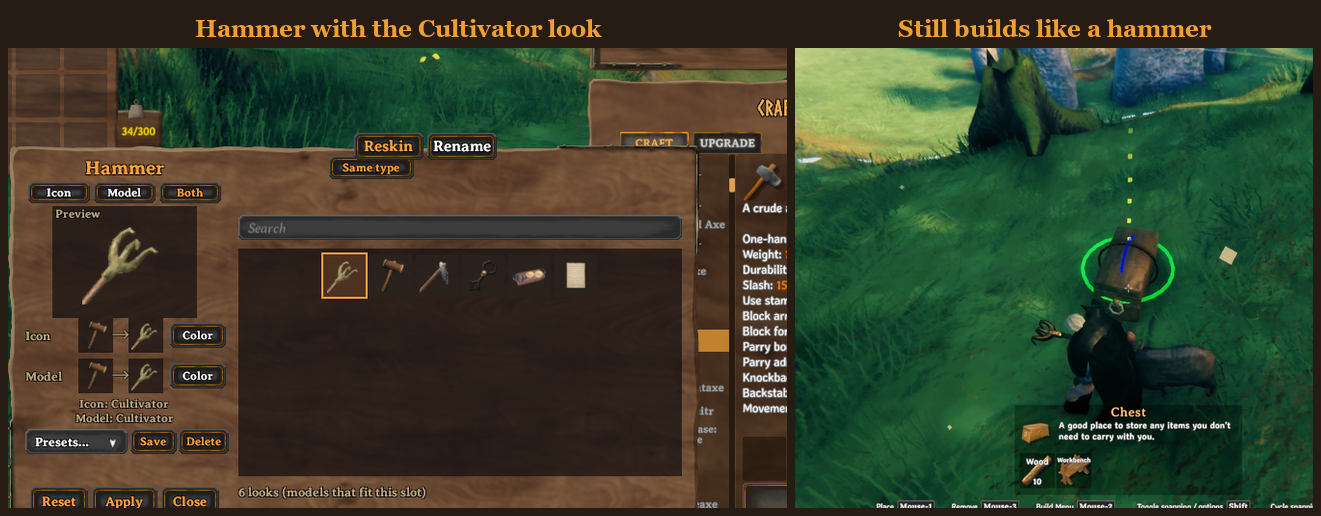
- New model: make an equipped weapon, tool, shield or armor piece look like another item of the same kind (a hoe that looks like a hammer, a wooden shield that looks like a banded one). Other players see it too.
- Colors: tint the icon, the equipped model, or both, with a full color picker.
- Presets: save a look (icon + model + colors) under a name and load it onto any item, on any character or server.
- Reset: put the original look back at any time.
- Server rules: admins decide who can reskin, which items are off limits, whether looks have to be discovered or unlocked by boss progress, and whether reskins cost something.
Reskins are cosmetic only. Stats, damage, durability and recipes never change.
How to use it
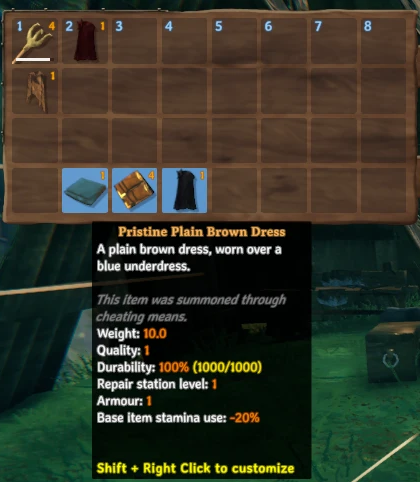
- Open your inventory.
- Shift + right-click an item.
- Pick the Reskin tab. (If you also run DrakesRenameIt, the tabs are Rename, Paper, Reskin.)
The Reskin menu
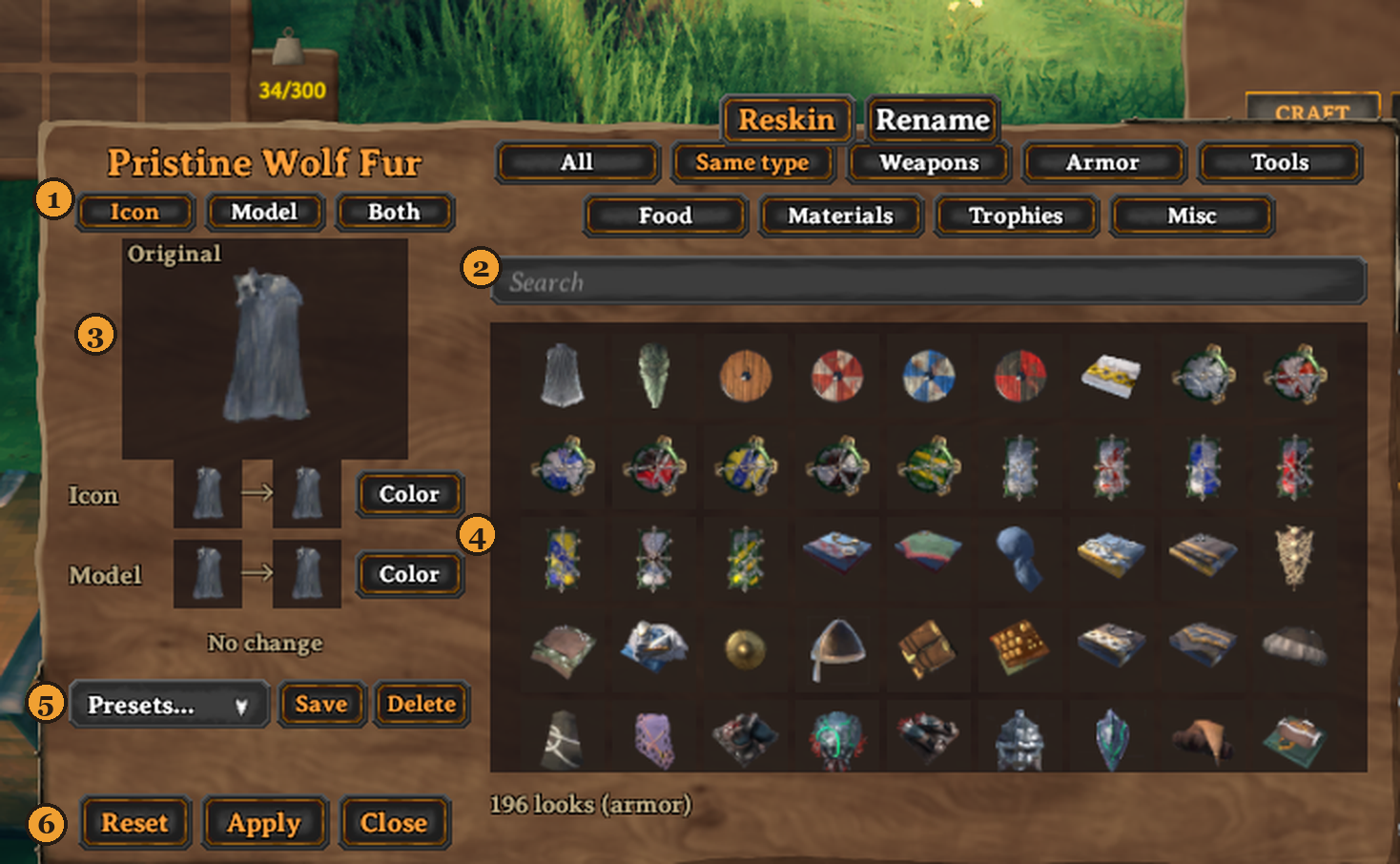
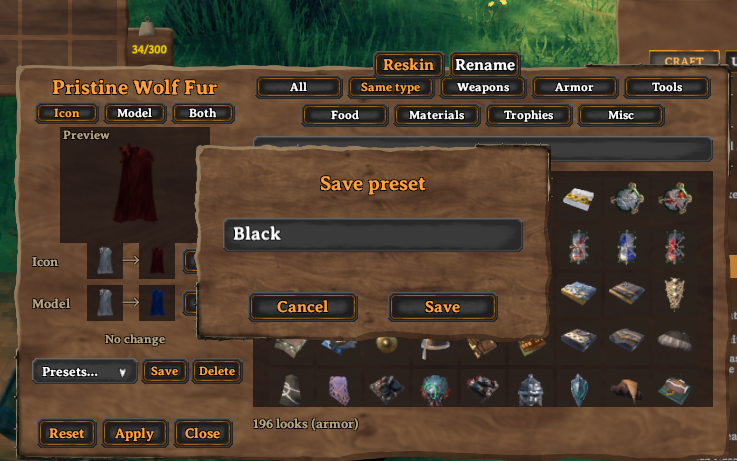
- Icon / Model / Both: what clicking a tile in the grid changes. Model and Both only appear for items you can equip.
- The grid: every look you're allowed to use. Hover a tile to see the item's name. Use the Search box and the filters at the top to narrow it down; Same type is the default.
- Preview: the Icon and Model rows show the original next to the new look, and the badge tells you whether you're looking at the Original, an unsaved Preview, or a saved Reskinned item.
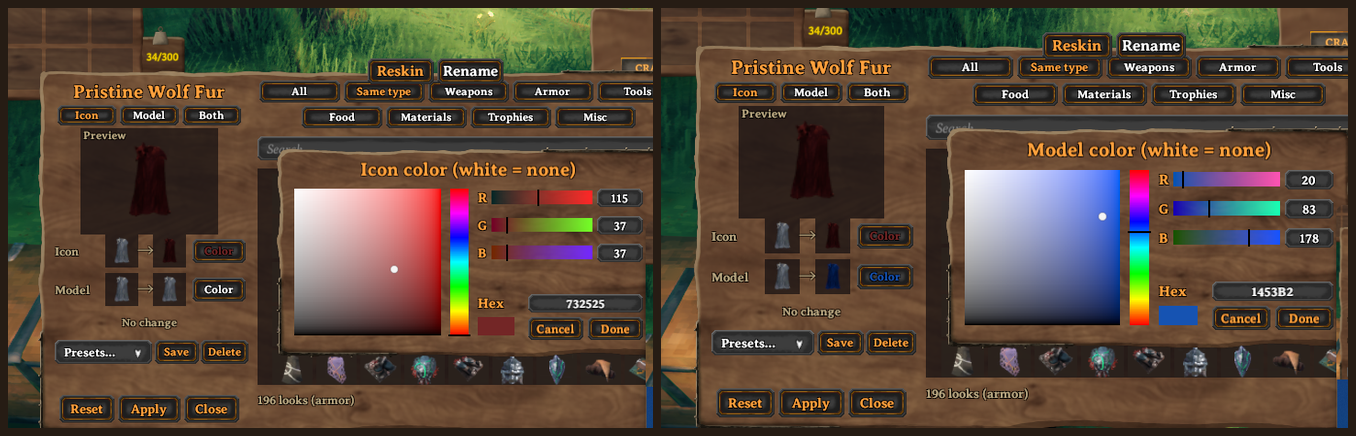
- Color buttons: open a color picker for the icon or the model. White means no tint.
- Presets: Save the current look under a name, pick one from the list to load it, Delete removes the one you last loaded.
- Apply / Reset: Apply saves everything at once (and charges the cost once, if the server has one). Reset restores the original look after asking you to confirm.
Where you'll see your reskin
- Inventory and hotbar: the new icon and icon color.
- On your character: the new model and model color, visible to everyone on the server.
- Tooltips and pickup messages: use the new icon.
Locked looks
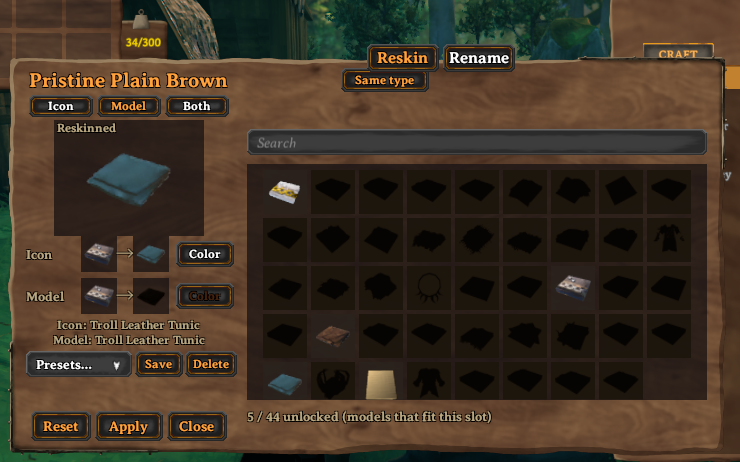
Depending on server settings, some tiles show as dark silhouettes. Hover them to see why: usually you haven't found or crafted that item yet, or the server hasn't reached that boss yet. The line under the grid shows how many looks you have unlocked.
Install
DrakesReskinIt is published on Hexium.
Mod manager (recommended): install from Hexium with a manager that supports it (e.g. Gale). Dependencies install automatically. You can also download the zip from Hexium or GitHub releases and use your manager's "Import local mod".
Manual: install BepInExPack Valheim, Jotunn and DrakeModsLibs (0.9.11 or newer), then put DrakesReskinIt.dll in BepInEx/plugins.
Optional: DrakesRenameIt adds the Rename and Paper tabs to the same menu and can share its admin/VIP list with ReskinIt.
Servers: everyone, server included, needs the mod. Settings sync from the server automatically.
Configuration (server admins)
Config file: BepInEx/config/com.drakesworkshop.reskinit.cfg. All settings below sync from the server. With LockSyncedConfig = true (default) only server admins can change them.
Who counts as admin / VIP (02 - Admin)
| Setting | What it does |
|---|---|
AdminSource |
RenameIt (default): use RenameIt's admin settings, so one VIP list covers both mods. Own: use the three settings below. If RenameIt isn't installed, Own is used and a warning is logged. |
AllowAdminOverride |
Admins/VIPs are "elevated": they skip exclusions, discovery and progression locks, and pass Access = AdminsAndVips. Never grants Valheim admin commands. |
VipOnlyOverride |
Only VIP-list players are elevated; Valheim server admins are not. |
VipList |
Character names and/or Steam IDs (same IDs as adminlist.txt), comma separated. |
What players can do (03 - Features)
| Setting | What it does |
|---|---|
EnableIcon |
Allow icon changes. |
EnableModel |
Allow changing the equipped model (same kind of item only). |
EnableColor |
Allow icon and model tints. With all three off, the Reskin tab disappears. |
Access |
Everyone or AdminsAndVips (nobody else can reskin). Rename permissions are separate and unaffected. |
SameTypeOnly |
Only icons from the same kind of item. |
RequireDiscovery |
Seen (default): only looks of items the character has held. Crafted: craftable items must have been crafted by the character (trophies/ores/drops only need Seen). Off: anything. |
ShowUndiscovered |
On: locked looks show as dark silhouettes with the reason on hover. Off: hidden (no spoilers). |
ProgressionGate |
On (default): looks from tiers the server hasn't unlocked stay locked (iron gear until The Elder dies, and so on). Uses server world keys, so clients can't fake it. |
KeyAliases |
Swap a boss key for your own: defeated_gdking=mod_iron. That tier opens when a moderator runs setkey mod_iron. |
ProgressionOverrides |
Pin single items: SwordIron=mod_iron, MyModdedAxe=defeated_dragon, or SomeItem=none to never lock it. |
A look is usable only when both the progression key and discovery pass. Already-applied reskins are never removed.
Which items are off limits (04 - Exclusions)
| Setting | What it does |
|---|---|
ExclusionSource |
Own (default): the lists below. RenameIt: RenameIt's exclusions exactly as RenameIt applies them. Merge: blocked if either list blocks it. Use this to be stricter than RenameIt without copying its list. |
ExcludedNames |
Items by token ($item_axe_stone), prefab name (AxeStone), or English name (Stone axe). |
ExcludedCategory |
Weapons, Armor, Tools, Ranged, Melee, Shields, Ammo, Fish, Paper (with RenameIt), any skill type (Swords) or item type (Trophy). |
Allowlist |
Items that stay allowed even if the lists above match them. |
Elevated players are never blocked by exclusions. Quest-item and immutable tags block reskins for everyone.
Cost (05 - Cost)
CostEnabled, CostItem (prefab name, e.g. Coins), CostAmount. Charged once per Apply; Reset is free and not refunded.
Common setups
- One VIP list, same rules as RenameIt:
AdminSource = RenameIt,ExclusionSource = RenameIt. - Reskin is a VIP perk:
Access = AdminsAndVips(Rename stays open to everyone). - Moderator-paced progression:
KeyAliases = defeated_gdking=mod_iron, defeated_bonemass=mod_mountain, thensetkey mod_ironwhen the server is ready for iron looks. - Same VIPs, stricter reskin:
AdminSource = RenameIt,ExclusionSource = Merge, then add e.g.ExcludedCategory = Trophy. - Fully separate: set both sources to
Own.
Known limitations (beta)
- Dropped items and item stands / armor stands still show the original model (the icon and name are kept).
- Models only swap within the same kind of item: a sword can look like another one-handed sword, but not like a shield.
- Presets are saved on your PC (
BepInEx/config/DrakesReskinIt.presets.txt), not on the server. - Players without the mod can't join a server that runs it (and vice versa).
Links
- Source and issues: https://github.com/drakethos/DrakeReskinIt
- Changelog: CHANGELOG.md
- Also in the suite: DrakesRenameIt (rename items, write notes on paper), LockSmith