 Install with Gale

Serverside QoL
This mod adds some QoL features as a serverside-only mod.
It's designed and tested for dedicated servers with vanilla/console clients (e.g. XBox/PS/Switch users).
If you'd like to support me, subscribe as a test user. You can help by testing the beta versions on hexium.
Features
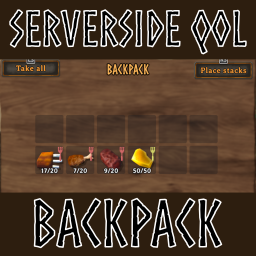
- Adds a backpack players can open via emoting
- For example, on xbox you can bind the Y-Button to the wave-emote by entering
/bind JoystickButton3 wavein the in-game chat to open the backpack with the same button as the inventory
- For example, on xbox you can bind the Y-Button to the wave-emote by entering
- The backpack's capacity can be configured to grow with progression
Documentation
The best available documentation is the config file. Read the description of the config options for a better idea of how this mod works.
Feature Requests
If you have an idea you think might fit this mod, you can create a feature request issue in the github project. If a similar request already exist, you can add a 👍 reaction to it.
Known Issues
Known issues are listed in the github project. If you experience an issue, please file a report there or on the hexium mod page.
Configuration
The configuration is loaded from BepInEx/config/ArgusMagnus.ServersideQoL.Backpack.cfg. Start the server once to generate the file if it does not exist.
Backpack
| Option | Default Value | Acceptable Values | Description |
|---|---|---|---|
| Enabled | true | True/False | Enables/disables the entire mod |
| OpenBackpackEmote | Wave | -2, Wave, Sit, Challenge, Cheer, NoNoNo, ThumbsUp, Point, BlowKiss, Bow, Cower, Cry, Despair, Flex, ComeHere, Headbang, Kneel, Laugh, Roar, Shrug, Dance, Relax, Toast, Rest, Vibe, LoveYou, Count | Emote to open the backpack. If a player uses this emote, a virtual container acting as their backpack will open. -2 to use any emote as trigger. You can bind emotes to buttons with chat commands. For example, on xbox you can bind the Y-Button to the wave-emote by entering "/bind JoystickButton3 Wave" in the in-game chat. If you use emotes exclusively for this feature, it is recommended to set the value to -2 as it is more reliably detected than specific emotes, especially on bad connection/with crossplay. |
| InitialBackpackSlots | 4 | Initial available slots in the backpack | |
| AdditionalBackpackSlotsPerDefeatedBoss | 4 | Additional backpack slots per defeated boss | |
| MaxBackpackWeight | -1 | Maximum backpack weight. -1 for no limit. | |
| AdditionalMaxBackpackWeightPerDefeatedBoss | 0 | Additional maximum backpack weight per defeated boss | |
| BackpackOnDeath | SameAsInventory | One of SameAsInventory, Keep, Destroy, DropTombStone, DropItems | What happens to backpack contents on player death |