Confirm with your password

CraftIndex

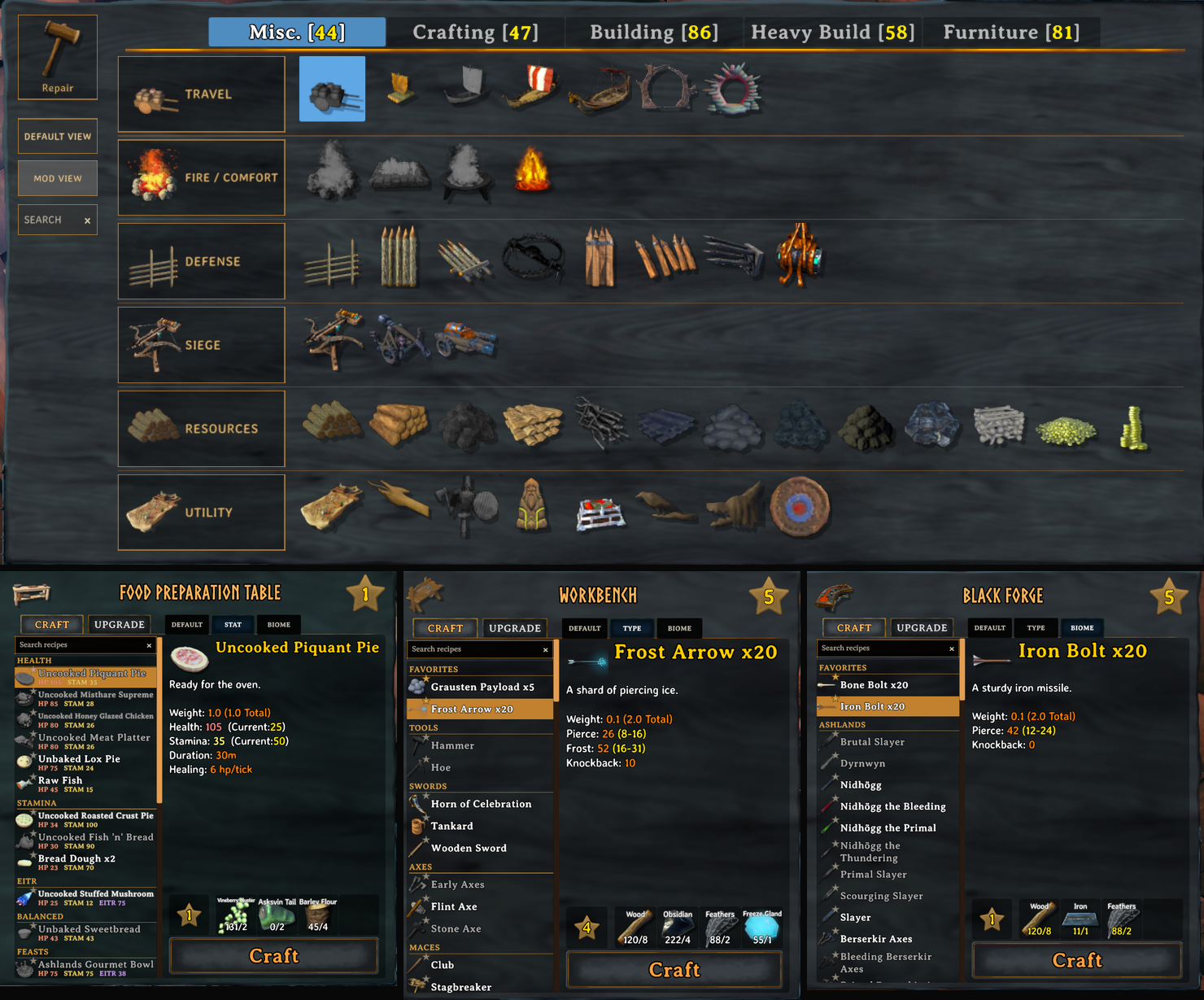
Organizes Valheim's Hammer and crafting-station menus.

Client-only

· Website

Stars
0
Downloads
3
Version
0.3.4
Updated
Author
jg224
Virus scan
✓ Scan successful
Runs on
Client-only

Description

CraftIndex organized Hammer and crafting-station menus

CraftIndex

Organizes Valheim's Hammer and crafting stations without changing recipes, costs, or progression.


Features

1 - Hammer and Crafting Stations

  • Groups and searches unlocked Hammer pieces, with persistent favorites.
  • Adds recipe views, search, favorites, and readable food stats to crafting stations.
  • Gives PlantEverything plants their own organized section when installed.

Changelog

0.3.4 Latest
  • Standardizes organized Hammer layout blocks on Valheim's native cell size: category cards take exactly two blocks with a quarter-block gap before the first item column and every piece cell matches the vanilla block size in both directions.
  • Draws subgroup dividers centered in the space between cells and gives group boundaries such as Resources and Utility a 1.15x pitch for easier visual separation.
  • Gives every organized Hammer tab the same window width so the piece-selection menu no longer resizes when switching tabs.
  • Hammer tabs view is now persistent. Can mix and match default and mod view and each tab choice will stay.
0.3.2
  • Performance improvements.
0.3.1
  • Resets the crafting-station recipe scrollbar to the top when switching between Craft and Upgrade, preventing the rebuilt list from opening midway down or appearing empty.
0.3.0
  • Renames the mod from CraftGuard to CraftIndex while retaining the existing plugin identifier and settings file.
  • Adds cached search to every organized Hammer tab.
  • Adds persistent middle-click favorites in a dedicated section pinned to the top of each organized Hammer tab.
  • Adds a clear no-results message when a Hammer search has no unlocked matches.
  • Adds persistent recipe favorites with an in-row star and a dedicated section pinned to the top of crafting-station lists.
  • Widens crafting-station recipe lists, keeps names inside a fixed text area, wraps long names, and shows full names on hover.
  • Centers the Craft and Upgrade tabs over the widened recipe list while leaving the view controls in place.
  • Adds optional PlantEverything support with a dedicated Plant Everything section ordered as Misc., Bushes, and Trees.
  • Organizes the Cultivator's vanilla actions and plants into Cultivate/Grass, crops, and trees while preserving its independent Default/Mod View setting.
0.2.6
  • Adds a dedicated Bait section at the bottom of food-station Stat views.
0.2.5
  • Removes the client-side/source footer from the Thunderstore Details page.
0.2.4
  • Keeps release-specific update notes in the changelog instead of the main mod description.
0.2.3
  • Filters crafting searches against cached recipe rows instead of rebuilding Valheim's entire crafting panel on every keystroke.
  • Preserves the input field's native focus and caret handling so typed characters remain in the correct order.
  • Caches Hammer classification and sorted category results per build tool, then refreshes only categories whose available pieces changed.
  • Reuses Hammer category cards, dividers, tile tints, labels, and recipe-list headings instead of repeatedly creating and destroying UI objects.
  • Precomputes each crafting-station view order once and reuses a single search-results buffer while typing.
  • Avoids refreshing recipe details when the currently selected recipe remains visible after filtering.
  • Initializes prepared-food conversion data only for confirmed food stations and caches resolved results per food item.
  • Replaces repeated hierarchy checks in the global input guard with an event-maintained search-focus flag.
  • Removes the dormant per-frame diagnostics poll and runs the optional data export from scene initialization events.
0.2.2
  • Adds a CraftGuard menu showcase to the top of the Thunderstore Details page.
0.2.1
  • Remembers Default or Mod View independently per build tool; Hammer starts in Mod View while Hoe and Cultivator start in Default View.
  • Releases generated Hammer UI, crafting-station controls, listeners, and cached Unity references when their owning HUD, inventory, or scene objects are destroyed.
  • Clears cached food-prefab references when Valheim tears down its network scene.
  • Avoids Hammer UI work while the player is teleporting or the game is shutting down.
  • Adds self-healing circuit breakers so a UI compatibility error cannot become a per-frame exception and log-writing loop; failed features clean up, pause briefly, and retry with rate-limited diagnostics.
  • Removes the left category rail's separate fill so it displays the exact native wood beneath it, matching warm, blue, and green environments without another rendered background.
  • Removes the experimental forced backdrop and fixes its solid brown box remaining after the Hammer menu closed.
  • Gives the crafting search field exclusive keyboard control while focused, preserving focus through recipe-list refreshes so letters such as E cannot trigger Use, movement, guardian powers, or other gameplay actions.
  • Changes the Default View and Mod View controls to 50%-transparent grey fills with true orange one-pixel borders, avoiding the orange fill caused by Unity's outline effect.
  • Gives the static Repair control and left category cards neutral grey fills at 70% opacity with the same true orange borders.
  • Styles custom category cards from the darkest visible inactive vanilla category header's rendered canvas color, matching the Misc, Crafting, and Building tab backgrounds while retaining orange borders.
0.2.0
  • Rebuilds the organized Hammer layout only when pieces, tabs, or relevant settings change, eliminating full-list scans and hierarchy reordering on idle frames.
  • Computes names, identifiers, progression keys, and group metadata once per piece during a refresh instead of repeatedly inside sort comparisons.
  • Reduces custom Hammer UI object count by replacing four-object borders with lightweight outlines.
  • Removes redundant grid transpilers now that CraftGuard uses Valheim's native 15 by 6 Hammer grid.
0.1.2
  • Fixes the static Repair button so it enters repair mode from every Hammer tab without switching categories.
0.1.1
  • Publishes CraftGuard under the correct jg224 Thunderstore namespace.
  • Places the native Q previous-category control in the open header space immediately left of Misc.
  • Adds persistent Default View and Mod View buttons beneath Repair, rebuilding the live Hammer list when switching so visuals, hover, and selection stay aligned.
  • Orders Misc Travel as Cart, Raft, Karve, Longship, Drakkar, and Portal; moves the Cartography Table to Utility and uses it as that section's icon; places Roundpole Fence first and Shield Generator last in Defense.
0.1.0

Initial public release of CraftGuard, renamed from the private InventoryUX development builds.

Hammer menu

  • Adds organized, progression-aware layouts to Misc., Crafting, Building, Heavy Build, and Furniture.
  • Uses compact inset category cards, subtle dividers, native hover feedback, and corrected hit targets.
  • Keeps Repair static and outside dynamic sorting.
  • Adds optional outlined Hammer piece names, disabled by default.
  • Caches menu decoration work to avoid frame loss while organized tabs are open.

Crafting stations

  • Adds fixed Default, Type/Stat, and Biome view controls.
  • Adds recipe search with a clear button.
  • Groups equipment by type and biome.
  • Groups meals by nutrition and shows readable HP, Stamina, and Eitr values.
  • Resolves doughs, uncooked pies, feasts, and other prepared foods through their live final edible item.
  • Groups Mead Ketill recipes as HP, Stamina, or Utility.
  • Removes inappropriate station-upgrade copy from food and equipment recipe details.

Safety and compatibility

  • Organizes only Hammer pieces and recipes already exposed by Valheim.
  • Leaves recipes, costs, unlocks, saves, worlds, and multiplayer state unchanged.
  • Preserves modded content through fallback groups.
  • Retains the legacy com.inventoryux.valheim plugin identifier so existing settings migrate automatically.

Full version history & older downloads →

Manual installation instructions
1

Install BepInExPack Valheim

BepInExPack Valheim is required to run mods in Valheim.

Download BepInExPack Valheim 5.4.2333 · View mod page

Check out the mod page for detailed installation instructions.

2

Install CraftIndex

This mod only needs to be installed on the client.

Download CraftIndex 0.3.4

Extract the ZIP and place the file(s) into the BepInEx/plugins/ folder inside your Valheim game folder.