 Install with Gale

Rummage
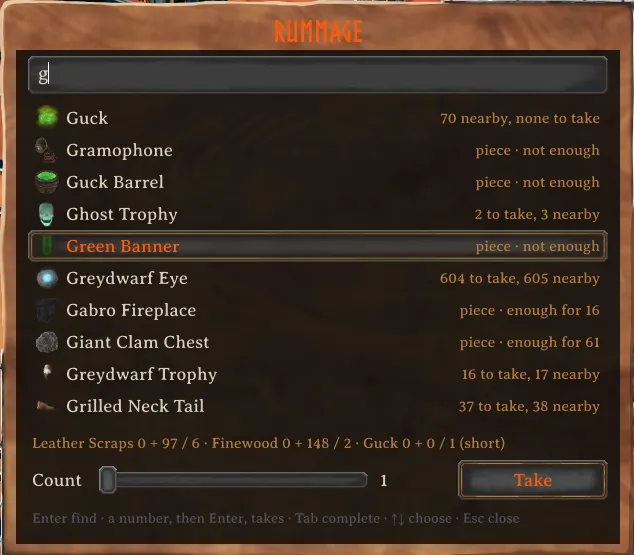
Take what you need from the chests around you with one key. Point at a recipe, a build piece or a stack in your inventory and press the Rummage key, J unless you change it, and Rummage takes whatever is still missing from the chests nearby. Press it anywhere else and a search box opens over all of them, to find where something is kept or take it straight out.
Rummage needs AzuCraftyBoxes 1.8.27 or later. It decides which chests Rummage may use and what has to stay in them. Mod managers install it along with Rummage.
AI notice
Most of Rummage was written by Claude Code (Anthropic), which did the heavy lifting on implementation and design. Heads-up so you can judge for yourself.
Getting started
Select a recipe in the crafting tab and press the Rummage key, and the materials for one craft are in your inventory. Each further press takes enough for one more. With the hammer it works the same way, for the piece you are placing or the one under the cursor in the build menu. What you already carry counts, so only the difference is taken, and a part the chests have run out of does not stop the count for the others.
Over a stack in your inventory, the key fills that stack to a full one.
While building, a box to the right of the game's build panel shows how much of each part you carry and what the next press would take, in orange, with anything the chests cannot give in red.
The search box
The search box lists everything the chests within 50 metres hold, along with every piece and recipe you know. Type part of a name and Tab completes it. Enter alone finds it: the chests that hold it light up, and a message says how many are in each. Put a number in front, as in "40 wood", and Enter takes that many of Wood. The Count slider and Take do the same with the mouse. For a piece or a recipe the number is how many you want to build or craft, and a number that is part of a name stays part of the name.
Shift with the Rummage key over a recipe or piece opens the search box on it, the count already filled in. The search box can also have a key of its own.
New items
Valheim unlocks recipes and pieces once you have carried their materials. When the chests nearby hold something you have never carried, the search box shows New items at the top, and Enter takes one of each. Typing /rummage new in chat does the same.
Good to know
Rummage keeps to AzuCraftyBoxes' rules. It takes only from the chests that mod would use, leaves in what its chest rules keep in, and with its Leave One Item setting on, leaves one of each item in every chest. Items kept back that way still show in the search, so you can find them. Chests you could not open by hand, such as another player's private chest or one under a ward you have no access to, are never touched.
When something cannot be taken, the message says why: kept back, kept in by chest rules, in a chest someone has open, in a private chest, no room in your inventory, or simply not in the chests nearby.
In multiplayer, only the game that currently holds a chest can safely change it. With MultiUserChest installed, Rummage asks that game for the items, the same way MultiUserChest handles dragging an item out by hand, and tells you what arrived. Without it, those chests are left alone. Items are never in your inventory and a chest at the same time, so nothing can be doubled.
Rummage runs on your own machine only, and servers do not need it. MultiUserChest, if you use it, belongs on the server and every client, as it requires.
Settings
All settings are in BepInEx/config/isimp.Rummage.cfg, each with a description. They cover the Rummage key and how the search box opens, what the key takes for and how much one press fills a stack, what the search box lists, how far it looks and how big it is, when the box beside the build panel shows, how much the messages tell, and its sounds. The chest range and Leave One Item are AzuCraftyBoxes' own settings, and a server's values for them apply.
Tested with AzuCraftyBoxes 1.8.27, MultiUserChest 0.6.2, ExtraSlots 1.2.18 and AzuAntiArthriticCrafting 2.1.11.
More
Technical notes and build instructions are on GitHub at https://github.com/isimp/Rummage