
 Install with Gale
Hoard
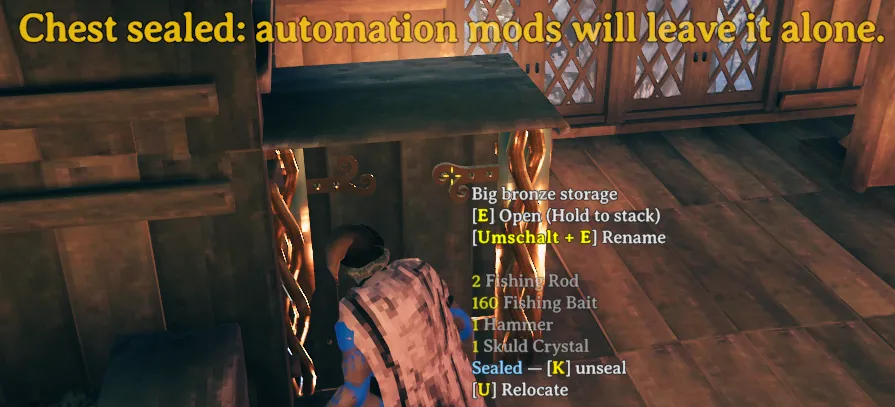
Seal a chest so that container automation mods leave it alone.
Mods that store items into nearby chests, craft from them or feed tames from them usually treat every chest you own the same way. Their own settings can at most exclude a whole chest type. Hoard lets you take one particular chest out of their reach.
AI notice
Most of Hoard was written by Claude Code (Anthropic), which did the heavy lifting on implementation and design. Heads-up so you can judge for yourself.
Using it
Look at a chest and press K to seal it for everyone: every player's automation mods leave it alone, yours included. Press K again to seal it for others, so that only the automation mods of other players leave it alone while yours still use it, and once more to unseal it. A seal for everyone belongs to nobody, and anyone allowed at the chest can change it. A seal for others is personal: only the player who set it can change it, and everyone else sees in the hover text who sealed it. Inside a ward only players permitted on that ward can change a seal at all, and a personal chest only by the player who built it. The seal is stored on the chest itself, so it lasts across saves.
Sealing and unsealing play a short sound that players nearby hear as well. A chest sealed for you carries a faint violet tint and a small shimmer above it, so it stands out without hovering. A chest you sealed for others, which your own mods still use, carries a blue tint instead. Both colours can be changed and both marks switched off in the settings.
Chests sealed with an earlier version count as sealed for everyone.
Hoard finds supported mods on its own and does nothing if none are installed. Type /hoard in chat to see what it found. If a supported mod is updated in a way Hoard no longer recognises, Hoard tells you when you spawn, because that mod ignores seals until Hoard supports it again.
Tested with AzuAutoStore, AzuCraftyBoxes, GrabMaterials and PetPantry.
Multiplayer
Hoard has to be installed on the server and by every player, and the server refuses players without it or with a version older than 0.3.0, which cannot read a seal for others. Automation mods run on each player's own machine, so a single player without Hoard could still empty a sealed chest. A seal for others is decided on each machine too: on the owner's, the chest simply stays open to their mods. The owner is the character that sealed it, so another character of the same player counts as someone else. The server's settings apply to everyone, while your key and hover text options stay your own.
Settings
All settings are in BepInEx/config/isimp.Hoard.cfg, each with a description. Every supported mod Hoard finds gets its own switch there.
More
Technical notes and build instructions are on GitHub at https://github.com/isimp/Hoard