 Install with Gale
SeneaL HUD Layout
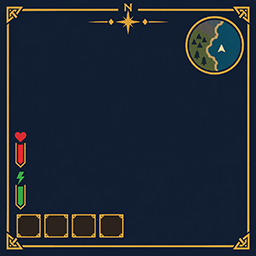
Client layout companion for SeneaL UI. Moves the hotbar cluster to the bottom left, lifts health/food above it, keeps the compass at the top, and places Passive Powers next to the food column.
Requires SeneaL UI. Clients only.
1.1.112
- The equip countdown no longer throws an error when the inventory is open. It was reading the wrong icon list.
1.1.111
- Rebirth and Prestige results stay visible. A failed confirm replaces "This cannot be undone" with the reason. A success is written into chat.
- SeneaL's piece health color bar stays left of the cursor.
[Hover] ShowPieceHealthandShowPieceHealthPercentdefault off and, when on, show only the current/max number or the percent beside that bar.ShowPieceHealthSizeandShowPieceHealthPercentSizeset the text size. - Crop and beehive hover text shows the real Plant Easily bulk-harvest keys. Shift plus the use key picks the area.
- A Creature Level and Loot Control effect name such as Curious stays the name's size.
HideNameplateExtrasremoves that word.
1.1.104
- Creature level stars are ours again at every level, with the Creature Level and Loot Control colour and
[Creature/Player HUD] StarSize. SeneaL UI 1.1.9 had started drawing its own row over them. - New
[Creature/Player HUD] StarAlign: Left (default), Center or Right. - Ships, carts and portals can stay off the compass while SeneaL UI still shows them on the map and minimap.
[Compass] ShowShips,ShowCarts,ShowPortals, all off by default.
1.1.103
- The top-left equip number on item icons is hidden.
[Slots] ShowEquipQueue.
1.1.102
- Rarity fill and the equip countdown default off.
[Slots] RarityFill,ShowEquipCue,ShowGearBarCue.
1.1.101
- SkillsReworked newer than 1.8.2 uses SeneaL UI's skills panel. 1.8.2 and older use the vanilla skills window.
1.1.97
- Wind and day hide follows SeneaL UI 1.1.9. Boss stars:
[BossBar] HideStars. Creature nameplates:[Creature/Player HUD] Enabled. Hotbar OffsetY default 14.5.
1.1.96
- Quests window has a 1 pixel brass edge. The fill stays the Background color.
1.1.95
- Quests window is a solid fill.
[Quests] BackgroundandBackgroundAlpha(1 is solid).
1.1.94
- The Quests list scrolls with the mouse wheel and has a scrollbar on the right.
1.1.93
- Character window: Quests button (EpicLoot adventure mode) and Talents button (TalentTree), left of the settings gear. Same dark fill, 1 pixel brass edge.
- Quests opens Bounties and Treasure tabs: target, zone, stars, loot, and a Map button. Closing the map returns to that list.
Bounties: 2/8uses EpicLoot's Max Bounties Per Player. Treasure shows how many maps you have. - Accepting a bounty or treasure map from Haldor does not open the map (
Quests/KeepMapClosedOnAccept, on by default). - Passive Powers shared cooldown is shown beside the icons.
1.1.85
- With SkillsReworked installed, the Skills button opens the vanilla window.
UseVanillaSkillsWindow. - The Passive Powers "Passive" label is hidden. Shared activation cooldown sits to the right of the icons; grey F / Shift+F keys while it runs. Green above an icon = passive buff time left; red under a key = that power's depletion.
1.1.84
- Creature level stars can be hidden.
ShowCreatureStars(on by default).
1.1.83
- Gold diamonds and lines beside creature names are hidden by default.
ShowNameplateDiamondsto bring them back.
1.1.82
- Talents button beside the character-window level (opens TalentTree).
ShowTalentsButton. - 100 px SkillsReworked XP bar under that level.
ShowLevelXpBar. - Fix: skills like Tenacity can take points again after a death leaves them at a partial level. Needs Tenacity and SkillsReworked.
FixSkillRespendAfterDeath.
1.1.81
- Threat icons: size/lift/opacity (
ThreatIconSize5,ThreatIconLift10,ThreatIconOpacity0.71).ShowThreatIconsto hide them. - Shudnal ConfigurationManager works with SeneaL
ModSettingsWindow = ConfigurationManager. - Nameplate: ValuesBesideLabels restores when off; single CLLC-colored star row;
HideNameplateExtras;ShowEnemyLevel.
1.1.73
- With SeneaL
ModSettingsWindow = ConfigurationManager, F1 opens shudnal ConfigurationManager (SeneaL alone only detects the official BepInEx manager GUID).
1.1.31
- Highlight and check color or size changes apply to items that are already selected.
- Turning Highlight or CornerPip on or off updates marks already on screen.
1.1.30
- Selected and equipped items get a soft gold glow.
[Slots] Highlightdefaults on. Color is[Slots] HighlightColor, size is[Slots] HighlightSize. - A green check marks the selected hotbar item and equipped gear.
[Slots] CornerPipdefaults on. Size is[Slots] CornerPipSize. - Inventory equip countdown:
[Slots] ShowEquipCue. Hotbar countdown for worn gear only:[Slots] ShowGearBarCue. - Health numbers sit just below the bar. The login server-rules window stays hidden.
1.1.15
- Equipped items get a brighter blue frame.
[Slots] SelectionGlowis 0 to 3, default 1.4. - Equipping or unequipping shows a white seconds countdown on the item.
[Slots] ShowEquipCuedefaults on.
1.1.8
[Powers] Scalesizes the Passive Powers icons (0.5 to 1.5, default 1).- Creature and player bars show
current/maxjust above the bar.[WorldHud] ShowHealthNumbersdefaults on. [Vitals] AlwaysShowStamina,AlwaysShowEitr, andAlwaysShowAdrenalinedefault off, so SeneaL UI still fades those bars.- Item Drawer hover shows one slot and the total count.
Config: BepInEx/config/cjayride.SeneaLHudLayout.cfg
[General] Enabled = false restores SeneaL's own placement.
SeneaL UI by seneaL. Layout overlay by cjayride.