 Install with Gale
InstantMonsterLootDrop
Updated for Valheim 1.0
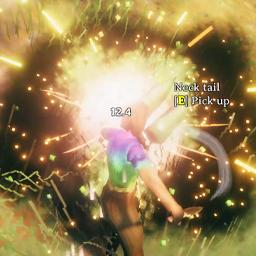
This is no longer just a tiny “poof the corpse” tweak. InstantMonsterLootDrop is a full loot-flow overhaul built on the bones of aedenthorn/InstantMonsterDrop: instant drops, a wider pickup radius, a body that stays long enough to see, and a stacked loot feed that shows everything you vacuumed in one glance.
What it is now
Vanilla Valheim makes you wait on death animations, then flashes one pickup message at a time. This mod turns a kill into a clean loot beat:
- Loot hits the ground in 0.05 seconds. No standing around while a greyling finishes its collapse.
- The body stays for 60 seconds. You still see the kill. The ragdoll is not gone in a blink.
- Auto-pickup waits 1 second, then pulls from 2.5 meters. Close enough to feel greedy. Far enough that you can still read the pile.
- A stacked loot window in the bottom-right shows every item as it comes in. Same items combine (
Wood x14). Lines slide in, punch, and fade. You are not stuck watching vanilla’s one-name-at-a-time ticker.
This fork started as InstantMonsterDrop. It has become the loot HUD you wish Valheim shipped with.
Loot notification window
A compact 250×120 panel, bottom-right by default, closer to vanilla: no gold bar or hairline border unless you turn ShowBorders on. Names have a dark stroke and configurable colors so they stay readable on snow, meadows, or night. The count column grows with font size and window width so x120 is not clipped.
You can:
- Turn the window off and restore vanilla messages
- Pin it to any corner (bottom-right default)
- Move it with WindowX / WindowY offsets
- Change width, height, opacity, font size, and how long each line lingers (8 seconds by default)
- Toggle ShowBorders, TextOutline, TextColor, AmountColor, and OutlineColor
If old ragdolls pile up, open the console (F5) and run imd_cleanup. That force-removes leftover corpses.
Configuration
Run the game once to generate BepInEx/config/cjayride.InstantMonsterDrop.cfg.
If you already have an older config, delete it or edit these values so the new defaults apply:
Loot and bodies
- DropDelay = 0.05
- DestroyDelay = 60
- AutoPickupDelay = 1
- AutoPickupRange = 2.5
Notification window
- Enabled = true (false restores vanilla pickup messages)
- Anchor = BottomRight (BottomLeft, TopRight, TopLeft)
- WindowX / WindowY = 20 / 20 (pixels from the chosen corner)
- WindowWidth / WindowHeight = 250 / 120
- Opacity = 0.72
- Linger = 8
- FontSize = 15
- ShowBorders = false
- TextOutline = true
- TextColor / AmountColor / OutlineColor = white / warm cream / black
If corpses never despawn, press F5 and run imd_cleanup.
You can still pick items up immediately with the use key.
Contact
-
𝕏: x.com/cjayride
-
Discord: discord.gg/cjayride (find me at the top of the user list) "cjayride"
-
Twitch: twitch.tv/cjayride
AI Generated
This code was not AI Generated, however, AI was used to verify that it works with the new version of the game.