 Install with Gale
# OreMines
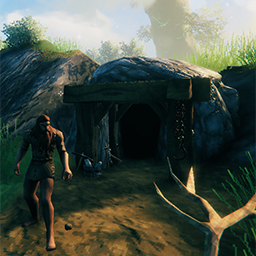
Adds 8 mines/dungeons for ores (ie. copper, iron) across all biomes (except the last biome), that automatically resets (configurable reset day).


## Installation (manual)
- extract
OreMines.dllfile to yourBepInEx\Plugins\folder
## Features
-
Adds a FlintMine in Meadows biomes that contains flints.. doesn't need a key.
-
Adds a CopperMine and a TinMine in BlackForest biomes that contains copper ore and tin deposits.. needs a key to enter, you can get the key by slaying the first boss Eikthyr.
-
Adds a CoalMine in Swamp and Mountain biomes that contains coal deposits.. needs a key to enter, you can get the key by slaying the second boss The Elder.
-
Adds an IronMine in Swamp and Plains biomes that contains iron ore deposits.. needs a key to enter, you can get the key by slaying the second boss The Elder.
-
Adds a SilverMine in Mountain biomes that contains silver ore deposits.. needs a key to enter, you can get the key by slaying the third boss Bonemass.
-
Adds a BlackMetalMine in Plains and Mistland biomes that contains blackmetal scrap deposits.. needs a key to enter, you can get the key by slaying the fourth boss Moder.
-
Adds a FlametalMine in Ashlands biomes that contains flametal ore deposits.. needs a key to enter, you can get the key by slaying the sixth boss SeekerQueen.
-
Ore deposits and creatures inside and outside the mines are randomly spawned at configurable chance.
-
Mines automatically reset (configurable) at a certain day (configurable reset day) or you can reset it manually by using a console command.
-
Configurable reset day, configurable through config file or Configuration Manager
-
Uses serversync to sync configs from server to client.
-
If adding mod on an existing world you need to install UpgradeWorld mod and use this command.
locations_add BOM_FlintMine01,BOM_FlintMine02,BOM_CopperMine01,BOM_CopperMine02,BOM_TinMine01,BOM_TinMine02,BOM_CoalMine01,BOM_CoalMine02,BOM_IronMine01,BOM_IronMine02,BOM_SilverMine01,BOM_SilverMine02,BOM_BlackMetalMine01,BOM_BlackMetalMine02,BOM_FlametalMine01,BOM_FlametalMine02
## How to reset Manually
- Open console by pressing default key (F5) then type/copy/paste this command
/mines reset - (NOTE: Automatic Reset and Manual Reset will only WORK if you are in the same zone as the mine you want to reset or if the mine is loaded in the zone or you are near the mine.. Reset won't work if the mine is not loaded in the zone or you're not in the same zone as the mine.)
- (NOTE: There are instances that a mine won't reset after you reset it manually or automatically.. When that happens all you need to do is reload the mine in the zone by leaving the zone or going far away for a bit then coming back at the mine.. if its still didn't reset.. just use the reset command again either inside or near the mine.)
Credits
- big shoutout to @Majestic, thanks for all the test you've done and for all the suggestions.