
Confirm with your password

NotificationsOverhaul

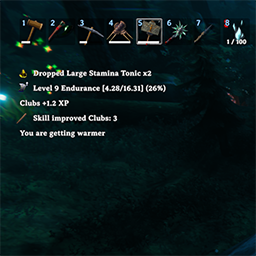
Overhauls the boring notification system with a configurable one.

Client (& Server) User Interface Valheim 1.0 Visuals

Stars
3
Downloads
245
Version
1.0.3
Updated
Author
blacks7ar
Virus scan
✓ Scan successful
Runs on
Client (& Server)
Required by
10 mods

Description

# NotificationsOverhaul

Overhauls the boring notification system with a configurable one.

## Installation (manual)

  • extract NotificationsOverhaul.dll file to your BepInEx\Plugins\ folder

## Features

  • Configurable Duration, MaxVisibleNotifications and Position.
  • Configurable FontSize and Color.
  • Can be configured to only apply to pickup notifications (picking up items).
  • Configurable through config file or Configuration Manager

Changelog

1.0.3 Latest
  • fixed bug where null ref errors spams when the game change scenes.

1.0.2
  • fixed center notification message delay

1.0.1
  • fixed icon bug with custom items and skills.
  • fixed bug when the user hides the hud (ctrl+F3), the notifications doesn't disappear.

1 older entry, full version history & downloads →

Files

5 files · 124 KB download

Loading files…

Manual installation instructions
1

Install BepInExPack Valheim

BepInExPack Valheim is required to run mods in Valheim.

Download BepInExPack Valheim 5.4.2351 · View mod page

Check out the mod page for detailed installation instructions.

2

Install NotificationsOverhaul

This mod must be installed on the client. Installing it on the server is optional (e.g., for config syncing).

Download NotificationsOverhaul 1.0.3

Extract the ZIP and place the file(s) into the BepInEx/plugins/ folder inside your Valheim game folder.