
Confirm with your password

LootParticlePlus

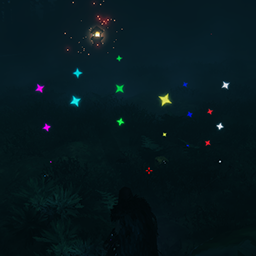
A simple mod that changes particles of loot and adds configurable options for timed destruction, stack items on ground, floating items, autopickup radius and autopick hotkey.

Client (& Server) Quality of Life Valheim 1.0 Visuals

Stars
2
Downloads
68
Version
1.2.0
Updated
Author
blacks7ar
Virus scan
✓ Scan successful
Runs on
Client (& Server)
Required by
5 mods

Description

# LootParticlePlus

A simple mod that changes particles of loot and adds configurable options for timed destruction, stack items on ground, floating items, autopickup radius and autopick hotkey.


## Installation (manual)

  • extract LootParticlePlus.dll file to your BepInEx\Plugins\ folder.

## Features

  • Changes the particles of loot drops.
  • Every item type has its own particle colors.
  • Adds configurable destruction timer for loots.
  • Adds configurable floating options for loots.
  • Adds configurable options to stack items on ground when drop.
  • Adds configurable option to disable particles of loots when drop.
  • Adds configurable hotkey to pick nearby items on the ground with the given radius (configurable).
  • Adds configurable players auto pickup radius.
  • Uses ServerSync and built-in ConfigWatcher.
  • Configurable through config file or Configuration Manager

Changelog

1.2.0 Latest
  • updated for valheim 1.0 deepnorth

1.1.9
  • updated for the latest bepinex build (5.4.2333).
  • updated for the latest valheim build (221.4) call to arms update.

1.1.8
  • updated serversync.

17 older entries, full version history & downloads →

Files

5 files · 149 KB download

Loading files…

Manual installation instructions
1

Install BepInExPack Valheim

BepInExPack Valheim is required to run mods in Valheim.

Download BepInExPack Valheim 5.4.2351 · View mod page

Check out the mod page for detailed installation instructions.

2

Install LootParticlePlus

This mod must be installed on the client. Installing it on the server is optional (e.g., for config syncing).

Download LootParticlePlus 1.2.0

Extract the ZIP and place the file(s) into the BepInEx/plugins/ folder inside your Valheim game folder.