 Install with Gale
Wire's Shadows
In Valheim, torches shine straight through walls. Here every light you place casts real shadows, and your base runs faster for it.
In short:
- Lights respect your walls. Every room gets its light and its dark corners, so what you build looks solid and cozy.
- Surfaces feel like what they're made of. Wood, stone and earth catch the light differently, and from every angle. You won't notice it right away, but vanilla will look like cardboard once you go back.
- Corners stay colourful. They used to be dirty grey smudges; now they give shapes weight.
- The sun reaches the small things. Every blade of grass, pebble and plank edge casts a shadow, and so do far things that Valheim leaves without one. It barely costs anything.
Still Valheim, only prettier.
In vanilla Valheim only the few lights nearest you get shadows, and the game redraws those every frame. Every other sconce and torch shines straight through walls, floors and roofs. Wire's Shadows gives every placed light cached shadows instead, so your base gets the mood it deserves and runs faster.
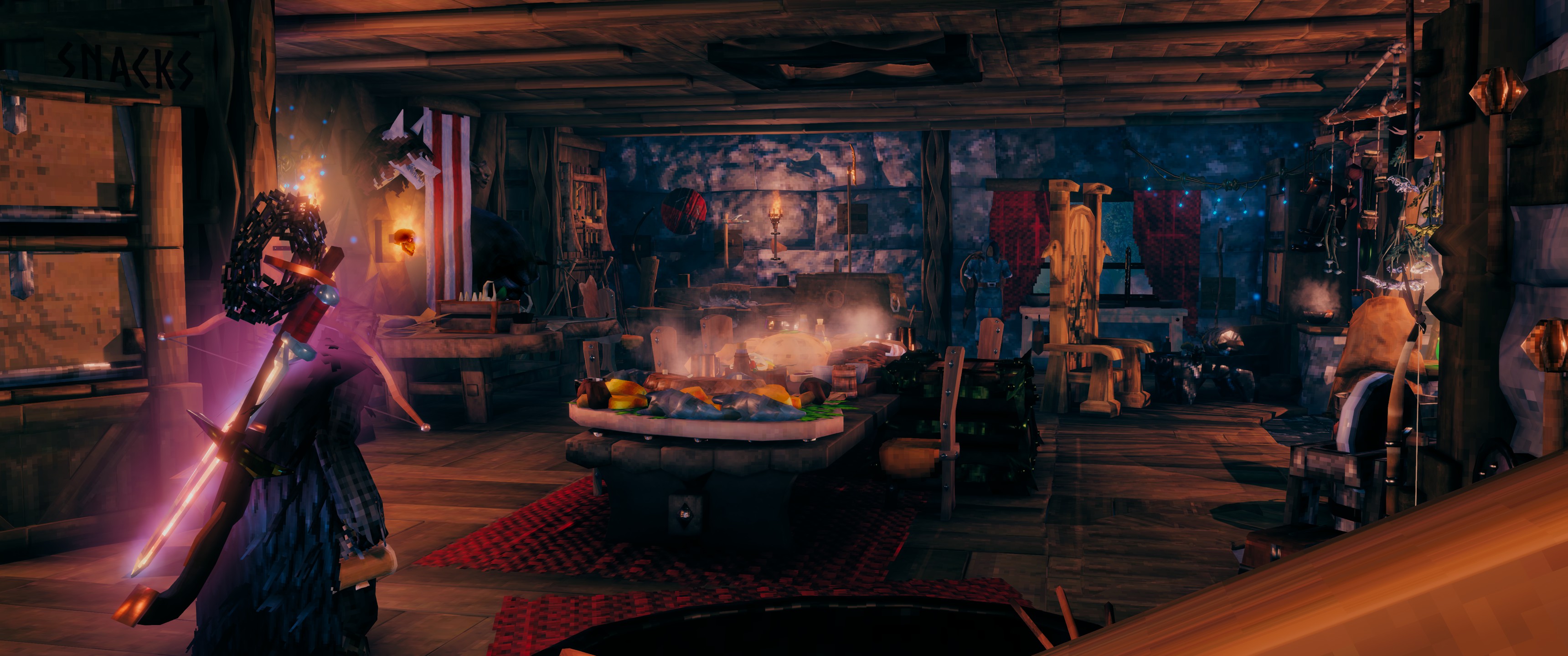
Look at the back wall and under the tables: each light only lights what it can reach and the rest stays dark, so the room gets depth and a much better mood. Vanilla lights it almost evenly and looks flat.
Features
Shadows for every light
- Every placed light casts shadows: sconces, torches, braziers, hearths, lanterns, forges and the rest. No more light leaking through walls, floors and roofs.
- Cached: a light's shadow is drawn once and again only when something near it changes (building, a door opening, a felled tree). That's why it's faster.
- Moving shadows for players, creatures, doors, dropped items and moving machine parts. Only the changed part is redrawn, only where it can be seen.
- Items on stands, food and meads cast shadows, and so do glowing ones with their light.
- Ready before the loading screen fades, so nothing pops in after loading or teleporting.
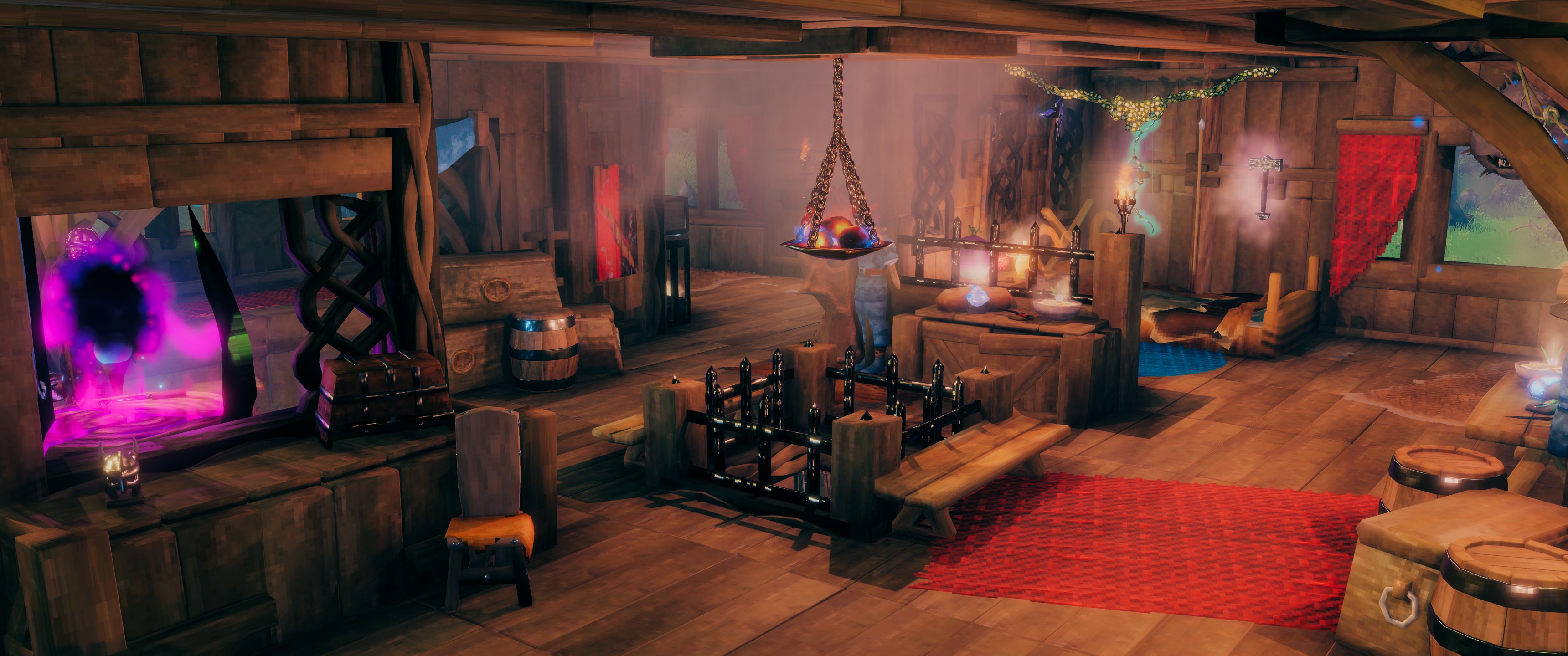
Look at the floor: the counter, the benches and the railing throw clear shadows, and the light fades into dark corners. It grounds everything in the room. Vanilla has only a few faint ones here and looks washed out.
Look and feel
Enhanced shading: Burley's diffuse
Softer and more believable light on every surface, above all outdoors.
Valheim lights every surface with Lambert's model (Lambert, 1760): how bright a surface is depends only on the angle of the light, and it looks the same from every side. Real surfaces don't. A rough one (ground, rock, bark, leaves) looks brighter and flatter when the light is behind you, and a smooth one darkens toward its edges.
The mod uses Burley's diffuse instead (Burley, Disney, 2012), which does both from each surface's roughness and was built to match measured real materials. Unity's Standard shader uses it too.
Improved ambient occlusion: multi-bounce
Corners and creases look warm and rich instead of dirty grey.
Valheim's ambient occlusion (Amplify Occlusion, GTAO) darkens corners and creases the same grey everywhere. In reality light bounces around inside a corner and picks up the surface's colour, so bright corners stay lighter and coloured ones keep their colour. The mod adds that bounce, per colour channel from the surface's colour, with the fit from Jimenez et al., Activision, 2016. It also stays steady from frame to frame.
Contact shadows
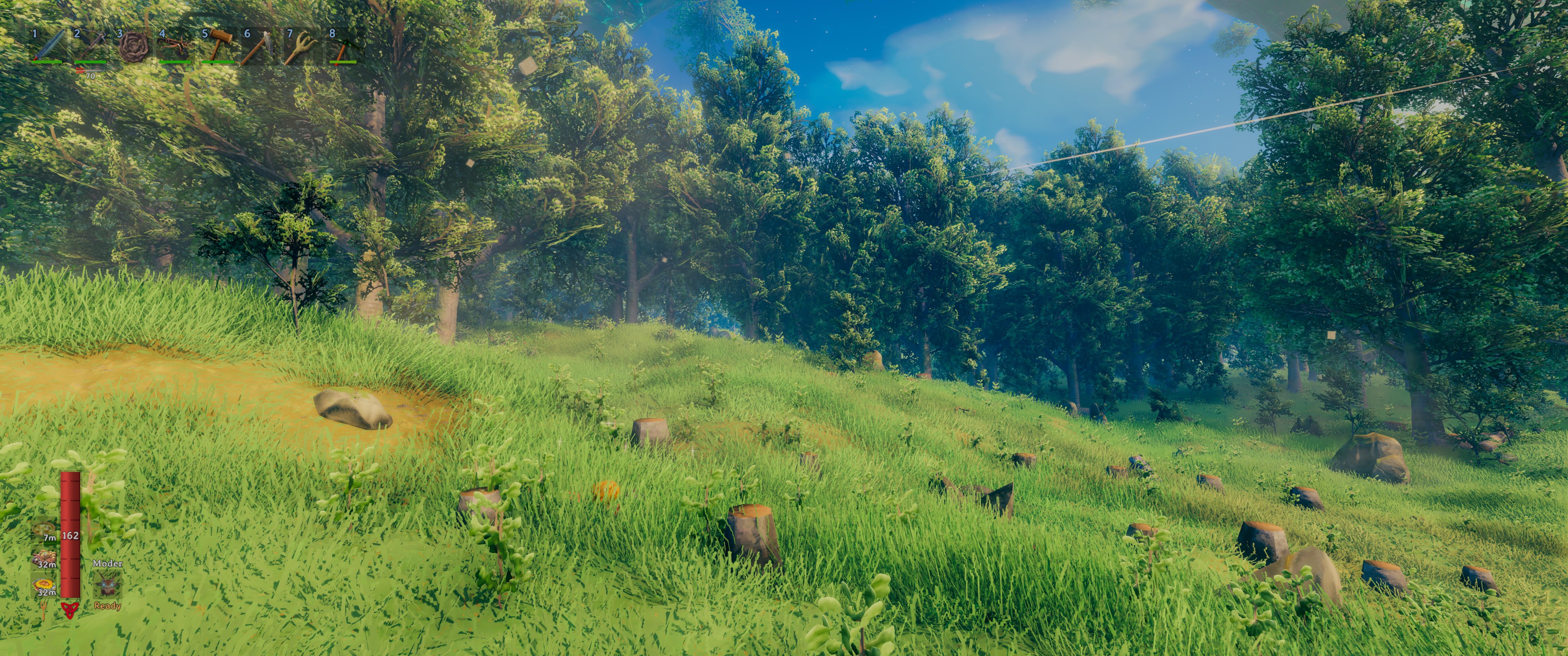
Crisp little sun and moon shadows on grass, stones, plank edges and the foot of a post, longer at dawn and dusk. They cover everything on screen out to Valheim's sun shadow distance (150 m on High), including grass and far models that cast no shadow in vanilla.
The shadow map is too coarse for these, so they're traced on screen toward the sun with Bend Studio's screen-space shadows (Aldridge, Sony Interactive Entertainment, 2023). Pixels the sun can't shadow anyway (sky, beyond its shadow distance, surfaces facing away) are skipped, so it costs very little.
Look at the grass, the small plants and the stumps: every blade and leaf throws a small, crisp shadow (Contact shadows), so the meadow looks lush and detailed. In vanilla the grass close to you looks nearly flat.
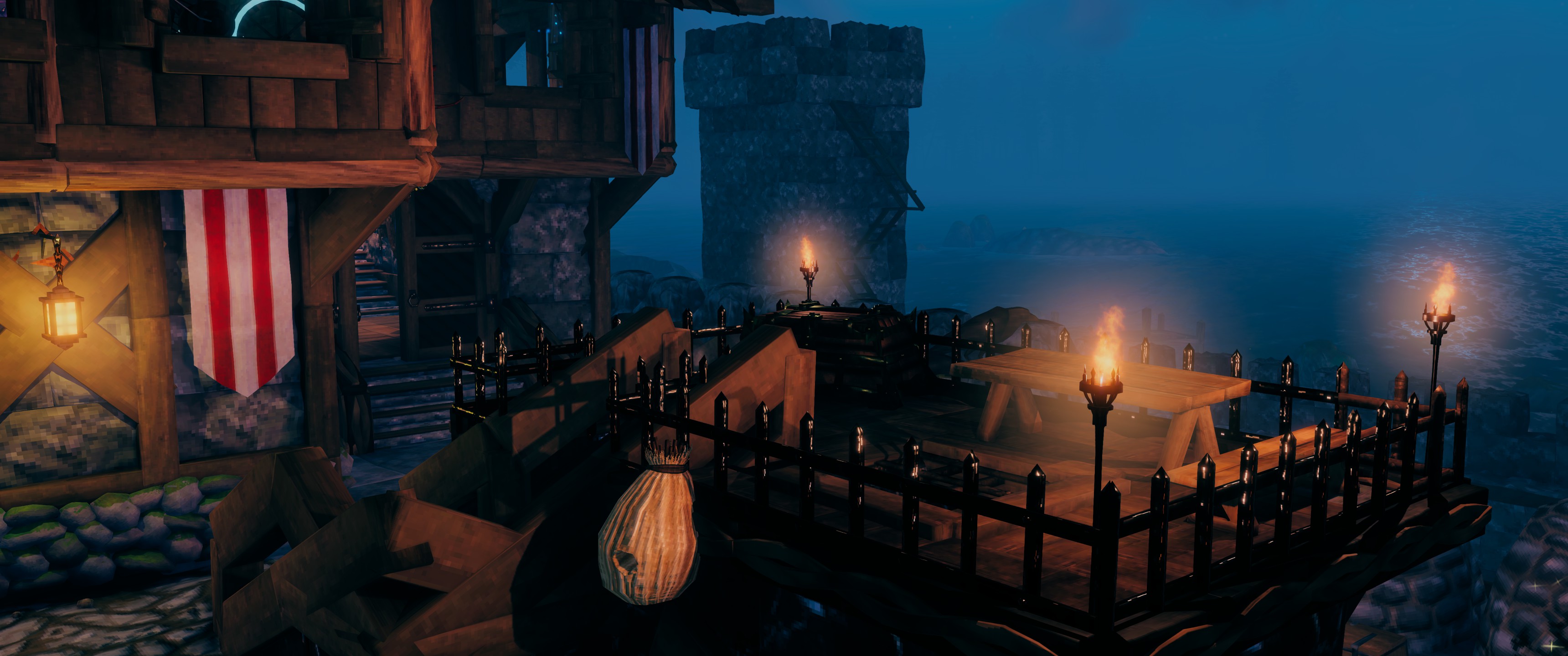
Look at the deck boards and the stones by the lights (Enhanced shading: rough wood and stone catch more of the light) and at the creases between the stones and beams (Improved AO: dark but still colourful, which looks much nicer than flat grey).
Weather catches light
Rain and snow sparkle in firelight and moonlight instead of being flat white specks: they're lit by which way each flake faces the light.
Smooth shading (optional)
Off by default. Light fades smoothly from lit to unlit instead of in Valheim's toon steps, the look of Badgers Shading Overhaul, built in.
Look at the banners and the stone wall: the light fades out softly instead of in hard-edged patches. Less cartoonish, more natural.
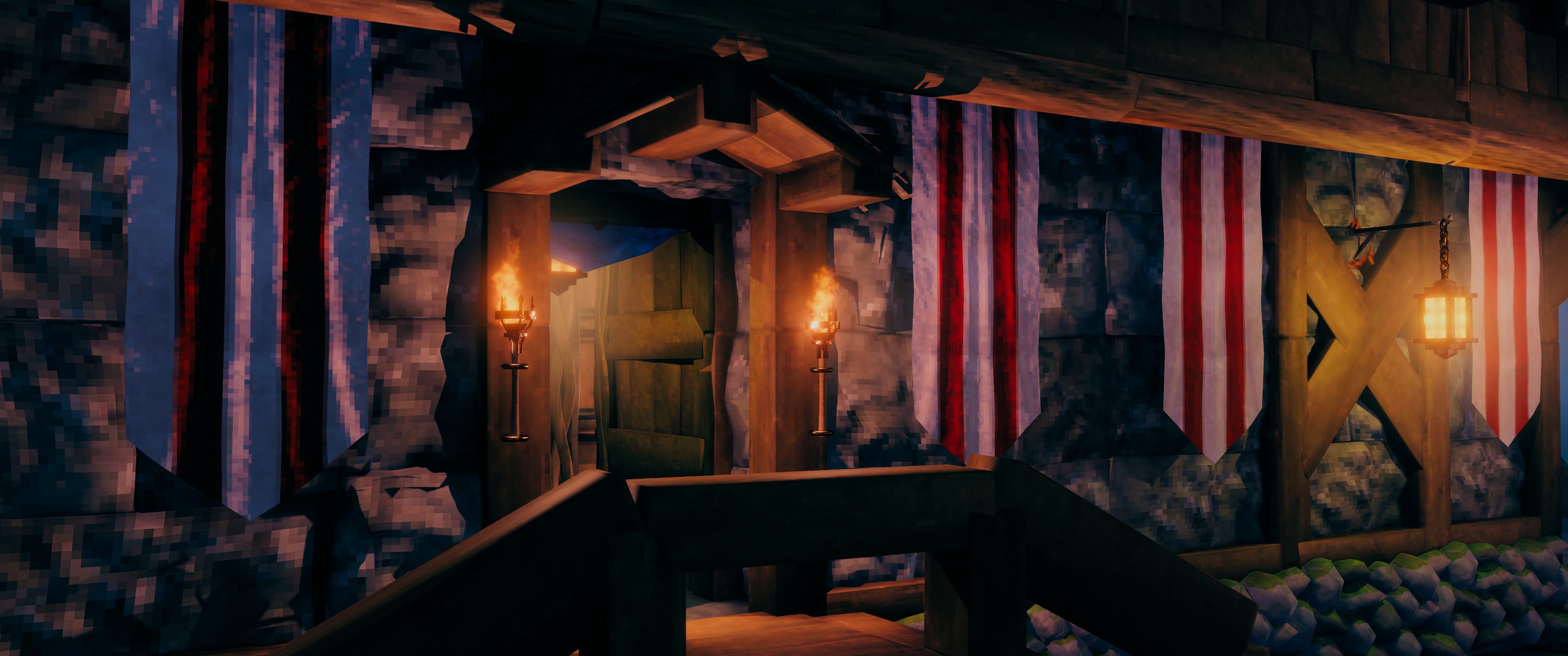
With the Look settings off, the shading is exactly that of Valheim.
Limitations
- No fire wiggle. In vanilla a fire's light shakes around a little. A cached shadow is drawn from one spot, so here the light holds still. Its brightness still flickers.
- No swaying shadows. Banners, hanging cloth and herbs cast their shadow at rest, not moving with the wind.
Settings
General
- Enabled: off brings back Valheim's lighting and shadows.
- Shadows: which placed lights cast shadows. All (default): every one. Performance: only the ones the game itself gives shadows (fires, braziers, hearths, lanterns); sconces, standing torches and the like get none. Off: none. Passing effects (spells, a boss's fire) get none from the mod, and torches you carry keep Valheim's. The game's Point light shadows setting isn't used for placed lights.
Look
- Enhanced shading: on by default. Burley's diffuse instead of Lambert. Off: the game's look.
- Smooth shading: off by default. No toon steps, for the sun, moon and every light. Just as bright overall.
- Improved AO: on by default. Multi-bounce ambient occlusion. Off: Valheim's.
- Contact shadows: on by default. Short sun and moon shadows the shadow map is too coarse for.
- Weather catches light: on by default. Rain and snow lit by which way each flake faces the light.
Performance
- Weather lit in one pass: on by default. Rain, snow, mist and wind dust lit by every nearby light in one draw. Same look.
- Flicker culling: on by default. Lights further than the flicker distance, or not lighting anything on screen, stop flickering and hold a steady brightness.
- Flicker distance: 15 metres by default. How far from you lights still flicker.
- Lights in one pass: on by default. Every point light in one pass instead of one pass each.
- Skip hidden pieces: on by default. Build pieces fully hidden behind others (the rooms above your basement, the inside of a house from outside) aren't drawn. Their shadows stay.
Testing
- Benchmark: about a minute. Measures the mod against vanilla where you stand and shows the frame times, and what moving shadows, point lights and the lighting shader each cost.
- Quick benchmark: the mod against vanilla in about 10 seconds.
- Timing log: off by default. What the mod's work costs per frame, in the log every 5 seconds.
- Debug log: off by default. Writes what the mod does to the log; turns itself on while a benchmark runs.
Performance
Faster than vanilla with point lights maxed out, while looking much better.
On my PC (RTX 4090, i5-13600KF, 128 GB RAM), in my base of about 6,000 pieces, the latest benchmark (0.2.1) gave 16.26 ms a frame (62 fps) with the mod and 20.26 ms (49 fps) in vanilla, 4 ms a frame faster. Earlier ones there: 15.35 ms (65 fps) against 19.95 ms (50 fps), and 20.17 ms (50 fps) against 24.85 ms (40 fps). It depends on what's happening, so I can't guarantee it's always faster.
Who gets it: nearly everyone in some form, because Valheim is almost always held back by the processor, and that's where this mod saves. The gap is widest in a big base against vanilla on its highest settings, and shrinks the lower you set vanilla. A PC held back by its graphics card gains little or nothing, and a weak one can even lose a bit to Enhanced shading, Improved AO and Contact shadows. I don't expect many of you to be in that spot, but if you are, turn those three off.
Measure it yourself: turn on Benchmark in an in-game config menu (such as Shudnal's Configuration Manager).
Compatibility
- Client side only.
- Windows (DirectX 11). Where the shaders can't load, Valheim's lighting stays.
- Mods that merge building pieces into bigger meshes: their meshes are left as they are.
- Mods that replace the game's lighting shader can't be used together with this one.
The ambient occlusion shader is built from Amplify Occlusion by Amplify Creations (MIT license, included in the DLL).
Contact shadows are a port of Bend Studio's screen-space shadows (Graham Aldridge, Sony Interactive Entertainment, 2023, Apache License 2.0, included in the DLL).
Disclaimer: development is AI assisted. Not fully human or AI.
Donations: ko-fi.com/krosshair