 Install with Gale

Wacky Spawners
This is a replacement for Custom Spawners: https://valheim.thunderstore.io/package/Detalhes/CustomSpawners/
While Custom Spawners still works, it lacks documentation, features and examples.
Dynamic Monster Spawning: The mod enables the creation of monster spawners that generate monsters based on configurable parameters.
Features:
- Custom monster spawner for specific places in Dungeons/Temples, etc.
- Attaches spawner to ordinary objects, so they don't look out of place.
- 0 health means invincible.
- Highly customizable.
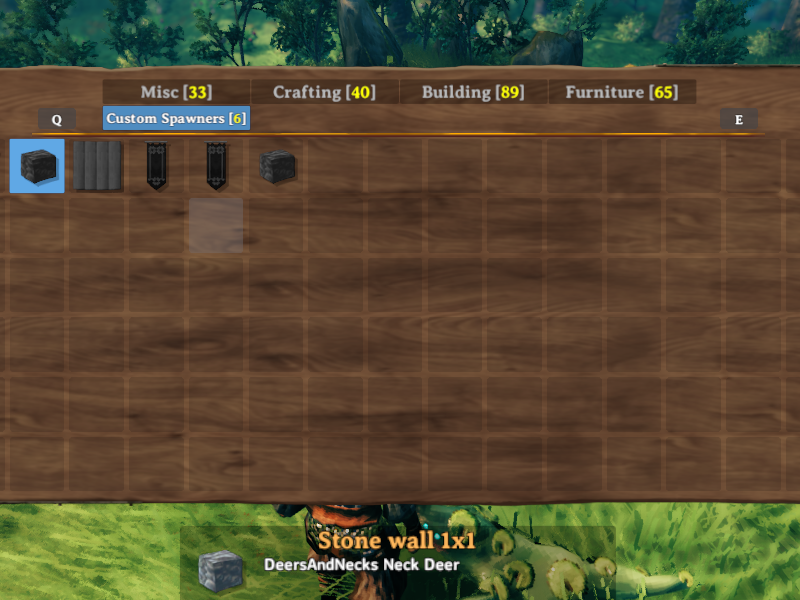
All created spawners will appear in the hammer; only admins can build them.
New Features:
- Drop-in replacement converts JSON to YAML.
- Replaced RPC calls with ServerSync.
- Added Filewatcher for YAML, live updates.
- Added support for multiple YAML files starting with "wackymole.customspawners." This allows you to organize your spawners into different files, such as by biome or theme. For example wackymole.customspawners.marshyman69.yml
- Default file will be created if none exist, with examples.
- Custom Spawners drop nothing when they are destroyed
- MultiSpawn at once!
WackyMole.CustomSpawners.yml
Configuration Parameters
Live updates for new pieces, existing ones might not.
-
name (string): Name of the monster spawner. - (Can't change without reboot)
-
prefabToCopy (string): Prefab to copy when creating monsters. (Can't change without reboot)
-
m_spawnTimer (int): The internal counter:
m_spawnTimer += 2f; if (m_spawnTimer > m_spawnIntervalSec) Vanilla Spawn Timer updates every 2 seconds
-
m_onGroundOnly (bool): Set to true to spawn monsters only on the ground.
-
m_maxTotal (int): Maximum total spawned monsters.
-
m_maxNear (int): Maximum monsters in the NEAR proximity of the spawner.
-
m_spawnRadius (int): Radius within which monsters can spawn.
-
m_setPatrolSpawnPoint (bool): Set to true to enable patrol spawn points for monsters. (Between Near and Far?)
-
m_triggerDistance (int): Distance at which players trigger monster spawns. Players have to inside this line for spawns to be renewed
-
m_spawnIntervalSec (int): Time interval between monster spawns (in seconds).
-
m_levelupChance (int): Chance for monsters to level up when spawned.
-
m_prefabName (string): Name of the spawned monster prefab. Can be multiple. It is random on which it will spawn, BUT it Uses m_weight of mob to increase chances of spawning. Higher weight more likely to spawn
-
m_nearRadius (int): What determines a NEAR Radius
-
m_farRadius (int): What determintes a FAR Radius.
-
minLevel (int): Minimum level for spawned monsters.
-
maxLevel (int): Maximum level for spawned monsters.
-
HitPoints (int): Hit points for spawned piece. A 0 is infinite, 400 is the standard health of a portal.
-
mob_target (bool) Determines if a mobs target this piece or not. Sets all three, m_randomTarget, m_primaryTarget, m_targetNonPlayerBuilt
-
multiSpawn (int) Default is 0. Allows the spawn logic to spawn multiple mobs at the same time. This allows you to set your timers really high without worrying about an empty area and without a huge spawn radius. Dont use large radii.
Example
- name: GhostsMultiSpawn prefabToCopy: piece_banner01 m_spawnTimer: 11 m_onGroundOnly: false m_maxTotal: 15 m_maxNear: 5 m_farRadius: 1 m_spawnRadius: 30 m_setPatrolSpawnPoint: false m_triggerDistance: 30 m_spawnIntervalSec: 30 m_levelupChance: 10 m_prefabName: Ghost m_nearRadius: 0 minLevel: 1 maxLevel: 3 HitPoints: 0 mobTarget: false multiSpawn: 5
Credits:
Detalhes and all his mods https://valheim.thunderstore.io/package/Detalhes/
Azumatt and his template.
JVL Team
For questions or suggestions please join discord channel: Odin Plus Team or my discord at Wolf Den
Support me at https://www.buymeacoffee.com/WackyMole or https://ko-fi.com/wackymole