
Confirm with your password

EquipmentSheet

Persistent equipment/food panel for Valheim. Human-directed, with AI-assisted code analysis, optimization review, and verification support.

Client-only

Stars
0
Downloads
0
Version
0.9.3
Updated
Author
Terramizer
Virus scan
✓ Scan successful
Runs on
Client-only

Description

EquipmentSheet

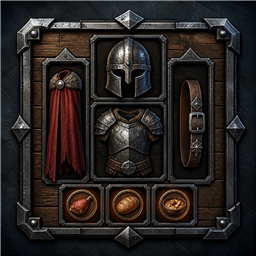
EquipmentSheet is a client-side Valheim mod that adds a dedicated equipment and food panel beside the vanilla player inventory. It gives important gear a consistent home without hiding its weight or bypassing Valheim's normal equip and death-drop behavior.

Development note

This mod is human-directed and built from human structure, concepts, ideas, client/server testing, and gameplay improvement goals. AI is used as an assisting tool for code analysis, optimization review, implementation refinement, and verification support, while final decisions, packaging, and in-game validation remain under human direction.

Created and maintained by R4V9N1.

Features

  • Six dedicated equipment slots: Helm, Chest, Legs, Trinket, Back, and Belt.
  • Three persistent food slots for food and drink consumables.
  • Uses Valheim's real equipped-item state so armor values and character visuals work normally.
  • Automatically moves supported gear into its matching sheet slot when equipped and swaps the previous item back into the bag.
  • Shows equipped sheet gear in crafting-station Upgrade lists and returns upgraded gear to the same slot.
  • Includes sheet contents in carry weight.
  • Shows vanilla item tooltips and durability bars.
  • Moves sheet items into the normal tombstone flow before death drops are created.
  • Keeps equipment separate per character and clears stale data when switching characters.
  • Supports drag-and-drop, left-click pickup, food-stack refills, and right-click food use.
  • Dragging equipment into the bag leaves it unequipped; right-clicking an equipment slot returns it directly to the bag.

Installation

Install with a Thunderstore mod manager, or copy EquipmentSheet.dll into:

<Valheim>/BepInEx/plugins/EquipmentSheet/EquipmentSheet.dll

This is a client-side mod. Install it for each player who wants the extra panel.

Updating from 0.8.1, 0.9.0, 0.9.1, or 0.9.2

Close Valheim completely, then replace the previous DLL or update the package through your mod manager.

  • You do not need to remove gear from the equipment sheet. Version 0.9.3 uses the same saved equipment data and slot layout, so leave it equipped while updating.
  • Keep BepInEx/config/r4v9n1.equipmentsheet.cfg. Deleting it only resets panel positioning to the defaults and does not affect saved gear.
  • Move sheet gear into the normal bag before removing EquipmentSheet permanently. This is necessary for uninstalling, not for updating.
  • A character backup is a reasonable general precaution before mod updates, but this update does not require one.

Configuration

After the first launch, BepInEx creates:

BepInEx/config/r4v9n1.equipmentsheet.cfg

You can enable or disable the panel and adjust its horizontal gap and extra right offset for other UI mods or different UI scales.

Compatibility note

Equipment and food in the panel live in EquipmentSheet's own per-character saved inventory. The mod intentionally does not use hidden extra rows in the vanilla player inventory.

Changelog

0.9.3 Latest
  • Moves the human/AI development disclosure to the top of the Thunderstore details text so it is visible immediately.
  • Adds a concise human-directed, AI-assisted development note to the package manifest description.
  • Corrects the Thunderstore package layout so the DLL is placed under plugins/EquipmentSheet/EquipmentSheet.dll.
  • No gameplay changes intended relative to 0.9.2.
0.9.2
  • Adds the human/AI development disclosure to the Thunderstore package description.
  • No gameplay changes intended relative to 0.9.1.
0.9.1
  • Fixes manually removing gear from the sheet after automatic equipment routing was added.
  • Dragging gear from a sheet slot into the bag now leaves it in the bag and unequipped instead of routing it straight back to the sheet.
  • Right-clicking an occupied equipment slot now unequips the item and returns it directly to the bag when a slot is available.
  • Keeps the 0.9.0 upgrade-list, in-slot upgrade, and automatic gear-replacement behavior.
0.9.0
  • Equipped sheet gear now appears in crafting-station Upgrade lists and can be upgraded without moving it into the bag first.
  • A successful upgrade returns the higher-quality replacement to the same equipment slot and equips it automatically.
  • Equipping supported gear from the bag now moves it into its matching sheet slot automatically.
  • Replacing equipped gear swaps the previous sheet item into the bag cell vacated by the newly equipped item, so the operation also works with a full bag.
  • Failed upgrade creation rolls the original sheet item back into its slot.

Updating from 0.8.1, 0.9.0, or 0.9.1

  • Close Valheim completely before replacing the old DLL or updating the package.
  • You do not need to remove gear from the equipment sheet before updating. Version 0.9.2 uses the same saved equipment data and slot layout.
  • Keep BepInEx/config/r4v9n1.equipmentsheet.cfg. Deleting it only resets the panel-position settings to their defaults; it does not remove or reset saved sheet gear.
  • Move all sheet gear back into the normal bag only if you intend to uninstall EquipmentSheet entirely.
  • A character backup before updating mods is always a sensible precaution, but it is not required for this update.
0.8.1
  • Fixes food-slot removal: left-click picks up the stack and right-click consumes one item through Valheim's normal item-use path.
  • Packages EquipmentSheet for Thunderstore under the R4V9N1 creator identity.
  • Uses the r4v9n1.equipmentsheet.cfg BepInEx config filename.

Full version history & older downloads →

Manual installation instructions
1

Install BepInExPack Valheim

BepInExPack Valheim is required to run mods in Valheim.

Download BepInExPack Valheim 5.4.2333 · View mod page

Check out the mod page for detailed installation instructions.

2

Install EquipmentSheet

This mod only needs to be installed on the client.

Download EquipmentSheet 0.9.3

Extract the ZIP and place the file(s) into the BepInEx/plugins/ folder inside your Valheim game folder.