 Install with Gale
Skill Gain Bars
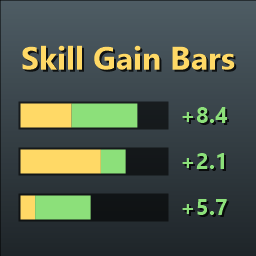
Shows a progress bar for each skill you train, with your current XP and a running total of what you've gained, just below the vanilla level-up messages.
Features
- One row per skill: progress bar, skill icon, level,
current / requiredXP and the XP gained so far. - The bar shows existing progress in gold and newly gained progress in green.
- Training a skill again before its row fades keeps adding to the total, including across level-ups.
- Also picks up skills added by other mods (e.g. SkillManager or Jötunn skills).
- Hides together with the HUD (Ctrl+F3).
Installation
Install with your mod manager, or drop SkillGainBars.dll into BepInEx/plugins.
Client-side only. No server install needed, and players without the mod are unaffected.
Configuration
BepInEx/config/spaaaaaaaaaaace.valheim.skillgainbars.cfg, or use a configuration manager in-game. Changes apply immediately.
- General: display time, fade time, max rows, decimal places and the text format.
- Layout: position offset, bar/icon/font sizes and spacing.
- Colors: bar background, existing progress and gained progress.
TextFormat supports these tokens, plus TextMeshPro rich text tags:
| Token | Value |
|---|---|
{name} |
Skill name |
{level} |
Current level |
{current} / {required} |
XP into the current level / XP needed for the next |
{percent} |
Progress through the current level |
{tally} |
XP gained since the row appeared |
{tallyPercent} |
Same, as a percentage of a level |