 Install with Gale
Get Comfortable
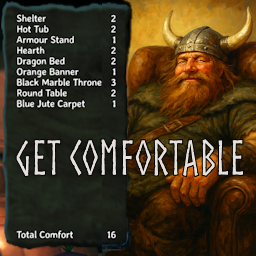
See what's providing comfort. Find your comfort spot. Feng Shui Valheim style.
Still hunting around for that perfect comfort 'spot'?
Can't figure out why you're not getting the comfort you need?
Want to know what you need to move to get maximum comfort?
With Get Comfortable you'll see which items are currently contributing to your player's comfort and by how much.
New
- Updated for Valheim 1.0
Configuration
General
- Toggle Comfort: Key used to toggle the comfort display on and off. Default is F4.
Utility
- LogLevel: Controls the level of information in the log.
In-game reconfiguration
You can use Configuration Manager (or similar) mod to change the configuration without exiting the game. You can also force a full configuration update by editing the config file.
Compatibility issues & defects
- If you find a compatibility issue please post it on mod-help on Discord. Be sure to include the mod name and version you think may be incompatible.
- If you have a bug please report it on Nexus or Discord in #mod-help. If you do post a bug report, please make sure to include the following:
- What you were doing, or attempting to do when it happened
- If it's repeatable - i.e., can you duplicate it?
- The exact behavior you observed (or didn't observe)
- If possible, attach your player log file with errors (errors always begin with this mod's name) on Discord
You can find all Neobotics released mods on:
- Thunderstore: NeoboticsOnThunderstore
- Nexus Mods: NeoboticsOnNexus
- Hexium: NeoboticsOnHexium
Your comments and feedback are always welcome. Post on NexusMods or Discord: NeoboticsOnDiscord