 Install with Gale
ValheimPortals
Name your portals and pick the destination on the map · Dê nome aos portais e escolha o destino no mapa
☕ Support the mod · Apoie o mod
Enjoying the mod? Buy me an energy drink (or a new keyboard, if you're feeling generous) so I can keep this beautiful project going! ⚡⌨️ Curtiu o mod? Me paga um energético (ou um teclado novo, se estiver se sentindo generoso) pra eu continuar esse lindo projeto! ⚡⌨️
☕ Donate on PayPal · Doar pelo PayPal
Bugs / suggestions · Bugs / sugestões: Discord
🇺🇸 English (click to open)
Every vanilla portal gets a name, a type, a color and a map icon. Step into a portal, the map opens and you click where you want to go. No more matching tags.
Must be installed on the server and every client. The server builds the portal list and syncs the config (no ServerSync needed).
How it works
- Build any vanilla portal. It starts as Personal, named "'s Portal".
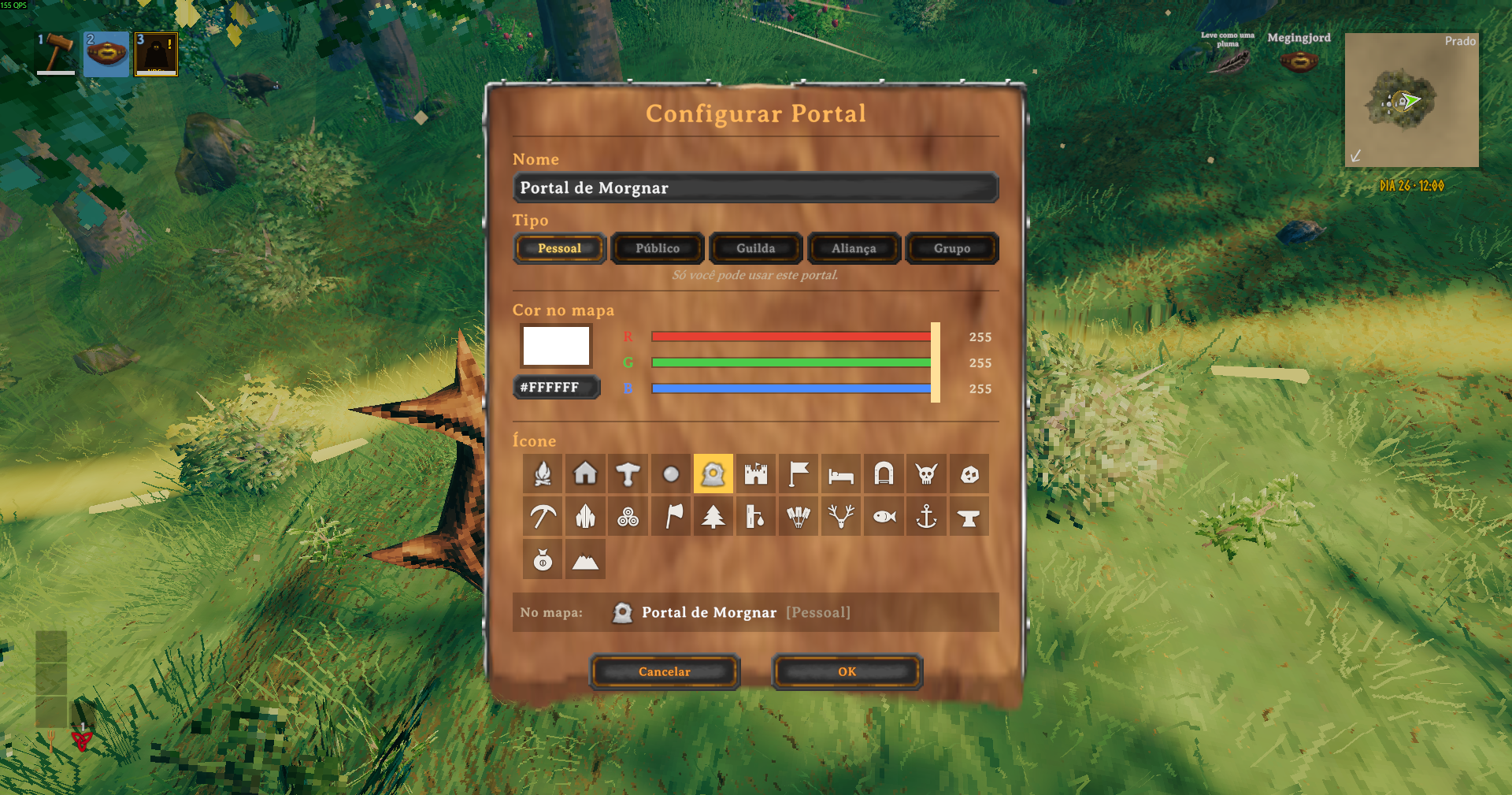
- Look at the portal and press E (Configure) to open the window:
- Name
- Type: Personal, Public, Guild, Alliance or Group
- Map color (RGB sliders or hex)
- Map icon: the vanilla map pins plus 19 icons in the same style (castle, flag, bed, dungeon, boss, ore, pickaxe, crystal, wood, axe, tree, sap collector, farm, hunting, fishing, harbor, forge, merchant, mountain)
- A live preview shows how it will look on the map.
- OK saves, Cancel keeps it as it was.
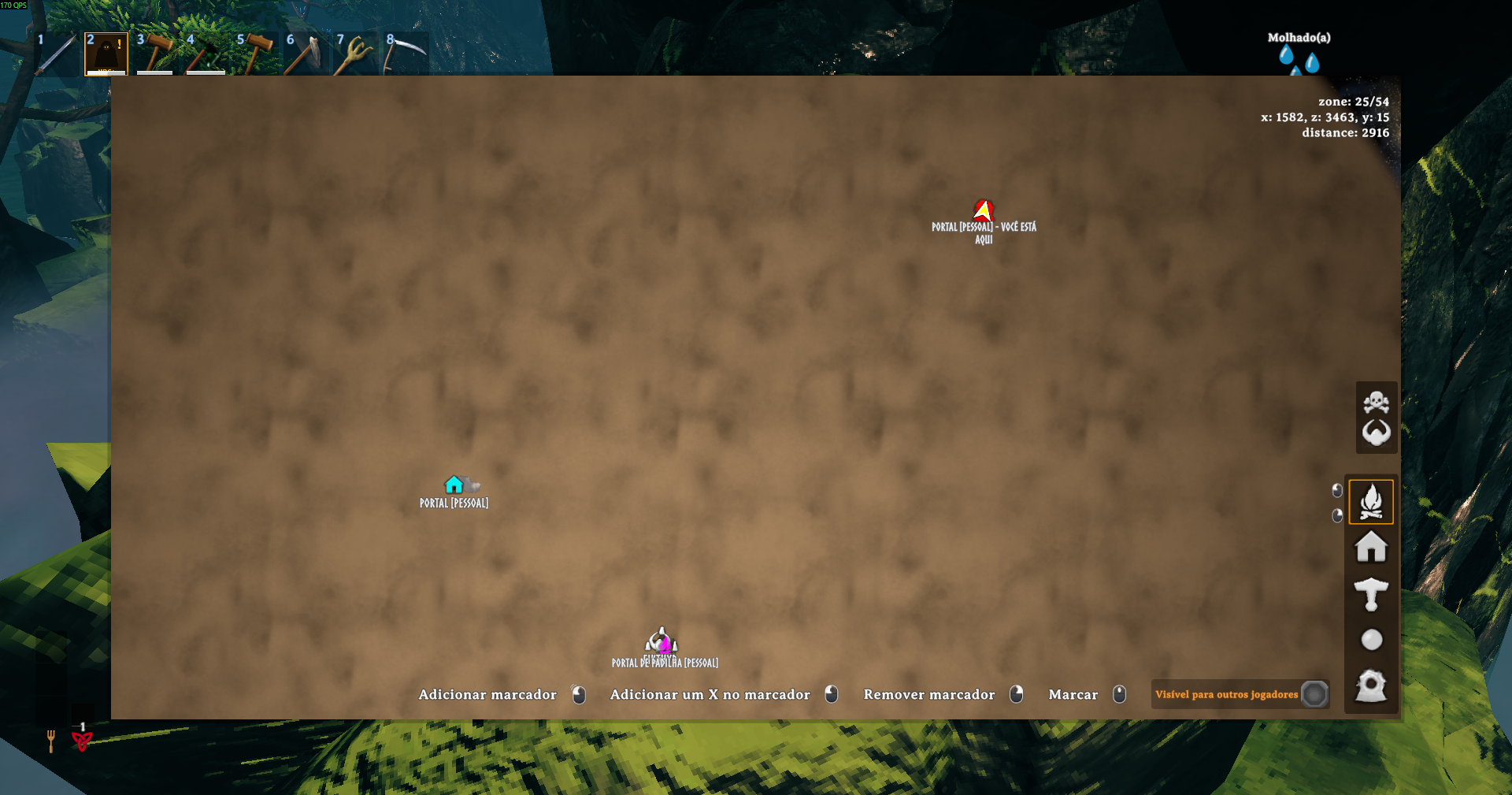
- Step into the portal: the map opens showing the portal you're at and every portal you're allowed to use, each with its name, icon, color and type.
- Click a portal on the map to travel. Space or Esc closes the map, and it also closes by itself when you walk away.
- Favorites: right-click a portal on the map to favorite it. Your favorites show in a list on the left whenever the map opens: click one or press 1–9 to travel. They're saved with your character.
Portal types
| Type | Who can use it |
|---|---|
| Personal | Only the owner (not even guild members) |
| Public | Everyone |
| Guild | The owner and the owner's guild members |
| Alliance | The owner, the owner's guild and the guilds allied with it |
| Group | The owner and whoever is in the owner's group right now |
Guild, Alliance and Group use the guild and group from ValheimNPCs. Without it, those options are disabled. The owner's current guild/group is what counts: if someone joins or leaves, access changes right away. Temporary guild guests don't count. Alliance uses the alliances made in ValheimNPCs (current ones: a broken alliance loses access right away); allies use the portal but can't remove it or change its area.
Protection
- Only the owner or admins can remove or damage a portal. The server can also allow the owner's guild (
GuildaPodeQuebrar); group and alliance members never can. - Only the owner or admins can change its settings (checked by the server).
- Protected area: within a radius around every portal (6 m by default) nobody destroys buildings or digs/changes the terrain. Only admins and, if the config allows it, the portal owner (and their guild, with
GuildaPodeQuebrar). - Monsters don't damage portals or buildings inside the protected area (configurable).
- Admin status comes from the server's
adminlist.txt.
Travel
- Ores and metals are blocked like vanilla, unless the server allows them (
AllowNonTeleportable) or the world modifier "teleport all" is on. - Optional cooldown and cost per trip (both off by default).
Languages / translations
- The mod comes in English and Portuguese (Brazil) and follows the language chosen in the game.
- Translate it into your language: open
BepInEx/config/ValheimPortals/translations/, copyEnglish.txt, rename it to your language using Valheim's name for it (German.txt,Russian.txt,Spanish.txt,French.txt,Polish.txt...) and translate the right side of eachkey = textline. Missing lines stay in English. - Made a translation? Send it on Discord and it can ship with the mod!
Config
BepInEx/config/ValheimPortals/ValheimPortals.cfg
- The server's config is sent to every player when they join, so changing your own
.cfgdoesn't change the rules. OnlyEfeitoPortalAtivoandDistanciaFecharMapaare per player.
| Option | Default | What it does |
|---|---|---|
TipoPortaisAntigos |
Publico | Type given to portals built before the mod |
DistanciaSaida |
2.5 | How far in front of the destination portal you appear |
PermitirItensNaoTeleportaveis |
false | Lets ores/metals through |
BloquearDanoDeNaoJogadores |
true | Monsters don't damage portals or buildings in the protected area |
RaioAreaProtegida |
6 | Protected area radius in meters (0 = off) |
DonoPodeMexerNaArea |
true | The owner can build/destroy/dig in the area |
GuildaPodeQuebrar |
false | The owner's guild can also remove/damage the portal and change its area |
TempoDeEsperaSegundos |
0 | Cooldown between trips (0 = off) |
ItemDeCusto |
(empty) | Item prefab charged per trip, e.g. Coins (empty = off) |
QuantidadeDeCusto |
0 | Amount charged per trip (0 = off) |
PermitirFavoritos |
true | Players can favorite portals and use the favorites list |
EfeitoPortalAtivo |
false | Shows the connected-portal swirl (per player) |
DistanciaFecharMapa |
1 | Meters you walk from where the map opened until it closes (per player) |
Notes
- Portals already in the world keep working, using their old tag as the name and the type from
TipoPortaisAntigos. - The map must be enabled in the world.
- Server and players must have the same mod version; otherwise a warning shows on screen and in chat.
🇧🇷 Português (clique pra abrir)
Todo portal vanilla ganha nome, tipo, cor e ícone no mapa. Entrou no portal, o mapa abre e você clica pra onde quer ir. Nada de ficar combinando tag.
Precisa estar no servidor e em todos os jogadores. O servidor monta a lista de portais e sincroniza a config (não precisa de ServerSync).
Como funciona
- Construa qualquer portal vanilla. Ele nasce Pessoal, com o nome "Portal de ".
- Olhe pro portal e aperte E (Configurar) pra abrir a janela:
- Nome
- Tipo: Pessoal, Público, Guilda, Aliança ou Grupo
- Cor no mapa (barras RGB ou hex)
- Ícone no mapa: os pins do mapa vanilla e mais 19 ícones no mesmo estilo (castelo, bandeira, cama, dungeon, boss, minério, picareta, cristal, madeira, machado, árvore, coletor de seiva, farm, caça, pesca, porto, forja, mercador, montanha)
- Uma prévia mostra na hora como vai ficar no mapa.
- OK salva, Cancelar deixa como estava.
- Entre no portal: o mapa abre mostrando o portal onde você está e todos os portais que você pode usar, cada um com nome, ícone, cor e tipo.
- Clique num portal do mapa pra viajar. Espaço ou Esc fecha o mapa, e ele também fecha sozinho quando você sai andando.
- Favoritos: clique com o botão direito num portal do mapa pra favoritar. Os favoritos aparecem numa lista na esquerda sempre que o mapa abre: clique num deles ou aperte 1–9 pra viajar. Eles ficam salvos no seu personagem.
Tipos de portal
| Tipo | Quem pode usar |
|---|---|
| Pessoal | Só o dono (nem membros da guilda) |
| Público | Todo mundo |
| Guilda | O dono e os membros da guilda dele |
| Aliança | O dono, a guilda dele e as guildas aliadas a ela |
| Grupo | O dono e quem estiver no grupo dele no momento |
Guilda, Aliança e Grupo usam a guilda e o grupo do ValheimNPCs. Sem ele, essas opções ficam desativadas. Vale a guilda/grupo atual do dono: se alguém entra ou sai, o acesso muda na hora. Convidado temporário da guilda não conta. Aliança usa as alianças feitas no ValheimNPCs (as atuais: aliança desfeita perde o acesso na hora); o aliado usa o portal mas não remove nem mexe na área.
Proteção
- Só o dono ou ADMs podem remover ou danificar o portal. O servidor também pode liberar pra guilda do dono (
GuildaPodeQuebrar); grupo e aliança nunca podem. - Só o dono ou ADMs podem mudar a configuração (conferido pelo servidor).
- Área protegida: num raio em volta de cada portal (6 m por padrão) ninguém destrói construções nem cava/mexe no terreno. Só ADMs e, se a config deixar, o dono do portal (e a guilda dele, com
GuildaPodeQuebrar). - Monstros não danificam portais nem construções na área protegida (configurável).
- O status de ADM vem do
adminlist.txtdo servidor.
Viagem
- Minério e metal são bloqueados igual ao vanilla, a não ser que o servidor libere (
PermitirItensNaoTeleportaveis) ou o modificador de mundo "teleportar tudo" esteja ligado. - Tempo de espera e custo por viagem opcionais (os dois desligados por padrão).
Idiomas / tradução
- O mod vem em inglês e português (Brasil) e segue o idioma escolhido no jogo.
- Traduza pra sua língua: abra
BepInEx/config/ValheimPortals/translations/, copie oEnglish.txt, renomeie com o nome do idioma no Valheim (German.txt,Russian.txt,Spanish.txt,French.txt,Polish.txt...) e traduza o lado direito de cada linhachave = texto. Linha que faltar fica em inglês. - Fez uma tradução? Manda no Discord que ela pode vir junto com o mod!
Config
BepInEx/config/ValheimPortals/ValheimPortals.cfg
- A config do servidor é enviada pra todos os jogadores quando eles entram, então mudar o
.cfgno seu PC não muda as regras. Só oEfeitoPortalAtivoe oDistanciaFecharMapasão de cada jogador.
| Opção | Padrão | O que faz |
|---|---|---|
TipoPortaisAntigos |
Publico | Tipo dos portais construídos antes do mod |
DistanciaSaida |
2.5 | Distância à frente do portal de destino onde você aparece |
PermitirItensNaoTeleportaveis |
false | Deixa passar minério/metal |
BloquearDanoDeNaoJogadores |
true | Monstros não danificam portais nem construções na área protegida |
RaioAreaProtegida |
6 | Raio da área protegida em metros (0 = desliga) |
DonoPodeMexerNaArea |
true | O dono pode construir/destruir/cavar na área |
GuildaPodeQuebrar |
false | A guilda do dono também pode remover/danificar o portal e mexer na área |
TempoDeEsperaSegundos |
0 | Espera entre uma viagem e outra (0 = desliga) |
ItemDeCusto |
(vazio) | Prefab do item cobrado por viagem, ex.: Coins (vazio = desliga) |
QuantidadeDeCusto |
0 | Quantidade cobrada por viagem (0 = desliga) |
PermitirFavoritos |
true | Jogadores podem favoritar portais e usar a lista de favoritos |
EfeitoPortalAtivo |
false | Mostra o redemoinho de portal conectado (de cada jogador) |
DistanciaFecharMapa |
1 | Quantos metros você anda de onde o mapa abriu até ele fechar (de cada jogador) |
Observações
- Portais que já existiam no mundo continuam funcionando, com a tag antiga como nome e o tipo de
TipoPortaisAntigos. - O mapa precisa estar ativo no mundo.
- Servidor e jogadores precisam da mesma versão do mod; se for diferente, aparece um aviso na tela e no chat.
🛡️ More mods by Morgnar · Mais mods do Morgnar
Click an icon to open the mod · Clique no ícone pra abrir o mod