
Confirm with your password

StoreAndCraft

Base that works with you: auto-store, dump, craft from chests, [E] + auto-fill [B], auto-store output [N], F10 settings panel + log, Storage Displays, Feed Trough, favorites, search. Server + all clients.

· Website

Stars
1
Downloads
740
Version
1.6.0
Updated
Author
Morda
Virus scan
—
Runs on
Client (& Server)

Images

Description

StoreAndCraft

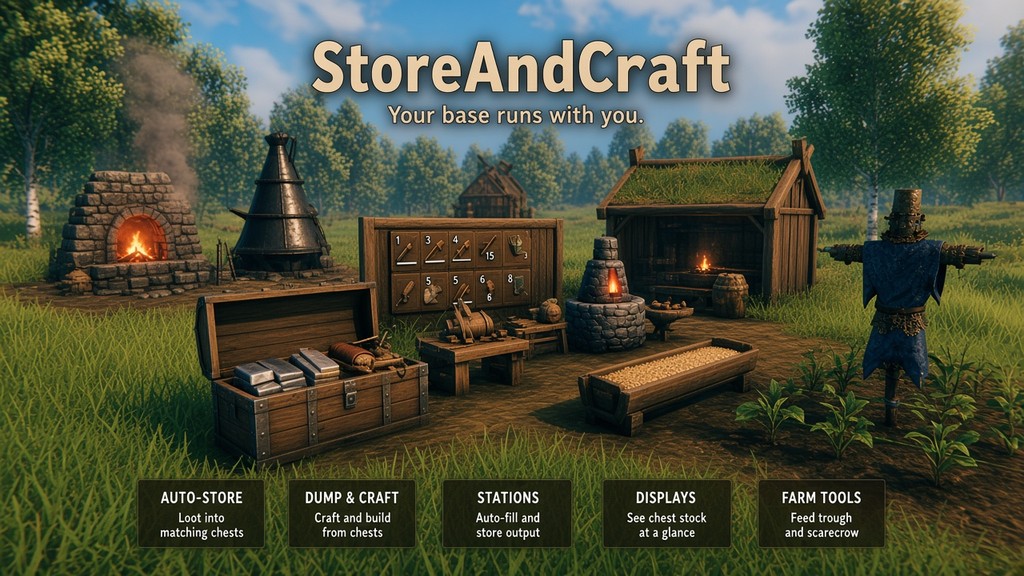
Your base runs with you. Loot finds its chest. One key clears your pockets. Craft, upgrade and build straight from storage. Stations refill themselves from chests and put their output back. Storage displays, feed trough, scarecrow and more.

Required on the server and on every client (same version). Valheim 1.0 · BepInExPack 5.4.2350+. Console players cannot load the mod.

Bug reports: https://github.com/morda0511/StoreAndCraft/issues/1 Discord: https://discord.gg/aVKVVmyzj

1.6.0: the beehives (Ice, Royal Jelly, Crystal), berry bushes, wild herbs and mushrooms are no longer part of StoreAndCraft. Want them? Download Forager's Garden: everything you built with them comes back. Until then nothing is lost, queens and spores wait in your chests.


Features

Whole loaded base

  • On by default: dump, crafting and building, stations, auto-store and the scarecrow use every chest in the area Valheim has loaded around you. No ranges to set
  • Items still only go into chests that already hold them, links and chest settings still apply
  • Each item type remembers the chest it went into last, the base is only searched again when that chest is full
  • Switch it off in the Morda Mod Manager to keep the old ranges in meters (under Advanced)
  • Valheim only loads the area around you: keep chests within about 80 m of their station

Store

  • Auto-store: ground items go into matching chests (one player in range is enough)
  • Chest takes an item only if the type is already inside (switch in the Morda Mod Manager)
  • Carts and ships count as chests. Player-built chests only. Ward rules apply
  • Dump (.): inventory into matching chests, hotbar and favorites stay
  • Middle mouse (inventory open): store the hovered item
  • Ctrl + middle mouse: fill the hovered stack from chests
  • Sort and Stack buttons on inventory and chest panels
  • Favorites (F): never dumped or stored
  • Search (Y): nearest chest with the item blinks, map ping
  • A chest shows Status: Full / Almost full when you look at it (counts the stacks, not only the slots)
  • Fish are never picked up from the ground: they stay in the sea or your fish pond

Craft and build from chests

  • Recipes, upgrades and hammer pieces use chest contents
  • Missing materials are taken from chests directly
  • Yellow requirement text = part comes from a chest
  • 1 item stays in each chest (switch in the Morda Mod Manager)
  • C + place: grab a piece's materials from chests, nothing is placed
  • Epic Loot: craft, enchanting table, Forge of Potential use chest stock
  • PierSupports: the extra pier segments are paid from chests too

Stations

  • [E] refill: fuel, ore, food from chests (inventory first)
  • B auto-fill: refills when empty, never from your bag
  • N auto-store: finished bars, food, honey, mead go into chests
  • Works on kiln, smelter, blast furnace, cooking stations, oven, fermenter, turrets, fires, torches; N also on beehive and sap extractor
  • Alt+E settings: allowed items, link l1-l9
  • Links: station fills from, and outputs to, chests with the same link
  • Torches: auto-fill for new torches, World Override for all torches
  • Station capacities (admin): kiln, smelter, blast furnace, eitr refinery, beehive
  • Fermenter: mead filter, add the same base in the first 60 s (batch up to 5)
  • Red label above a linked station when its chests ran out
  • Stations wait when their chest is full: "Chest full", "No linked chest", "No chest nearby" above them (switch in the Morda Mod Manager)
  • Catch-up while away (off by default): stations finish the time their area was unloaded

Storage displays (hammer, Storage tab)

  • Carved boards: small, medium, large, upright and wide. Vanilla sign displays too
  • E: pick categories (small: one category or up to 4 items), search box
  • Right click an item on the display (or in that menu): camera flies to the chest that holds it, the chest blinks (again = next chest)
  • Min field in each item tile of that menu: below this amount the count on the display turns red (empty or 0 = off)
  • Shift + right click: switch layout
  • Shift + left click: display scale
  • Alt+E on small: name / amount. Alt+R: scan range per display (the only place to set it, 10 m until set)
  • Every display shows all of its items by itself (no shared pages)
  • Chests set to Ignore are not counted

Feed trough (hammer)

  • Food filter, links, auto-fill (Alt+E)
  • Hungry tames walk to it and eat

Scarecrow (hammer)

  • Plants a crop grid, harvests when all is ripe, replants
  • Shift / Ctrl + wheel: width / length. E: crop, harvest / plant, auto-fill, links
  • Needs cultivated ground. Unlocks with the Cultivator recipe
  • Plants again 30 s after the harvest. The hover shows that countdown, the time until the harvest and the seeds the grid needs
  • Seed plants too: Carrot (for seeds) and so on grow seeds, so the seed supply never runs out
  • Patterns: pick several crops (each gets a colour) and draw on the grid which crop grows where
  • Own ranges in the Morda Mod Manager: player to scarecrow, scarecrow to chest
  • Plants that other mods add to the Cultivator show up in its list too, for example the berry bushes, herbs and mushrooms of Forager's Garden

Armor stand

  • E swaps your armor with the stand's
  • Alt+E: pick a preset item from your bag per weapon / shield / tool slot. E swaps it with the stand's piece, back and forth
  • Without a preset, E puts the stand's weapon into your bag

Chest settings (Alt+E)

  • Ignore: skipped by everything
  • Show on display: ignored chest still counts on displays
  • Only build/craft: you fill it (by hand or dump), no ground pickup or station output, stations never take from it. Only crafting and building take from it
  • Only stations: no dump, no ground pickup, no crafting or building from it. Only stations and links fill and empty it
  • l1-l9: link for stations
  • Settings are saved on the chest, not in its name

Morda Mod Manager

  • F10 opens the list of all your mods. Click one to change its settings (switches, sliders, numbers, lists, hotkeys), then Save. The back arrow returns to the list
  • StoreAndCraft: all ranges, all switches, station capacities and every hotkey (click it, press the new key)
  • Servers: only admins from adminlist.txt can save the server values
  • Activity log (optional): every transfer in a short list, renamed chests show as Chest[Name], lines fade out one by one

Install

  1. Install BepInExPack Valheim
  2. Put StoreAndCraft.dll in BepInEx/plugins/StoreAndCraft/ (or use Thunderstore / r2modman)
  3. Servers: same version on the server and every client

Changelog

1.6.0 Latest

Important: the Ice, Royal Jelly and Crystal beehives (with their queens), the berry bushes, wild herbs and mushrooms (with their spores) are no longer part of StoreAndCraft. Want them? From 1.6.0 on download the mod Forager's Garden: everything you built with them is back at once. Without it your built hives and plants stay hidden, and your queens and spores wait in your chests as "(needs Forager's Garden)" items, nothing is lost.

NEW FEATURES

  • The scarecrow lists plants that other mods add to the Cultivator, for example the berry bushes, herbs and mushrooms of Forager's Garden

FIX

  • Feed trough auto-fill refills as soon as only one food is left: the same food, up to one full stack of it (berries: 1 left, up to 49 more), as much as your chests have. An empty trough gets the first allowed food, one stack at most
1.5.0

NEW FEATURES

  • Chest setting "Only build/craft": you fill it (by hand or with dump), nothing else goes in by itself (no ground items, no station output, stations never take from it), only crafting and building take from it. It replaces "Manual fill": chests that had Manual fill count as "Only stations" now
  • Stations wait when their chest cannot take the product: smelter, blast furnace, kiln, eitr refinery, windmill and spinning wheel with auto-store (N) switch off while the chests are full or no chest with their link is in reach, and a notice shows above them: "Chest full", "No linked chest", "No chest nearby" (the last one only shows, the station keeps running)
  • The same notices above the grill (its food still goes to the ground, so it does not burn), beehive, sap extractor, fermenter and scarecrow
  • A chest shows "Status: Full" / "Status: Almost full" when you look at it. It counts how full the stacks are, not only the slots: a slot with one wood still has room for more
  • Ice, Royal Jelly and Crystal Beehive: craft an Ice Queen Bee (Queen Bee + Ice), a Royal Jelly Queen Bee (Queen Bee + Royal Jelly) or a Crystal Queen Bee (Queen Bee + Crystal) at the workbench, then build the white / yellow / violet beehive with it (the bees around it get its colour). It makes ice / royal jelly / crystal at the same pace as honey, and auto-store works like for honey
  • Plantable berry bushes and wild herbs (Cultivator): Raspberry, Blueberry and Cloudberry bushes, Dandelion, Thistle, Fiddlehead and Smoke puff. A bush sapling costs 5 berries, a herb (Dandelion, Thistle, Fiddlehead, Smoke puff) 1 and gives 3 per harvest, the plant stands there grown right away (as if just picked) and grows its harvest back, and the scarecrow plants and harvests them too (Raspberries (bush) ... in its crop list)
  • Scarecrow patterns: pick several crops (each gets a colour) and draw on a grid which crop grows where, so you can lay out a garden. Every kind of plant is harvested once all plants of that kind are ripe, the grid spacing follows the biggest plant
  • Scarecrow ranges: the scarecrow has its own ranges, player → scarecrow and scarecrow → chest (mod manager F10, 0 = same as auto-fill)
  • Scarecrow: Kale and Oat are in the crop list, and Kale seeds (for seeds) plants kale seeds to grow more kale seeds
  • Everything works in the whole loaded base (mod manager F10, on by default): dump, middle-click, crafting / building from chests, take stack, search, auto-fill, station output, auto-store of ground items and the scarecrow use every chest in the area that is loaded around you, no ranges to set. Items still only go into chests that already hold them (and links / chest modes still apply). Each item type remembers the chest it went into last and goes there first, the base is only searched again when that chest is full. Switch it off to use ranges in meters (now under Advanced). Storage Displays keep their own range
  • Storage Display minimum: every item tile in the display filter (E) has a small Min field. When the display shows less than that, the count turns red (empty or 0 = off). Each display keeps its own minimums
  • PierSupports (other mod): the extra pier segments it builds down to the ground are paid from your chests too, like any other piece

UI IMPROVEMENTS

  • Mod manager (F10): the Stack / Sort buttons can be switched off, separately for the inventory and for the chest
  • Mod manager (F10): the notices above stations can be switched off
  • Mod manager (F10): Save works without admin rights too (it saves the settings for your own PC)
  • Activity log: lines leave one after another from the top with a soft fade (each one stays readable for at least 3 s) instead of all standing for 12 s. Renamed chests show as Chest[Name], e.g. Chest[Tin Ore]
  • The Storage Display range is only set on each display (Alt+R); the default slider in the mod manager (F10) is gone. A display without its own range uses 10 m
  • Bloodgold is listed under Metals in the Storage Display filter
  • Kale, Oat and their seeds are listed under Crops & Seeds in the Storage Display filter

FIX

  • Storage Displays no longer cause short stutters when many chests change: the work is split over several frames, displays that show the same chests share it, and a display that is slow to redraw waits a little longer before the next redraw
  • The crafting list counts the items in your chests with much less work, also with large chest ranges
  • Storage Displays update with much less work when chests change (each chest is only read again when it changed)
  • Auto-fill spreads its station checks over several frames instead of doing them all at once
  • Storage Displays show their items only within 20 m (the board itself stays visible), and displays you cannot see (out of view or farther away) no longer recount and redraw; they update as soon as you look at them
  • Dump, middle-click, take stack, search, station output and auto-store only look at chests that hold the item, and no longer reload every chest in range before a dump (Valheim keeps loaded chests up to date by itself)
  • Big bases run smoother: Storage Displays, chest searches, auto-stack, auto-store and station checks do much less work per frame and create less garbage (fewer short stutters)
  • Items on the ground that do not fit into a chest are tried less often
  • Scarecrow: crops that only grew in one biome (Flax, Barley, Onion, Turnip ...) now grow on any cultivated ground inside the scarecrow's grid
  • Auto-stack (and the Stack / Sort buttons) no longer swap a 9/50 and a 50/50 stack with each other again and again; only partial stacks are merged
  • Displays that stayed empty for a while after joining a server look for newly loaded chests more often
  • If the display models cannot be loaded (for example a damaged upload on the server), the log now says so
  • Auto-store of ground items no longer takes fish: live fish in the sea or a fish pond stay where they are (pick fish up by hand)
  • Saving in the mod manager (F10) on a server no longer shows a long yellow message with all ranges
  • Storage Displays no longer share pages with other displays that have the same selection: every display shows all of its items by itself (after changing a layout some items were missing until the range was changed)
1.4.2

NEW FEATURES

  • Plantable mushrooms (Cultivator): Mushroom, Yellow mushroom and Blue mushroom
    • Plant a mushroom on cultivated ground: it grows spores (3 per mushroom)
    • Plant the spores: they grow mushrooms. Same cycle as carrot and carrot seeds
    • New items: Mushroom spores, Yellow mushroom spores, Blue mushroom spores, each in its colour
    • The scarecrow plants and harvests them too (Mushroom (for spores) and Mushroom spores in its crop list)
  • Scarecrow: after a harvest it waits 30 s before planting again, the hover text counts down ("Auto-plant in") and shows the time until the harvest ("Harvest in")
  • Scarecrow: seed plants too (Carrot (for seeds), Onion (for seeds) ...): plant the vegetable, harvest seeds, so the seeds never run out
  • Scarecrow: the crop list and the hover show how many seeds the whole grid needs

UI IMPROVEMENTS

  • Mod manager: scrollbar next to the list (drag it with the mouse)
  • Station label for an empty input says what the station takes: Wood (kiln), Grain (windmill), Flax (spinning wheel), Ore (smelter)
  • Much quieter log: only real problems show up

FIX

  • Scarecrow: Level ground and Cultivate only touch the planted grid (before they reached far beyond it), pressing again no longer makes spikes
  • Scarecrow: no seeds are planted where a plant would have no room to grow, and a stuck plant no longer blocks the harvest
  • Scarecrow: choosing another crop while the old one is still growing no longer leaves the old one unharvested
  • Scarecrow: harvest after a plant has just grown no longer waits a whole minute
  • Feed trough, scarecrow and displays were magenta (no texture) with Vulkan / DirectX 12
  • Only stations chests are no longer used for crafting, building or Epic Loot, only by stations and links
  • Lit fire / torch that can be switched off: E switches it off again (it refilled it instead)

15 older entries, full version history & downloads →

Manual installation instructions
1

Install BepInExPack Valheim

BepInExPack Valheim is required to run mods in Valheim.

Download BepInExPack Valheim 5.4.2351 · View mod page

Check out the mod page for detailed installation instructions.

2

Install StoreAndCraft

This mod must be installed on the client. Installing it on the server is optional (e.g., for config syncing).

Download StoreAndCraft 1.6.0

Extract the ZIP and place the file(s) into the BepInEx/plugins/ folder inside your Valheim game folder.