 Install with Gale
CLLC Sector Level HUD
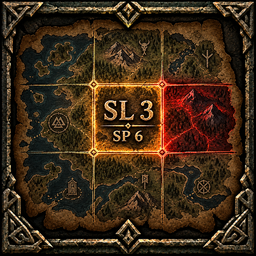
See your Sector Level (SL) and Sector Points (SP) without relying on CLLC's small original label. The plugin adds configurable counters beside the minimap and a sector overlay to the large world map.
What it adds
- Minimap counters for SL and/or SP, with horizontal or vertical layout and separate colors for labels, colons and numbers.
- An option to hide CLLC's original sector label without changing CLLC's configuration.
- Rectangles on the world map for CLLC sectors currently loaded on your client: pale at SL 0, gold at SL 1–2, red at SL 3+.
- SL and SP inside the rectangles when the map is zoomed in enough.
- An opacity slider and a choice between always showing the world-map overlay or showing it only while holding a key (Left Shift by default).
SP is the weighted kill-point total stored by CLLC for the exact sector. SL is CLLC's sector bonus level and can also be influenced by nearby sectors. The plugin only displays CLLC data; it does not change combat, spawns, loot or sector progression.
Installation
Install with Gale or another compatible mod manager. CreatureLevelAndLootControl 5.0.6 is a required dependency and is listed in the package manifest. BepInEx is also required.
For manual installation, put CLLCSectorLevelHUD.dll in BepInEx/plugins/CLLCSectorLevelHUD/. Remove any older copy of the DLL first. Install CLLC separately. This plugin runs on clients only; a dedicated server does not need it.
The config is created after the first launch at BepInEx/config/LoIYver.CLLCSectorLevelHUD.cfg. Settings can also be edited in game with a compatible Configuration Manager.
Key settings
| Section | Setting | Default | Effect |
|---|---|---|---|
| General | Enabled |
true |
Enable both minimap and world-map UI. |
| General | HideOriginalLabel |
true |
Hide the original CLLC sector text. |
| Counters | ShowSectorLevel |
true |
Show SL beside the minimap. |
| Counters | ShowSectorPoints |
false |
Show SP beside the minimap. |
| Display | VerticalLayout |
false |
Put both enabled minimap counters on separate lines. |
| Display | FontSize |
22 |
Minimap counter text size. |
| Display | OffsetX, OffsetY |
-12, 0 |
Position relative to the minimap's left edge. |
| Colors | LabelColor, SeparatorColor, ValueColor |
#FFDE8F |
Colors for SL/SP, : and the values. |
| World Map | ShowSectorOverlay |
true |
Show the sector rectangles. |
| World Map | ShowNumbersWhenZoomedIn |
true |
Show SL and SP in readable rectangles. |
| World Map | AlwaysVisible |
true |
Set false to show the overlay only while holding HoldKey. |
| World Map | HoldKey |
LeftShift |
Key held to show the overlay in hold mode. |
| World Map | Opacity |
1 |
Opacity of both rectangles and their numbers, from 0 to 1. |
| World Map | MinCellWidthForNumbers |
56 |
Minimum cell width before its numbers appear. |
| World Map | MaxVisibleSectors |
256 |
Maximum number of rectangles drawn per refresh. |
Map limits and compatibility
The overlay can show only currently loaded, explored sectors. CLLC does not expose a persistent world-wide history of sector points to the client. When a sector unloads, its rectangle disappears; this does not delete any CLLC data. The map grid is a local display and is not synchronized by this plugin.
Built against Valheim 1.0.16 and CLLC 5.0.6. The grid reads CLLC's loaded sector objects and Valheim's map coordinates, so a future update that changes those internals may need a plugin update. BetterUI ForeverMaintained 2.5.13 was included in the compatibility review; this plugin adds its own UI and does not patch BetterUI.
Credits
Created by LoIYver. Creature Level & Loot Control is by Smoothbrain.