
 Install with Gale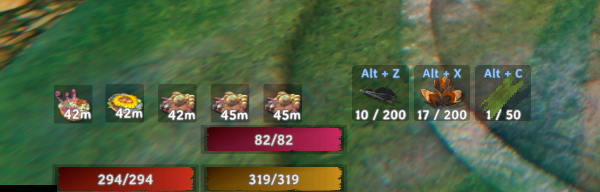
Glutton
Glutton expands Valheim's food system with up to 8 food slots, automatic eating, and a weighted scoring system that picks the best food for your playstyle. Configuration syncs across multiplayer sessions via ServerSync so server admins can enforce settings for all players.
Features
Extra Food Slots
Increases the number of active food slots from Valheim's default of 3 up to 8. The slot count is configurable and syncs to all clients when playing on a server.
Auto Eat
Glutton monitors your active food buffs and automatically re-eats food when a slot drops below a configurable time threshold. No more dying because you forgot to eat.
- Refills slots when a food reaches a set percentage of its remaining duration (default 50%)
- Optionally keeps all slots filled at all times (Eat Maximum Foods)
- Can draw food from your inventory or from any food in the game database (kitchen mode)
- Optionally removes the consumed item from your inventory stack
- Swap on Renewal: when all slots are full and a better food becomes available, Glutton can drop the lowest-scoring active food to make room
- Toggle auto eat on/off in-game with Left Shift + F5
Weighted Food Scoring
When choosing which food to eat, Glutton scores each food item using five configurable weights:
| Weight | What it values |
|---|---|
| Health Score Weight | Raw health granted |
| Stamina Score Weight | Stamina granted |
| Eitr Score Weight | Eitr granted |
| Burn Time Score Weight | How long the food lasts |
| Regen Score Weight | Health regeneration rate |
Set any weight to 0 to ignore that stat entirely. A warrior might max Health and ignore Eitr; a mage does the opposite. Weights sync from the server so public servers can enforce a consistent scoring policy.
Food Benefit Normalization
Optionally makes food provide its full base stats regardless of how much time is left on the buff. When enabled, a food that is nearly expired gives the same bonus as one freshly eaten.
The health/stamina/eitr split for the normalized value can be derived automatically from your score weights, or set manually as explicit percentages.
Configuration
All settings are in BepInEx/config/Norger.Glutton.cfg. The file reloads automatically when saved — no restart needed.
When running on a dedicated server, set Lock Configuration = true to push all synced settings to clients and prevent local overrides.
| Section | Setting | Default | Synced |
|---|---|---|---|
| General | Lock Configuration | false | — |
| General | MaxFoodSlots | 4 | Yes |
| General | Auto Eat | true | Yes |
| General | Refresh Food at Percentage | 50 | Yes |
| General | Eat Maximum Foods | true | Yes |
| General | Eat Best Foods First | true | Yes |
| General | Ignore Inventory | false | Yes |
| General | Remove Eaten Item From Inventory | true | Yes |
| Renewal | Allow Swap On Renewal | true | Yes |
| Normalization | Normalize Food Benefits | false | Yes |
| Normalization | Use Weights For Normalized Split | true | Yes |
| Normalization | Food Health Benefit % | 50 | Yes |
| Normalization | Food Stamina Benefit % | 50 | Yes |
| Normalization | Food Eitr Benefit % | 50 | Yes |
| Weighted Food Score | Health Score Weight | 50 | Yes |
| Weighted Food Score | Stamina Score Weight | 50 | Yes |
| Weighted Food Score | Eitr Score Weight | 50 | Yes |
| Weighted Food Score | Burn Time Score Weight | 50 | Yes |
| Weighted Food Score | Regen Score Weight | 50 | Yes |
| Keyboard | Toggle Automatic Eating | LShift + F5 | No |
| Logging Verbosity | Debug Verbosity Level | 0 | No |
Compatibility
- MinimalUI — fully compatible. Extra food slots are injected into MinimalUI's food bar panel and rendered correctly.
- Dragon HUD Replacer — fully compatible. DragonHud's FoodList manages slot display; Glutton defers to it automatically.
- BepInEx Configuration Manager — all settings are visible and editable in-game via the Configuration Manager UI.
Installation
- Install BepInExPack Valheim.
- Drop
Glutton.dllintoBepInEx/plugins/. - Launch the game — the config file is created automatically on first run.
ServerSync is embedded in the DLL. No additional dependencies required.