
 Install with Gale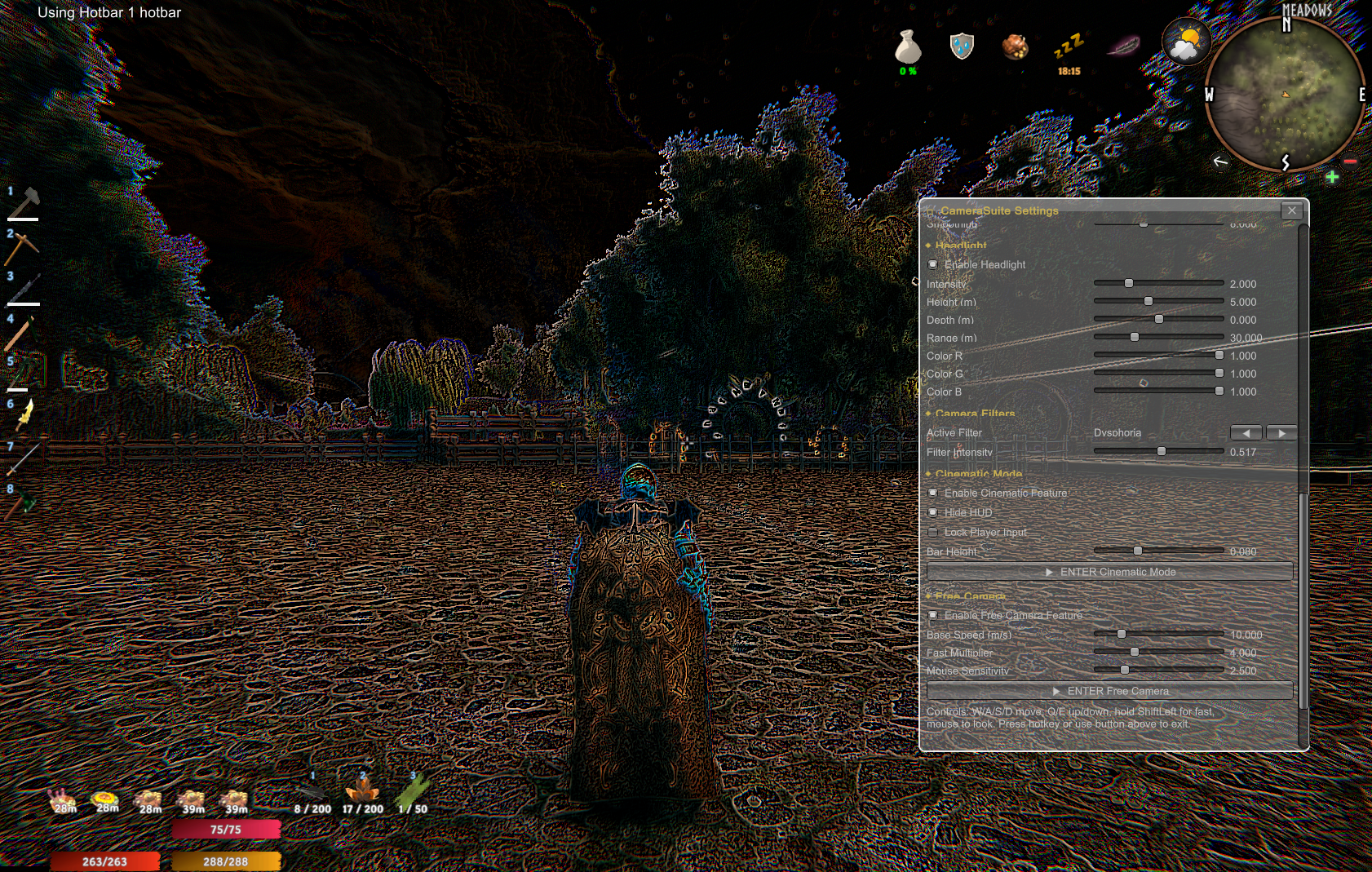
CameraSuite
A comprehensive camera enhancement mod for Valheim that adds first-person modes, cinematic tools, post-process filters, and a wide range of camera motion effects — all configurable from an in-game GUI.
Installation
- Install BepInExPack Valheim
- Drop
CameraSuite.dllintoBepInEx/plugins/ - Launch the game — press F10 to open the settings panel
No other files needed. The shader bundle is embedded inside the DLL.
Features
In-Game Settings GUI
Press F10 to open a draggable settings panel. Every feature can be toggled on/off and tuned with sliders without leaving the game. All changes write back to the BepInEx config file automatically.
First-Person Modes
Cycle through camera perspectives with H (default):
| Mode | Description |
|---|---|
| ThirdPerson | Standard third-person camera |
| FirstPersonHelmet | First person with helmet visible |
| FirstPersonNoHelmet | First person, helmet hidden |
| FirstPersonNoHelmetAlt | Alternate FP head position |
| FirstPersonOnlyWeapons | Weapons visible, body hidden |
| FirstPersonNoBody | Full FP, entire body hidden |
- Configurable FoV per perspective
- Scroll wheel transition support
- Body visibility options for aiming/blocking
- Melee attack direction follows camera in FP
Orbital Camera
- Raises the maximum zoom distance (default 90m, configurable up to 200m+)
- Removes the sailing zoom cap so you can zoom out on ships
- Configurable camera FoV
Camera Shake
Triggered automatically when the player takes damage. Shake magnitude scales with damage received.
- Configurable magnitude, duration, and decay speed
- Can be disabled independently
Smooth Zoom
Lerps the camera zoom distance instead of snapping, giving a fluid zoom feel.
- Configurable lerp speed
Camera Tilt / Roll
Subtly rolls the camera when strafing or traversing slopes.
- Configurable strafe angle, slope angle, and smoothing speed
Shoulder Swap
Press V to toggle the third-person camera between left and right shoulder.
- Configurable horizontal offset distance
Head Bob (First Person)
Adds a subtle vertical camera bob while walking and running in first-person.
- Configurable amplitude and frequency
- Separate run speed multiplier
Weapon Sway (First Person)
Applies a gentle idle oscillation to the equipped weapon in first-person.
- Configurable amplitude and frequency
Crouch Camera Offset (First Person)
Smoothly lowers the camera when the player crouches in first-person.
- Configurable Y offset and transition speed
Corner Lean (First Person)
Hold Alt+Q / Alt+E to lean the camera left or right — peek around corners without exposing your whole character.
- Configurable roll angle and lateral translation distance
- Smooth lerped transition
Headlight
Attaches a point light to the player's head — useful for caves and dark interiors.
- Toggle: Ctrl+L
- Intensity up/down: Ctrl+= / Ctrl+-
- Height up/down: Ctrl+PageUp / Ctrl+PageDown
- Depth forward/back: Ctrl+Home / Ctrl+End
- Configurable colour (RGB), range, and starting position
- All adjustments shown as HUD messages
Camera Filters
58 post-process image filters applied to the full screen in real time. Cycle with Ctrl+F or select from the GUI.
Colour Grading Grayscale, GrayscaleRGB, Negative, Sepia, ColorFilter, ColorCorrection, DualTone, Posterization, Toon
Distortion / Warp Acid, Drunk, Psycho, Wave, Fisheye, Lens, Dysphoria, Wiggle, MechanicalDistortion, NormalMapDistortion, Diplopy
Blur / Aberration RadialBlur, SimpleAberration, ChromaticAberration, Pendulum
Lighting / Glow Bloom, Glow, Vignetting, BlackContour, Kino
Pixel / Retro Pixel, LowRes, CleanPixel, Cuby, LCD, SSAA
Noise / Glitch Noise, Glitch, NoSignal, Scratch, BigNoise, Parasite
Pattern / Overlay Grid, ColoredStripe, Zebra, WhiteDot, Thread, Silhouette, Pong, Rainbow, Carnival
Edge Detection Laplacian, NeoLaplacian, Impression
Animated / Special Hypnotia, Kaleidoscope, Ascii, Terminal, ThermalVision, OldTV
Cinematic Mode
Press Ctrl+C to enter cinematic mode for screenshots and video capture.
- Hides the entire HUD
- Adds black widescreen letterbox bars (configurable height)
- Optional player input lock to freeze character position
Free Camera
Press F11 to detach from the player and fly freely around the world.
| Key | Action |
|---|---|
| W / S | Move forward / backward |
| A / D | Strafe left / right |
| Q / E | Move down / up |
| Mouse | Look around |
| Left Shift | Fast mode (configurable speed multiplier) |
| F11 | Exit free camera |
- Configurable base speed and fast multiplier
- Player character is frozen in place while active
- Game camera restored cleanly on exit
Default Hotkeys
| Hotkey | Action |
|---|---|
| F10 | Open / close settings GUI |
| F11 | Toggle free camera |
| H | Cycle camera mode |
| V | Swap camera shoulder |
| Ctrl+C | Toggle cinematic mode |
| Ctrl+F | Cycle camera filter |
| Ctrl+L | Toggle headlight |
| Alt+Q / Alt+E | Lean left / right (FP only) |
All hotkeys are remappable in the GUI or the BepInEx config file (BepInEx/config/Norger.CameraSuite.cfg).
Configuration
All settings are stored in BepInEx/config/Norger.CameraSuite.cfg and can be edited directly or adjusted live from the F10 in-game GUI. Changes take effect immediately — no restart required.
Compatibility
- Valheim (current patch)
- BepInExPack Valheim 5.4.2333+
Changelog
1.0.0
- Initial public release
Known Issues
-some camera filters may not work havent tested all with config setting changes.