 Install with Gale

SeneaL Item Link
By Fermata.
English
Share inventory items in chat and inspect their details with SeneaL UI tooltips.
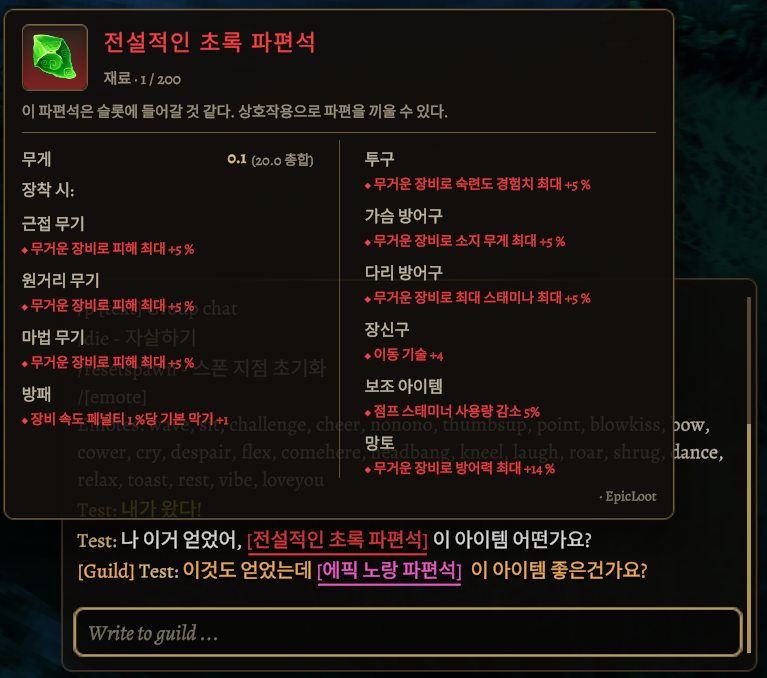
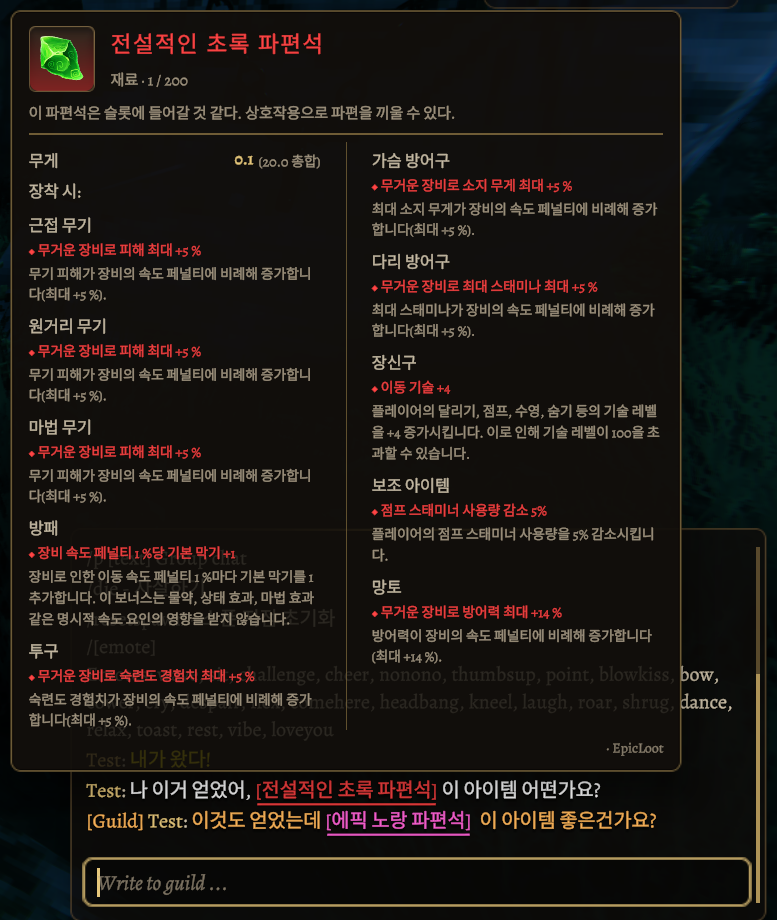
Improves EpicLoot shard tooltips by separating equipment types from effects and highlighting effects with rarity colors.
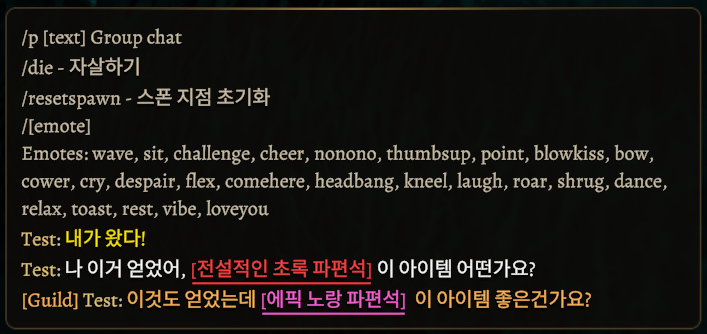
Adds item link support to Smoothbrain Guilds chat and a [Guild] tag before the sender's name on guild messages, including those without item links.
Usage
- Hold Left Shift + Left Ctrl and left-click an item in your inventory or an open container.
- The item link is added to the chat input. Type your message after it.
- Press Enter to send the link and your message together. Hover over the received link with chat open to view its details.
Item snapshots include quality, stack size, durability, crafter, and custom item data such as EpicLoot options. Tooltips are generated on the receiving player's PC using their installed mods and settings.
Installation
Install through Gale, or place SeneaLItemLink.dll in BepInEx/plugins.
- Requires SeneaL UI, BepInExPack Valheim, and JsonDotNET.
- All players who want to send or view item links must install this mod. The server does not need it.
- Enable SeneaL UI and its custom tooltips (
Elements / Tooltips).
Target versions: Valheim 1.0.17 and SeneaL UI 1.1.9.
Settings and limits
Change modifier keys in Fermata.valheim.senealitemlink.cfg. Keep the main key as Mouse0 (left-click).
- One item link per message is supported. Adding another item link clears the existing draft and inserts the new link.
- Sharing is limited to one item per 0.75 seconds and 32 KB of item data.
- Recent links remain available during the current session. They are not saved between sessions.
- Players need the item's original mod to inspect it.
- Item links are previews only and never give or transfer items.
- Equipped-item comparison and controller input are not included.
한국어
아이템을 채팅으로 공유하고 SeneaL UI 툴팁으로 정보를 확인하는 모드입니다.
EpicLoot 파편석 툴팁에서 적용 장비와 효과를 구분하고, 효과에 등급 색상을 적용해 가독성을 개선합니다.
Smoothbrain Guilds의 길드 채팅에 아이템 링크 기능을 지원하고, 아이템 링크 유무와 관계없이 길드 메시지의 닉네임 앞에 [Guild] 표시를 추가합니다.
사용 방법
- 인벤토리 또는 열린 상자에서 왼쪽 Shift + 왼쪽 Ctrl + 왼쪽 클릭으로 아이템을 선택합니다.
- 채팅 입력란에 아이템 링크가 들어갑니다. 뒤에 메시지를 작성하세요.
- Enter를 누르면 링크와 메시지가 함께 전송됩니다. 채팅을 연 상태에서 받은 링크에 마우스를 올리면 정보를 확인할 수 있습니다.
품질, 수량, 내구도, 제작자와 EpicLoot 옵션 등의 커스텀 데이터를 전달합니다. 받는 사용자의 모드와 설정으로 툴팁을 생성합니다.
설치
Gale로 설치하거나 SeneaLItemLink.dll을 BepInEx/plugins에 넣으세요.
- SeneaL UI, BepInExPack Valheim, JsonDotNET이 필요합니다.
- 링크를 보내거나 확인할 사용자는 모두 설치해야 합니다. 서버에는 필요하지 않습니다.
- SeneaL UI와 사용자 툴팁(
Elements / Tooltips)을 켜주세요.
대상 버전: Valheim 1.0.17, SeneaL UI 1.1.9.
설정과 참고
Fermata.valheim.senealitemlink.cfg에서 보조키를 변경할 수 있습니다. 기본 키는 왼쪽 클릭인 Mouse0으로 유지하세요.
- 메시지 한 개당 아이템 링크 한 개를 지원합니다. 기존 링크가 있는 상태에서 다른 아이템을 링크하면 작성 중인 채팅을 지우고 새 링크를 넣습니다.
- 0.75초당 한 번 공유할 수 있으며 아이템 데이터는 최대 32 KB입니다.
- 최근 링크는 현재 접속 중에만 유지됩니다.
- 모드 아이템을 확인하려면 받는 사용자도 해당 아이템 모드를 설치해야 합니다.
- 링크는 정보 확인용이며 아이템을 생성하거나 전달하지 않습니다.
- 장착 아이템 비교와 컨트롤러 입력은 지원하지 않습니다.