 Install with Gale
PassivePowers SeneaL UI
English
A client-side compatibility mod that displays Smoothbrain PassivePowers boss powers in the SeneaL UI style.
Features
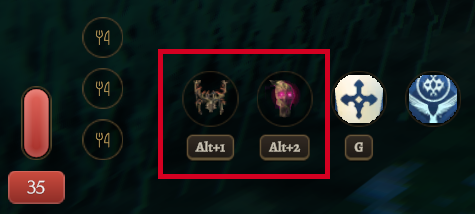
- Displays up to seven selected boss powers in selection order.
- Shows each power's shortcut and the shared cooldown.
- Follows PassivePowers shortcut settings, with labels such as
Alt+1andAlt+2. - Hides the overlapping original boss power UI while SeneaL UI is active.
- Places additional ability slots, including EpicLoot abilities, beside the boss power slots.
Installation
Install this mod through Gale, then use Launch modded. For manual installation, place PassivePowersSeneaLUI.dll in BepInEx/plugins.
Required mods:
- Smoothbrain PassivePowers
- SeneaL UI
- BepInExPack Valheim
Compatibility confirmed with PassivePowers 1.1.8, SeneaL UI 1.1.9, and Valheim 1.0.17.
Install on players' PCs only. This compatibility mod is not required on the server.
Settings
Enable SeneaL UI's custom UI and Elements / Health. Turning Health off restores the original PassivePowers UI.
Change boss power shortcuts in the PassivePowers settings. The displayed shortcuts follow those settings. Using the same key for another action may cause a conflict.
Power limits, effects, cooldowns, and kill requirements follow PassivePowers settings. This mod has no additional settings.
Notes
- Controller-specific shortcut labels and boss power name tooltips are not supported.
- If many abilities crowd a narrow screen, adjust the SeneaL UI scale.
- If you encounter a problem, disable this mod and restart the game.
한국어
Smoothbrain PassivePowers의 여러 보스 능력을 SeneaL UI 스타일로 표시하는 클라이언트 호환 모드입니다.
기능
- 선택한 보스 능력을 최대 7개까지 선택 순서대로 표시합니다.
- 각 능력의 단축키와 공유 쿨타임을 표시합니다.
- 단축키는 PassivePowers 설정을 따르며
Alt+1,Alt+2처럼 표시합니다. - SeneaL UI를 사용하는 동안 겹치는 기존 보스 능력 UI를 숨깁니다.
- EpicLoot 등 추가 능력 슬롯을 보스 능력 슬롯 옆에 배치합니다.
설치
Gale에서 이 모드를 설치하고 Launch modded로 게임을 실행하세요. 수동 설치 시 PassivePowersSeneaLUI.dll을 BepInEx/plugins 폴더에 넣으세요.
필요한 모드:
- Smoothbrain PassivePowers
- SeneaL UI
- BepInExPack Valheim
호환 확인 버전: PassivePowers 1.1.8, SeneaL UI 1.1.9, Valheim 1.0.17.
사용자 PC에만 설치하면 됩니다. 서버에는 이 호환 모드가 필요하지 않습니다.
설정
SeneaL UI의 사용자 UI와 Elements / Health를 켜주세요. Health를 끄면 PassivePowers의 기존 UI를 사용합니다.
보스 능력의 단축키는 PassivePowers 설정에서 변경하세요. 표시되는 단축키도 해당 설정을 따라 바뀝니다. 다른 기능과 같은 키를 사용하면 충돌할 수 있습니다.
보스 능력의 개수, 효과, 쿨타임과 처치 조건은 PassivePowers 설정을 따릅니다. 이 모드에서 별도로 설정할 항목은 없습니다.
참고
- 컨트롤러 전용 단축키 표시와 보스 능력 이름 툴팁은 지원하지 않습니다.
- 좁은 화면에서 많은 능력을 함께 표시할 때는 SeneaL UI 배율을 조정하세요.
- 문제가 생기면 이 모드를 비활성화하고 게임을 재시작하세요.