
Confirm with your password

RuneheimDecorations

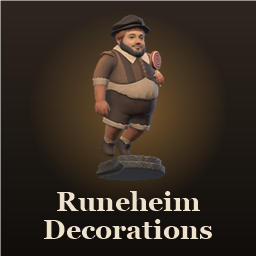
Placeable decorations, starting with the Floating Statue: a figure that hovers and slowly turns above its stone plinth. Created by special request. More and better decorations are planned.

Client & Server
Changelog & versions

· Website

Stars
0
Downloads
16
Version
1.0.1
Updated
Author
Daytreee
Virus scan
✓ Scan successful
Runs on
Client & Server

Compatibility

Required 1

Install these too — Gale pulls them in for you.
  • Jotunn ValheimModding ·2.30.2

Description

Runeheim Decorations

This mod was created by special request.

A growing set of decorations for your bases.

Coming later: more and better decorations are planned for future updates. This first release is just the beginning.

Feedback & bug reports

Join the Runeheim Discord: https://discord.gg/DMyDXNN5Qf Report bugs, suggest ideas and get announcements for all of Daytreee's mods.

Pieces

Floating Statue

A carved figure held aloft above its stone plinth. The figure gently bobs up and down and slowly turns.

  • Build with: the Hammer, in the Furniture tab
  • Needs: a Workbench nearby
  • Cost: Stone ×20, Wood ×5
  • Behaves like stone: stone durability, it can be damaged and repaired, it needs support, and you get the full cost back when you deconstruct it

Requirements

  • Jotunn
  • Install on the server and every player. Versions must match.

Config (daytreee.runeheimdecorations.cfg)

  • An Enabled switch for each piece, synced from the server. Turning one off stops it being built; ones already placed stay.

Changelog

1.0.1 Latest
1.0.0
  • First release: the Floating Statue (made by special request), with a floating, slowly turning figure. More decorations are planned.

Full version history & older downloads →

Manual download
Just this mod One .zip — RuneheimDecorations 1.0.1
Files you'll get 2
  • RuneheimDecorations 1.0.1 Daytreee this mod Get
  • Jotunn 2.30.2 ValheimModding Get

Your browser may ask permission to download several files at once. How to install these manually

Manual installation instructions
1

Install BepInExPack Valheim

BepInExPack Valheim is required to run mods in Valheim.

Download BepInExPack Valheim 5.4.2351 · View mod page

Check out the mod page for detailed installation instructions.

2

Install RuneheimDecorations

This mod must be installed on both the client and the server.

Download RuneheimDecorations 1.0.1

Extract the ZIP and place the file(s) into the BepInEx/plugins/ folder inside your Valheim game folder.