 Install with Gale
GhostBuild
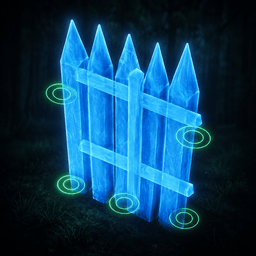
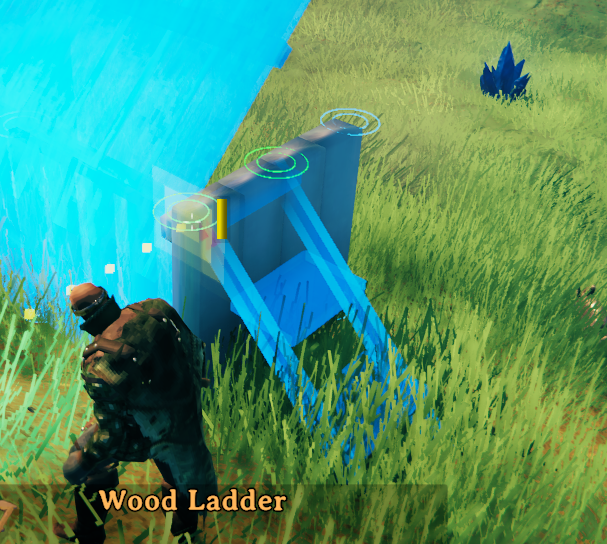
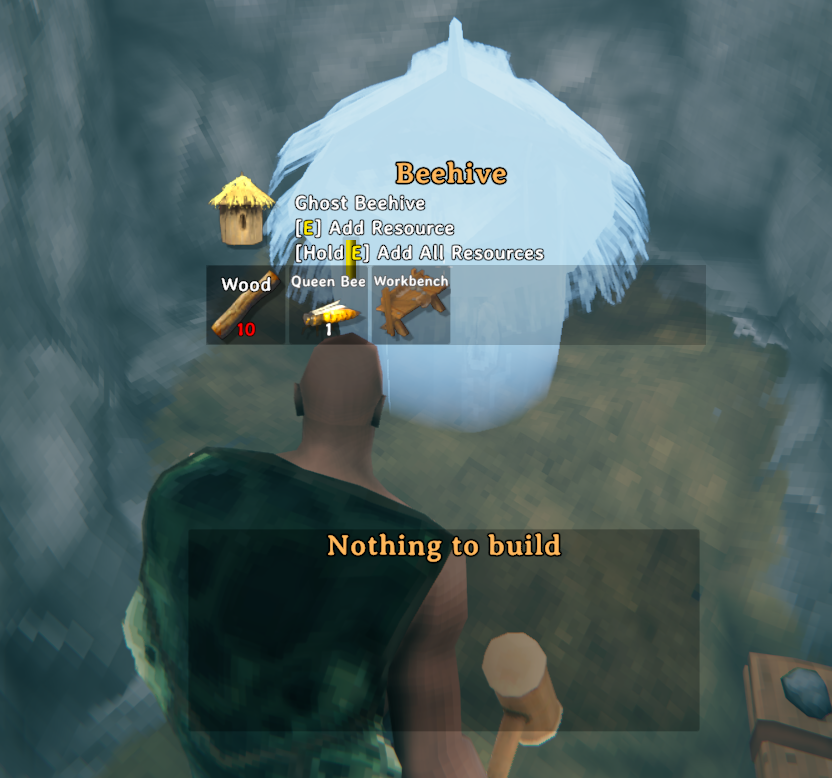
GhostBuild lets you place building pieces as translucent "ghosts" even when you don't have the resources or support to finish them yet. Plan out a whole build first, gather materials as you go, and confirm each ghost into a real piece with a hammer swing whenever you're ready.
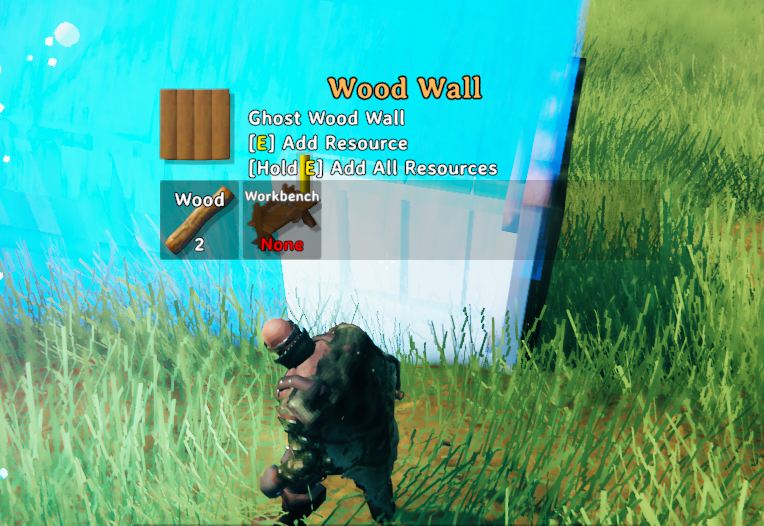
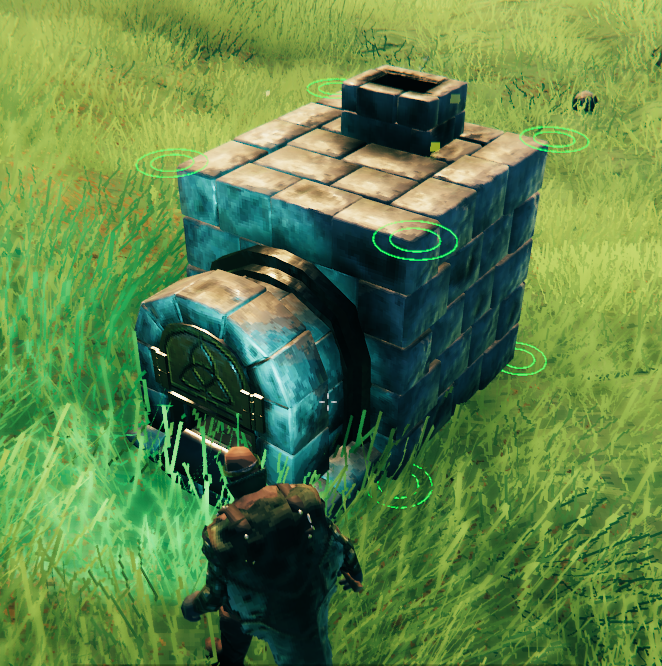
GhostBuild combines ideas from two other games' building systems: the ghost/blueprint placement itself and the hoverable piece info panel (name, description, icon, requirements) are inspired by Grounded, while the snap point ring gizmos are inspired by RuneScape: Dragonwilds.
How it works
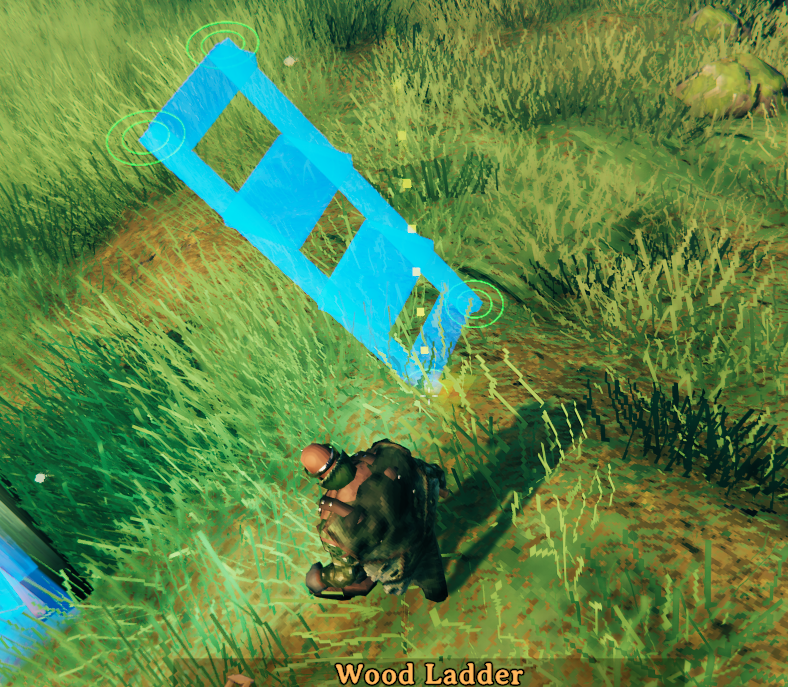
- Place a piece like normal while in ghost mode. Instead of consuming resources, GhostBuild spawns a see-through placeholder in that spot.
- Ghost pieces are colored to show whether they currently have support (e.g. resting on solid ground or another piece) or not, so you can see if a build will actually stand before committing resources to it.
- Walk up to a ghost piece and swing your hammer at it (like repairing) to confirm it. If you have the required resources, it consumes them and turns into the real piece. If you have some of the resources stored up already, those are credited automatically.
- Ghost pieces are saved with the world, so partially planned builds persist between sessions.
Ghost mode
Ghost mode can work in two ways, depending on config:
- Automatic (default): ghost pieces appear automatically whenever you're holding a hammer and in build mode.
- Manual toggle: enable "Require Manual Ghost Toggle" in the config to only place ghosts when you've turned ghost mode on yourself with the toggle hotkey.
There's also an auto-ghost safety net: if "Auto-Ghost When Out of Resources" is on (default), running out of materials for a piece automatically switches you into ghost mode so you can keep placing instead of getting blocked. Once you pick the missing resources back up, it automatically switches back out of ghost mode on its own.
Hotkeys
Configurable under "1.5 - Hotkeys" in the config file:
- Toggle Ghost Shortcut (default
T): toggles ghost mode on/off while holding a build hammer. - Quick Swap to Repair (default
Right Mouse + Left Alt): while holding a build hammer, quickly swaps to the repair tool so you can confirm nearby ghosts.
Configuration
All settings are in the BepInEx config file and can be changed live, including through the in-game Configuration Manager if installed.
Settings are marked below as either synced (pushed to clients by the server when connected to one, so everyone plays with the same rules) or client-only (a personal preference that only affects your own game and isn't controlled by the server).
1 - General
- Lock Configuration (synced): if on, only server admins can change the config for connected clients.
2 - Visuals (client-only)
- Unsupported color: tint applied to ghost pieces that don't currently have support.
- Supported color: tint applied to ghost pieces that do have support.
- Transparency: additional transparency applied on top of the colors above.
3 - Ghost Mode Behavior
- Require Manual Ghost Toggle (synced): if on, ghosts only appear when you manually toggle ghost mode. If off, ghosts appear automatically while in build mode.
- Auto-Ghost When Out of Resources (synced): if on, ghost mode kicks in automatically when you run out of resources for the current piece, and turns back off automatically once you have them again.
- Always Show Ghosts (client-only): if on, already-placed ghost pieces stay visible even when you aren't holding a hammer. If off (default), they're only visible while a hammer is equipped.
- Show Ghost Toggle Messages (client-only): if on (default), shows a center-screen message whenever ghost mode is toggled on/off. Turn this off if you find the messages distracting.
4 - Snap Gizmos (client-only)
Snap gizmos are small ring markers drawn at snap points to help with precise placement. These are purely visual aids for you, so none of them are synced.
- Show Ghost Snap Gizmos: draw snap point gizmos on the piece you're currently placing.
- Show Nearby Snap Gizmos: draw snap point gizmos on already-placed pieces near your current ghost.
- Inner Ring Radius / Outer Ring Radius: size of the gizmo rings, in meters.
- Nearby Search Radius: how far around the current ghost to look for snap points on other pieces.
- Ghost Snap Color: color of the gizmos on the piece you're placing.
- Nearby Snap Color: color of the gizmos on nearby pieces.
Why GhostBuild instead of PlanBuild (or similar)?
Valheim already has well-established planning mods like PlanBuild, and GhostBuild is not trying to replace their full feature set (blueprint sharing, terrain tools, rune markets, etc.). GhostBuild is a smaller, focused tool for a specific problem: "I want to lay out a build now and pay for it as I go," with as little added surface area as possible.
- No new tools to learn. There's no separate plan hammer or rune piece — you place ghosts with your normal hammer/build tools and confirm them with a normal repair swing. If you already know how to build and repair in Valheim, you already know how to use GhostBuild.
- At-a-glance stability. Ghost pieces are color-tinted by whether they currently have support, so you can spot a build that won't stand before you commit any resources, not after.
- Smart resource handling. Confirming a ghost credits resources you already have stored nearby automatically, and partial ghost mode kicks in on its own when you run out of materials mid-build, then quits on its own once you're stocked up again.
- Snap gizmos while you place. Ring markers on snap points (yours and nearby pieces) make precise alignment easier without needing a separate blueprint/grid tool.
- Persistent by default, nothing extra to manage. Ghosts save with the world like normal pieces — there's no separate blueprint library, file format, or rune network to maintain.
- Server-friendly. Built on ServerSync from the start, so admins can lock down the behavior-affecting settings for everyone without extra setup.
If you want blueprint copy/paste, sharing between players, or terrain editing, PlanBuild (or a similar mod) is still the right tool for that. If you just want to plan a single build in place and fill it in with real materials as you go, GhostBuild does that one job with minimal footprint.
Compatibility
GhostBuild uses ServerSync to keep relevant settings synced between server and clients automatically, so server admins can enforce a consistent setup for everyone connected.
Credits
Thanks to Blaxxun for ServerSync and for feedback that shaped several of the config options above.
Thank you to the contributors of PlanBuild for reference code and some code usage in this project. https://github.com/sirskunkalot/PlanBuild
For questions or comments, find me in the Hexium, Odin Plus Team Discord or in my own:

|

|

|