
 Install with Gale
Boarders Bumper Blurbs
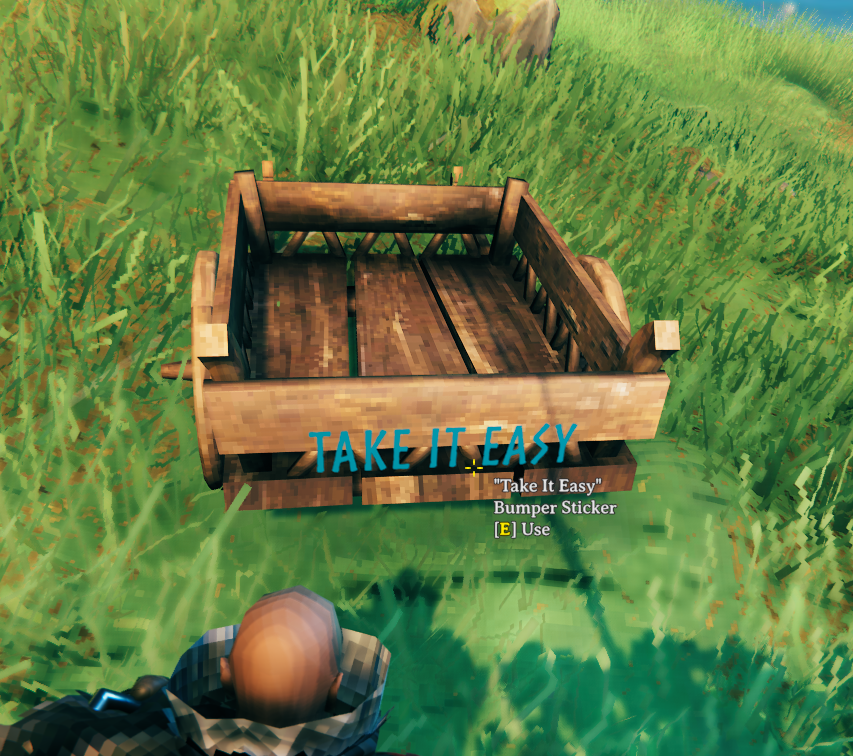
Puts an editable sign on the back of the vanilla cart. Write whatever you want on it.
Made for EasyBoarder, who wanted bumper stickers on his carts. Pulled code from my CraftyCartsRemake. Go follow him and catch a stream.

Install on the server if you wish to enforce the configurations. Installing on the server is optional.
The sticker is added to the vanilla Cart prefab only, so every cart in the world gets one. Walk up to the back of a
cart and hit your use key to write on it. Text is stored on the cart itself and travels with it.
Configuration
| Section | Setting | Default | What it does |
|---|---|---|---|
1 - General |
Lock Configuration | On |
Admin-only config. [Synced] |
1 - General |
Use Bumper Sticker | On |
Show the sticker. Turning it off hides it on every cart. [Synced] |
2 - Bumper Sticker |
Position | 0, 0.75, -1.089 |
Local position on the cart. Not synced. |
2 - Bumper Sticker |
Rotation | 0, 180, 0 |
Local rotation (euler) on the cart. Not synced. |
Position and Rotation are local only, ServerSync has no converter for Vector3. Both apply live, no restart needed, so you can nudge the sticker into place from the Configuration Manager.
Author Information
Azumatt
DISCORD: Azumatt#2625
STEAM: https://steamcommunity.com/id/azumatt/
For Questions or Comments, find me in the Odin Plus Team Discord or in mine:

