 Install with Gale
AzuAntiCheat
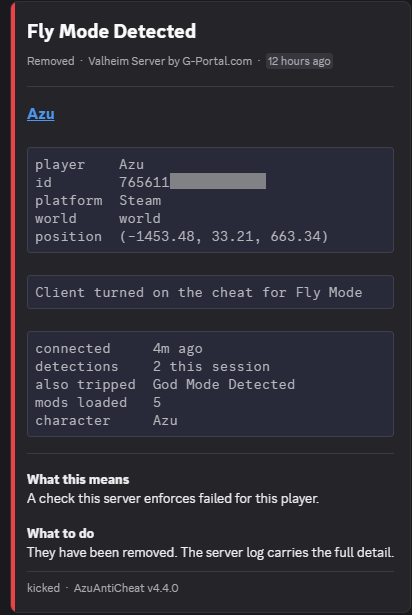
Anti-cheat for Valheim servers. You decide which mods players can use, set limits, catch common cheats, and get reports in Discord if you want them.
Install it on the server and on every client. Players without it, or on a different version, can't join.
Works on dedicated and player-hosted servers.
Video overview
5.0 COMING SOON, I need to record a new video on the new layout. Veterans should find it pretty easy to navigate the new version. (5.0.0). I will update the video below to the latest and notify people in my discord when I have uploaded it.
Setup
- Install BepInExPack Valheim.
- Put
AzuAnticheat.dllinBepInEx/plugins/on the server and every client. - Start the server once so it creates its files.
- Put
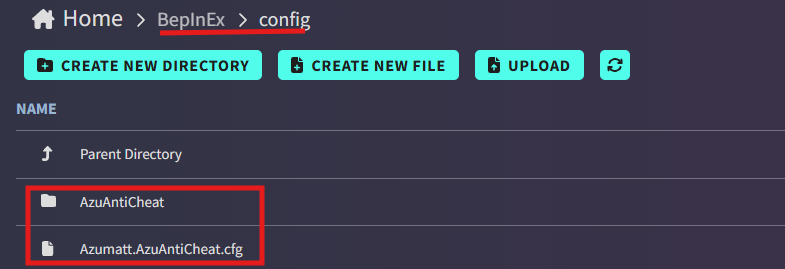
AzuAnticheat.dllinBepInEx/config/AzuAntiCheat/Whitelist/, along with every mod your players must have. - Restart the server.
Players don't need to set anything up. The server sends them its settings.
Don't skip step 4. If AzuAntiCheat isn't in the Whitelist or Greylist folder, every player gets kicked, even with the right version.
Updating from an older version? Your files are moved to the new folder automatically.
Where everything lives
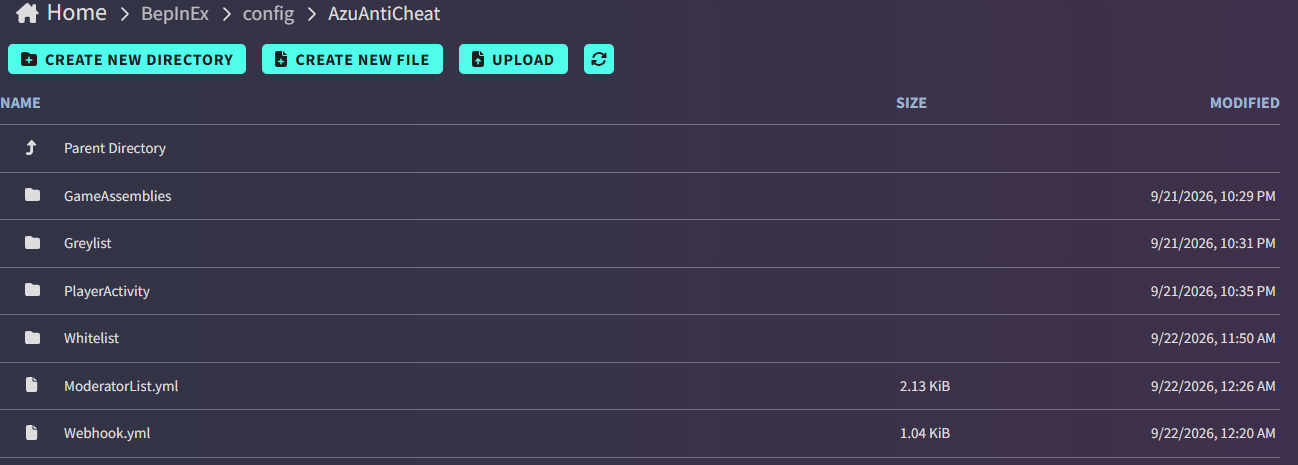
BepInEx/config/
  Azumatt.AzuAntiCheat.cfg      <- settings
  AzuAntiCheat/
    Whitelist/                  <- mods players must have (put the DLLs here)
    Greylist/                   <- mods players may have
    GameAssemblies/             <- optional, most servers don't need it
    ModeratorList.yml           <- moderators and what they can do
    Webhook.yml                 <- Discord
    Baseline.yml                <- created automatically, don't edit it
    PlayerActivity/             <- activity logs, if you turn them on
Most changes to these files apply when you save them. No restart needed.
Mod lists
Put each mod's DLL file in Whitelist/ or Greylist/.
| Folder | Meaning |
|---|---|
Whitelist/ |
Every player must have it |
Greylist/ |
Players may have it |
A player running anything else is kicked. Files are compared by their contents, so renaming or editing a mod doesn't get around it.
When you update a mod, put the new DLL in the folder too. Otherwise, players get kicked for having the new version.
A mod keeps getting refused
Some mods come as slightly different files depending on where you downloaded them. The kick message says
file does not match. Add the mod's name to Version Only Mods (section 4 - Server Guards) and only its version is
checked. ConfigurationManager is already on that list.
Discord
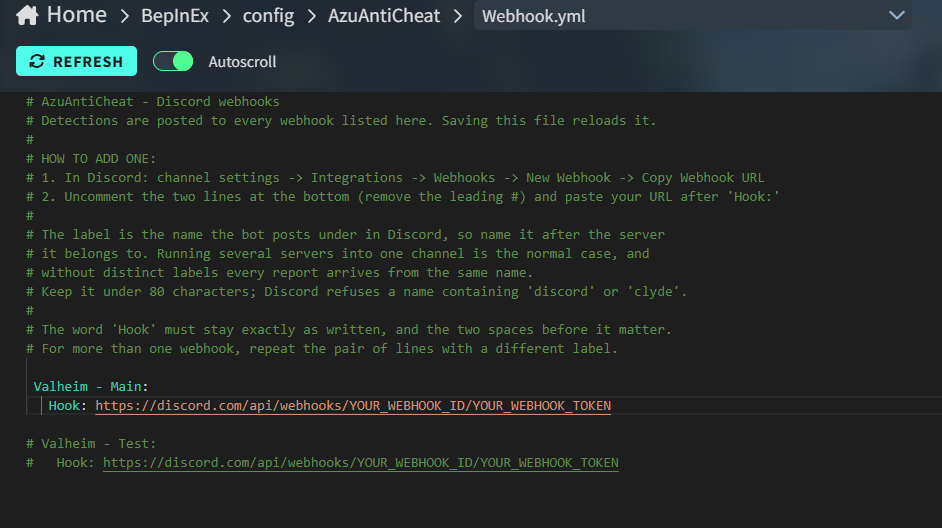
Open AzuAntiCheat/Webhook.yml and remove the # from a block:
Valheim - Main:
  Hook: https://discord.com/api/webhooks/YOUR_WEBHOOK_ID/YOUR_WEBHOOK_TOKEN
To get the link in Discord: channel settings -> Integrations -> Webhooks -> New Webhook -> Copy Webhook URL.
- The label (
Valheim - Main) is the name reports are posted under. Use your server's name. Hook:must be spelled exactly like this, with two spaces in front.- For more servers, copy the block and change the label.
- Don't use "discord" or "clyde" in the label. Discord won't accept it.
Run azuac-notify-test in the server console to send a test report.
Discord is optional. Detections always show in the server console, and bans still work without it. If reports aren't posting, the server log explains why when it starts.
What data goes where
No telemetry. The mod doesn't send anything to the mod author or any analytics service.
From each player to your server, when they join and at each re-check:
- Their mod list, with a hash of each mod file
- Their Steam or platform name, platform ID, and character name
- Hashes of their Valheim game files and BepInEx patchers, and of this mod's own code
- A detection report if a check catches something, with their position in the world
The player's game looks at the names of running programs and open windows to find cheat tools. That list stays on their computer. Only the name of a detected cheat tool is sent.
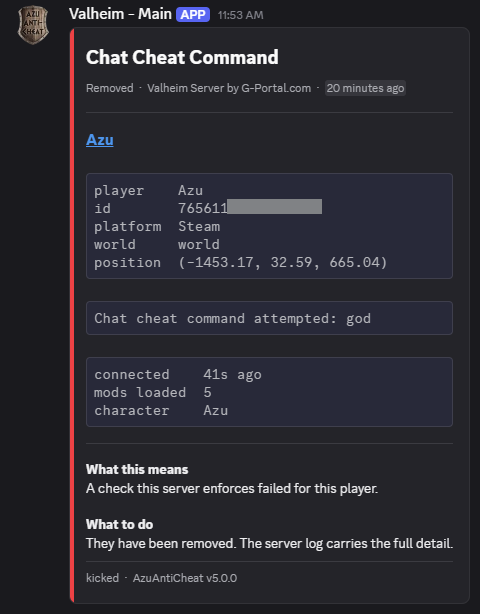
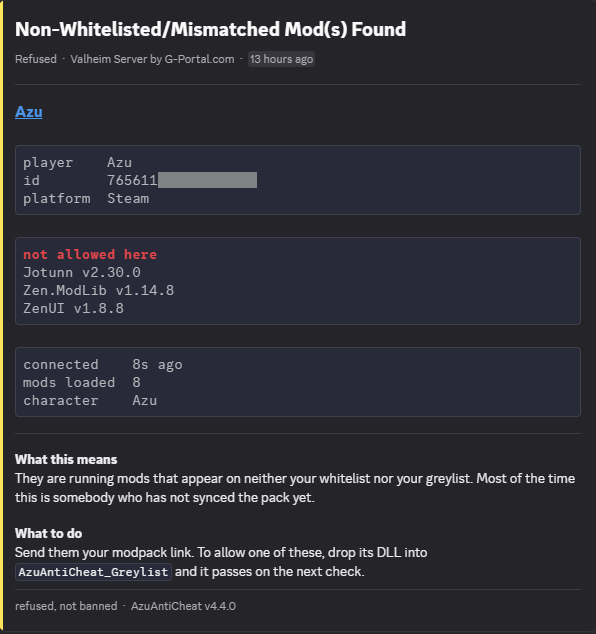
From your server to Discord, only if you (the server admin) set up a webhook. Players never contact Discord. Each report includes:
- The player's character name, platform, and ID. Steam players get a link to their Steam profile. Console IDs are hidden the same way Valheim hides them.
- The world name and the player's position
- What was detected, such as the mods that didn't match or the name of a cheat program
- How long they've been connected, their other detections this session, and how many mods they run
- Your server's name
The server log and player activity logs stay on your server.
Debug Send and Developer Report URL can send the same reports to a second webhook (use this to send me or other information). Both are off and empty by default, and they're only set in your server's config, never sent to players.
The report's bot picture is hosted on Imgur, and Discord loads it. No player information goes there.
Moderators
Admins come from Valheim's adminlist.txt and skip every check.
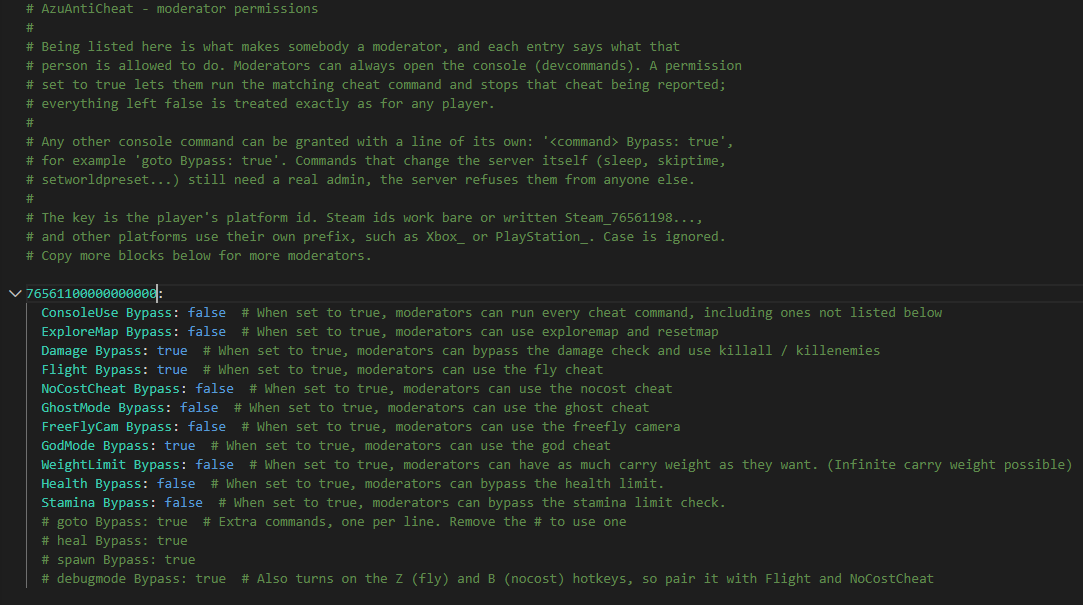
Moderators go in AzuAntiCheat/ModeratorList.yml, and only skip what you allow:
76561198000000000:
  ConsoleUse Bypass: false
  ExploreMap Bypass: false
  Damage Bypass: true
  Flight Bypass: false
  NoCostCheat Bypass: false
  GhostMode Bypass: false
  FreeFlyCam Bypass: false
  GodMode Bypass: true
  WeightLimit Bypass: false
  Health Bypass: false
  Stamina Bypass: false
  goto Bypass: true
Use the player's platform ID. Steam IDs work with or without the Steam_ prefix. Other platforms use their own prefix.
- Moderators can always open the console with
devcommands. - Setting a permission to
truelets them use that cheat without being reported. It also unlocks its commands:god,fly,nocost,ghost,freefly,exploremapandresetmap, andkillall/killenemiesunder Damage. - To allow any other command, add a line like
goto Bypass: true. ConsoleUse Bypass: trueallows every cheat command.- Commands that change the whole server, like
sleeporskiptime, still need a real admin. - Moderators skip the mod list check.
Changes apply right away. Moderators who are already online don't need to reconnect.
Console and crossplay players
Consoles can't install mods. Crossplay Policy decides what happens:
| Setting | Result |
|---|---|
RequireModFromEveryone (default) |
Everyone needs the mod. Console players can't join. |
AllowConsolesWithoutMod |
Console players can join without it. PC players still need it. |
AllowAnyoneWithoutMod |
Anyone can join without it. Most of the protection is lost. |
Players without the mod are still covered by the checks the server does itself: limits, movement, global keys, building deletions, teleports, and chat. They skip the mod list check and the cheat program scan.
Xbox covers both the console and PC Game Pass, and the server can't tell them apart. With AllowConsolesWithoutMod, a
Game Pass player without the mod can join too.
Settings worth knowing
These are in Azumatt.AzuAntiCheat.cfg. Everything else can stay on its default.
| Setting | Default | What it does |
|---|---|---|
| Instant Ban | false |
Ban cheaters instead of only kicking them |
| Check List Interval | 60 |
How often players are re-checked, in seconds |
| Health Limit | 1000 |
Highest health a player can have |
| Stamina Limit | 1000 |
Highest stamina |
| Carry Weight Limit | 5000 |
Highest carry weight |
| Max Damage Limit | 55000 |
Highest damage in one hit |
| Terminate Detected Processes | true |
Also close a cheat program when one is found |
| Ignored Cheat Processes | (empty) | Program names that are never treated as cheats |
| Save Character On Setup Kick | true |
Save a player's character before kicking them for wrong mods |
The strict checks
These settings in 4 - Server Guards start on Report, which only logs and reports. Play a session with your own
players, check that the log stays quiet, then switch them to Enforce. These are set to report by default as I'm not sure of false positives yet after the rewrite.
| Setting | What it catches |
|---|---|
| Handshake Enforcement (the only exception, this is set to Enforce by default) | A player reusing someone else's connection data |
| Guard Global Keys | Unlocking bosses or progress without earning it |
| Guard Cheated Objects | Kills or items made with cheats |
| Game Assembly Enforcement | Edited Valheim game files |
| Patcher Enforcement | BepInEx patchers your players shouldn't have |
| Enforce Loaded Code Integrity | A modified copy of this mod |
| Foreign Code Enforcement | Cheat menus loaded outside BepInEx (proxy DLLs) |
Switching to Enforce before reading the log can lock everyone out at once.
Foreign Code Enforcement reports Harmony patches that come from code which isn't an installed plugin, BepInEx
itself, or something a plugin depends on. Menus that load through a proxy DLL (a version.dll next to valheim.exe)
patch the game this way without ever appearing in the mod list. Plugins are recognized by the loaded code itself, not by
name or folder, so a menu can't pass by dropping its DLL in plugins.
Game Assembly Enforcement and Patcher Enforcement learn what clean game files look like from your first admin to connect after a Valheim update. They start working once Baseline Agreement Required players (3 by default) report the same files. The log shows the progress. Lower it on a small server.
Windows, native Linux (including Steam Deck) and Mac clients run differently compiled game files, so each platform learns its own baseline. Players on Proton count as Windows.
The mod also ships the official Steam hashes for recent Valheim versions. When your game version is on that list, the game file check uses it straight away and needs nothing learned. After a Valheim update it falls back to the learned baseline until the next AzuAntiCheat release.
Player activity logs
Off by default. Turn on Enable Player Activity Log to record connections, chat, deaths, building, what players take from chests, and what they drop.
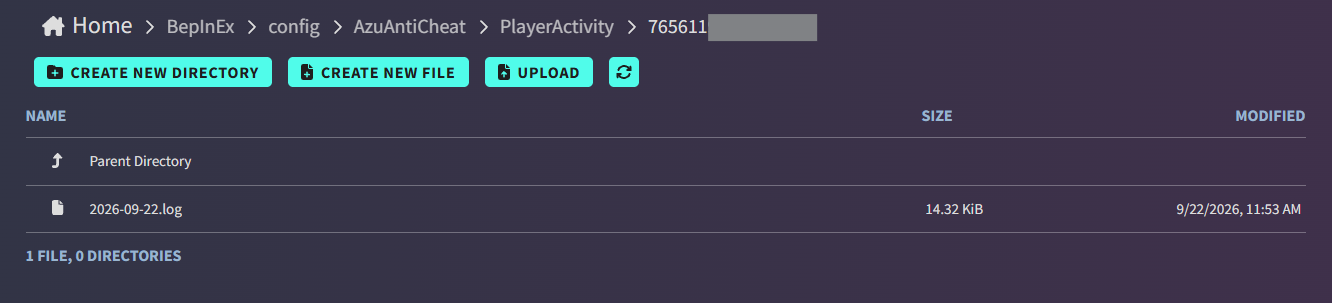
Logs are saved on the server in AzuAntiCheat/PlayerActivity/, one folder per player and one file per day.
These logs are personal data. They record what players said, where they went, and what they took. Activity Log
Retention Days (14 by default) deletes older files. 0 keeps them forever.
What happens when something is caught
| Caught | Result |
|---|---|
| Missing, extra, or modified mod | Kicked, with a message saying what to fix |
| Cheat turned on in the game | Kicked |
| Cheat program running | Kicked |
| Over a limit | Kicked |
| Edited game files or extra patchers | Reported. Kicked on Enforce |
| Cheated kills or items | Reported. Kicked on Enforce |
| Moving too fast | Reported only, since portals look similar, especially with legit mods |
| Global keys, teleports, or deleting buildings | Blocked. Nobody is kicked |
| Failed handshake | Reported. Kicked on Enforce, they can rejoin |
Instant Ban only applies to cheats. Blocked actions never ban anyone.
Players kicked for wrong or missing mods keep their progress. Their character is saved before they leave.
FAQ
A player keeps getting kicked for their mods.
The mod isn't in your Whitelist or Greylist, or their version is different. The kick message names the mod. If it says
file does not match and the version is right, see A mod keeps getting refused.
My moderators still get reported.
Check that their ID in ModeratorList.yml is right and that the permission is true. Admins in adminlist.txt don't
need any of this.
A moderator's command says "not valid" or "not in your moderator permissions".
Give them the permission for that cheat, or add a line like goto Bypass: true.
A boss kill or Vegvisir didn't count. The global key guard blocked a key it didn't know. The log names the key. Add it to Allowed Client Global Keys.
A player couldn't delete part of their build. Players can only delete things they own or are standing near. Raise Object Destruction Proximity, or turn the guard off if a building mod needs it.
Normal players are reported for moving too fast. Hops between linked portals (any portal with TargetPortal), dungeon entrances and real respawns are already allowed for. A teleport mod such as a recall or shrine mod can still add up; raise Speed Hack Readings Required to 3, or turn off Report Speed Hacks. This check never kicks anyone.
My Xbox or PlayStation players can't join. See Console and crossplay players.
Does this close programs on players' computers? Only when Terminate Detected Processes is on. The player is kicked either way.
Someone was kicked for a handshake failure. Usually their version doesn't match the server's. Have them rejoin. If it keeps happening, check their version.
Do players need to change any settings? No.
What this can and can't stop
Valheim trusts each player's game about a lot of things. AzuAntiCheat makes cheating much harder, but not impossible. I've always labeled this in the past as an "Anti-Dickhead" mod more than anything. There are now multiple versions of "anticheat" mods out there. Use whatever fits your use/server.
Some checks ask the player's game about itself: which mods it runs, whether god mode is on, which programs are open. Someone who edits this mod's files can fake those answers. Other checks are done by the server itself and can't be faked: limits, movement, global keys, building deletions, teleports, chat names, and cheated kills or items.
It stops people who download cheats, not people who write their own. If you find a way around it, please report it. Not all things can be fixed, so just ban the player and reconcile.
Support

|

|

|